How do I leave a placeholder when proposing a new time for a meeting?
When proposing a new time for a meeting, invitees now have an option to leave a placeholder for the original time of the meeting in their calendar.
Note: This option is available when using Verse 3.2.5 and Domino 14.5.
-
Open a meeting invitation.
-
Click the Respond ⏵ Propose New Time button.
-
Choose a new time for the meeting.
-
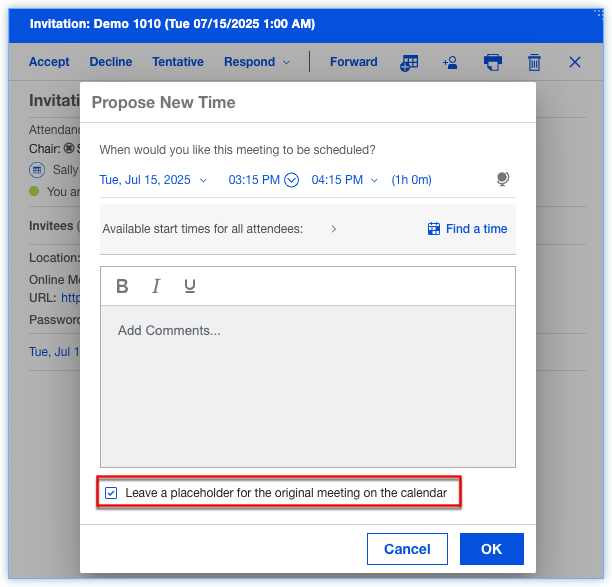
Check the Leave a placeholder for the original meeting on the calendar option and click OK.
-
In the Calendar, the meeting will remain at the original time and will display with a Counteredlabel.
-
If the chair of the meeting accepts the new time, all attendees will receive a notification with the rescheduled details. When the attendee accepts the reschedule, the placeholder will be removed from the Calendar.
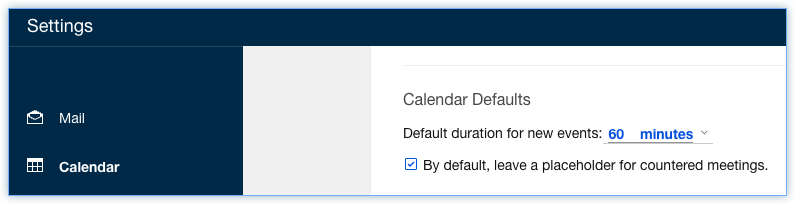
Note: There is a setting in the Calendar settings that controls the default value of the Leave a placeholder for the original meeting on the calendaroption. The option is By default, leave a placeholder for countered meetings.
Parent topic: How do I manage my calendar?