User Data Custom Module
Introduction
Custom modules provide a mechanism within the UIC to execute code defined by the organisation to perform a function not available by default. Described elsewhere in the SDK guide are HCL provided modules such as the AJAXListener, Universal Logger or Co-Browsing. Theses modules require only configuration, however the following describes the three (3) required components of a custom module.
- The data the custom module is acting upon
- The custom module code itself
- The configuration for the custom module
Custom modules also are:
- A useful approach to manage on-going development surrounding the data being sent
- An approach to minimise the effort should the data payload expand
- A single consistent approach and location for UIC customisations
- A control mechanism for when the function is called, onload, onclick, etc... through configuration
The function DCX.logCustomEvent executed in the example code below can be called directly with a JSON payload. Direct function execution may be useful in some scenarios, however using a custom module may meet requirements better given the above benefits.
Example
User Profile
User profile data is a good example of where a custom module(s) may be useful in sending data to Discover for event building and reporting. For example a requirement my exist (for an Intranet?) to report on role or department, this may be difficult as the visitor may not visit a page that displays the information required.
To achieve this, the data can be embedded programmatically by the business as a JSON object within the main site page as shown below. This only needs to occur once in the main site page where the UIC is loaded.
<script type="application/json" id="myhome-portal-user"> {
  "userId": "Usm123",
  "email": "abc@example.com,
  "displayName": "Usman",
  "jobTitle": "HCL DX",
  "department": "IT"
} </script>
The custom module example below should be included in the UIC after the UIC Core section and before the Config section.
// Track User Data v1.0
DCX.addModule("userData", function(context) {
    "use strict";

    var moduleConfig = DCX.getModuleConfig("userData") //Get module-specific configuration settings from the DCX framework
      , moduleLoaded = false
      , utils = context.utils
      , targets = moduleConfig.targets;

    function custData() {
        // Retrieve the text content from a specific ('myhome-portal-user') HTML element.
        // This element is expected to contain a JSON string with user data.
        const jsonStr = document.getElementById('myhome-portal-user').textContent;
        const jsonData = JSON.parse(jsonStr);
        DCX.logCustomEvent("User Data", jsonData);
    }
    // Return Data
    return {
        init: function() { // Re-fetch or update the module configuration on initialization
            moduleConfig = context.getConfig();
        },
        destroy: function() {},
        onevent: function(webEvent) {
            switch (webEvent.type) {
            case "load":
                custData();
                break;
            case "unload":
                moduleLoaded = false;
                break;
            default:
                break;
            }
        },
        version: "1.0"
    };
});
Lastly, a UIC config item would be required in the core:modules section. Highlighted in the config below is the configuration for when the custom module should be executed.
userData: {
    events: [{
        name: "load",
        target: window
    }]
},
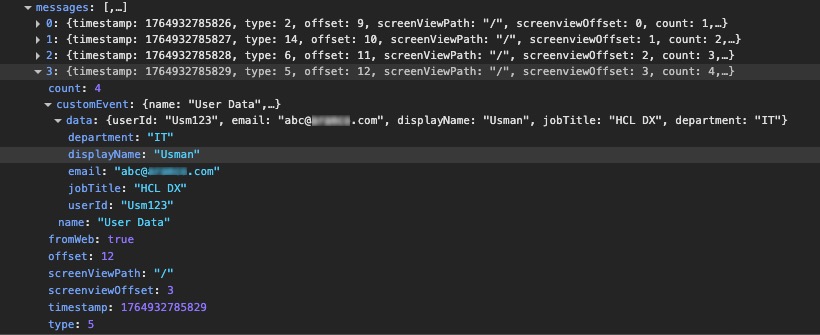
The resulting output is sent to Discover as a Type 3 message.