Supporting CNIL Compliance
Introduction & Context
HCL Discover places privacy and your data at the core of our solution delivery principles, focusing on your requirements to meet the needs of your business and linked regulations such as CNIL and GDPR.
This guide is intended to outline how Discover customers may benefit from the solutions' analytics capabilities and features by using HCL services typically procured with the initial software license purchase. Where customers have not or do not procure services this guide may serve as a helpful reference, but it will be the sole responsibility of the customer to ensure exemption when using Discover.
This guide concerns our customers whose website(s) and / or mobile application(s) are hosted in France and / or whose visitors reside in France, however may serve to be useful for other reasons or audiences.
CNIL
The CNIL guidelines state that only the following are strictly necessary for the proper administration of a site / application:
- Audience measurement, page by page;
- List of pages from which a link was followed to request the current page (sometimes called "referrer" whether internal or external to the site, per page and aggregated on a daily basis);
- Visitors' device type, browser and screen size, per page and aggregated on a daily basis;
- Page load time statistics, per page and aggregated hourly;
- Statistics on time spent on each page, bounce rate, scroll depth, per page and aggregated on a daily basis;
- Statistics on user actions (clicks, selections), per page and aggregated on a daily basis;
- Statistics on the geographic area of origin of requests, per page and aggregated on a daily basis.
Exemption Configuration
Exemption Team
As part of the solution on-boarding process is a critical step to appoint an individual focused on administrative tasks related to privacy and the ‘exemption’ to CNIL. The individual will be wholly responsible for implementing and verifying administrative steps outlined in this guide.
In addition to the administrative role and as part of the UAT, individual(s) must verify the implemented steps comply with the exemption criteria defined by the CNIL guidelines.
HCL, more specifically the Discover team will provide as part of the on-boarding process the contact details of a client / product specialist able to respond to specific exemption or product related configuration questions.
Discover will collect data relevant to three aspects:
- The simple presence of a visitor on a page and the information associated with that page (name, type, etc.).
- The use by that visitor of a functionality (button click, link click) and the associated information (destination, label, etc.).
- The statistics of loading time, browser console errors / warnings, scrolling or time spent on a page.
Solution Configuration Steps
- Install Discover within UAT or Development
- Confirm exemption compliant data for:
- Implement UIC
- Implement custom events / reports
- Implement DNCA Privacy rules
- Confirm exemption compliant data for:
- Move to Production with Replay switched off (not installed)
- Implement Do Not Track links with Discover
Cookie
As part of the UIC flow a first (1) party 'session cookie' and unique identifier is stored within the browser for the duration of the session only. This is often referred to as the ‘TLTSID’ however can be configured to be a value defined by the customer.
The session based cookie does not set or require a specific expiration date because its lifespan is linked to the browser session itself, not a set date. Session cookies are automatically deleted when the user closes their web browser, or the browser session ends, effectively acting as an implicit expiration
UIC Visitor Data Capture
Data is collected via a deployed User Interaction Capture (UIC) script enabled and included on the customer website / application pages requiring data capture. This is different to many other solutions that require tag placement and management throughout a page / site.
The UIC can capture:
- Browser environment information
- Pre-defined events
- User interactions
- Web Page Layout
Further capability is available here, but is not directly relevant to meeting CNIL exemption.
The UIC contains a ‘core’ which facilitates the data collection, and ‘configuration’ within the same JavaScript file to specify what data is collected and how.
Inverse Privacy
To ensure that no field level data is collected by Discover, the Inverse Privacy function should be set, this is located within the UIC configuration privacy section as shown below:
privacy: [ /* To add Inverted privacy */
    {
        exclude: true, // set to true to set inverse privacy - block everything,
        targets: [
                // Add targets that needs to be exposed
                //'#username',
                //’#add2ShopCart’,
                //'#subscribeNews',
                //{ id: { regex: "quantity_.*" }, idType: -1 },
                //{ id: { regex: "qty_.*" }, idType: -1 }
            ],
            maskType: 2
    }
DOMCapture
Set domCapture to false within the UIC configuration, this will stop any browser based HTML being sent to Discover, this also invalidates any other linked parameters in the UIC such as DomDiffCapture etc... which may still be set to True.
// DOM Capture configuration
          domCapture: {
            enabled: false,
Setting domCapture to false prevents sensitive information being displayed on a website as part of the HTML response captured by Discover.
DNCA Privacy
IP Obfuscation Using DNCA driven actions and rules modify visitors IP address to mask the last octet. Using the example below apply this to the REMOTE_ADDR=, HTTP_X_REAL_IP= and HTTP_X_FORWARDED_FOR= fields found in the response document.
| Description | Value |
|---|---|
| Name | CNIL Modify IP 1 |
| Description | CNIL action to modify last octet of visitors IP address with 0. |
| Sections | …(enter in the field below) |
| env | |
| Action | ReqSet |
| Field | REMOTE_ADDR |
| StartPatternRE | (.*).\d{1,3} |
| ReqSetField | REMOTE_ADDR |
| ReqSetResult | REMOTE_ADDR={g1}0 |
Campaign / CRM Tracking
UTM Module is not installed / enabled by default Remove any and all campaign tracking data from URLs
Minimize the OS, Browser, Device level data to major versions only. Modify the UAParser events and attributes to achieve. Data Import / Export Import Report based data is automatically triggered and generated when visitor data is captured via the UIC, DNCA and then processed via the Processing server. Session level data is stored within a bespoke data repository whilst report level data is stored in a traditional SQL repository.
Importing data is not possible due to the need to create or emulate complex session related data that is aggregated and processed to provide Report / Dashboard level user visible data.
Export
Data Export is a module that is implemented during the installation of Discover, if the product is already installed and being prepared for exemption, then the following can be implemented:
- Uninstall the Data Export module
- Continue as-is, the facility is not configured as standard to export any data
- Disabled data archiving
Replay
Session ‘Replay’ provides the system user with the ability to visualise and step through the visitors sessions end-to-end.
To remove the replay capability and comply with exemption:
- [Primary] During installation of the Windows server the Replay Server component can be removed. This is a preferred method as it also removes the UI features associated in the Session List, Session Search, and Event Tester features.
- Using IIS, configure the /Replay route to redirect to an appropriate page describing the unavailability of this feature.
- [Secondary options] Disable Replay Windows service, also add point 2 above.
Reporting Data
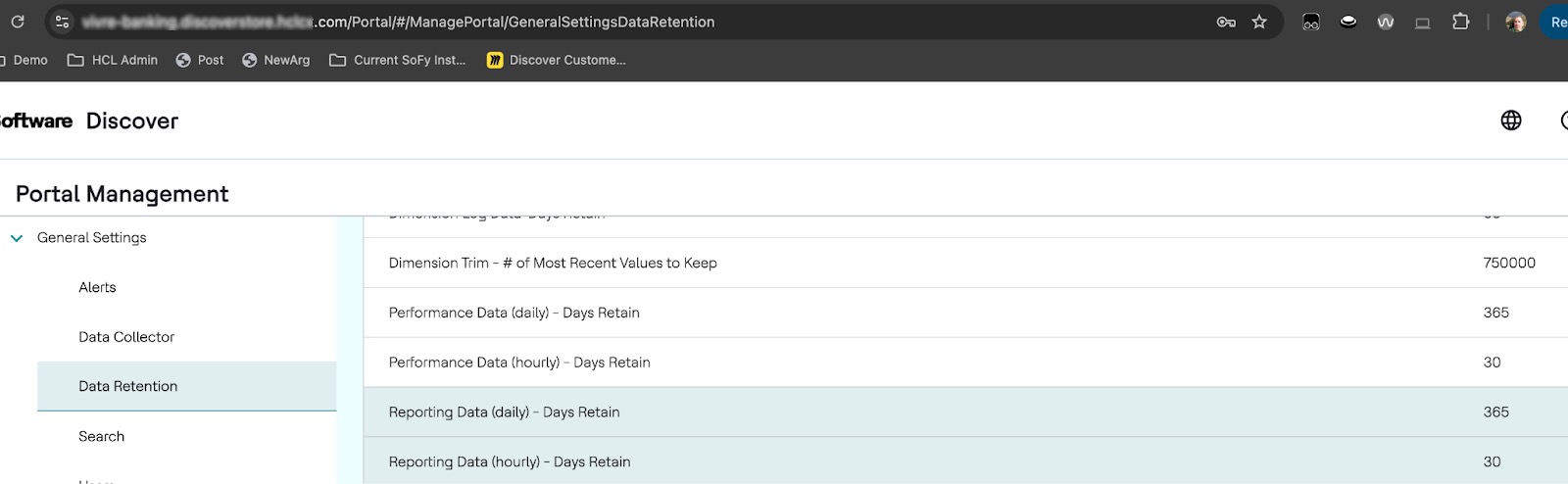
Daily reporting data by default is configured to be 1 year, after which it will be trimmed per day. Hourly reporting data is 30 days. Neither reporting configurations exceed 25 months as required by the CNIL compliance.
Data Export
Data export provides the system user with appropriate administrative permissions to export data to a 3rd party / system. By default no configuration is included during installation to export data.
To remove the data export capability entirely and comply with exemption:
- [Preferred] Do not install the Data Export component during installation
- API access is disabled by default
Data Processing (or collection)
Discover is provided for customer use in order to deliver customer / visitor analytics requirements. The solution is provided on-premises or within a public / private cloud facility, fully managed by the customer or a designated business partner.
HCL is not responsible for ANY data collection, or processing and subsequently is not required to provide a DPA, including any response to AGPR Article 28.
Opt-In / Out
Contact Discover (support)[hclSupport] for guidance implementing any integration with opt-in/out banners.