Co-Browse UIC module
What is CoBrowse?
When a visitor to a website or web application requires assistance, often they will call into the call center or raise a service request. CoBrowse provides the support representative in conversation with the visitor to follow the customers actions as they navigate around the site. At any time the visitor can end the session with no further data being shared to the sessions captured in replay.
Let's Discover how it works
The call center representative can notify the customer when the co-browsing session starts & ends. The session start & end notification requirement is up to the business to facilitate.
An optional 6 digit ID can be used to identify the users.
Module configuration:
Within the modules in config, add the following code:
coBrowse: {
coConfig: { // Queue configuration changes when IN cobrowse mode
maxSize: 20000,
timerInterval: 3000,
maxEvent: 4 //
},
coInterval: 2000, // Interval that checks the session storage
html: "<div id='dcxcobrowse' style='position:-webkit-sticky;position:sticky;will-change:transform;top:0;bottom:30;background-color:red;color:white;font-size:24px;'> A co-browsing session <span id='DCX_token'></span>has been initiated by customer support. <a href='javascript:void(0);' onclick='sessionStorage.setItem(\"DCXcobrowse\",\"false\");DCX.logCustomEvent(\"DCXcobrowse\", \"User clicked END CO-BROWSE\");'>[End Co-Browse]</a></div>", // Optional HTML to inject into DOM when cobrowse running
uidChars: "3469ACEFHJKMNQRUVWXYZ", // coBrowse ID characters
uidLength: 6 // coBrowse ID length
}
coConfigIt includes the queue configuration. The queue config will be changed when co-browse starts. And will be reverted to its original form when the session ends.maxSizeThe maximum size allowed for the queue.timerIntervalThe interval in which the queue posts the request.maxEventThe maximum event in the queue.
HtmlHTML that will be present in the header while co-browsing is enabled. If updating any HTML, IDs should be kept intact. uidChars and uidLnegth are used while generating DCX Token.uidCharsOptional 6 digit ID that can be used to identify the users.uidLengthLength of option uidChars ID.
Enabling / disabling the module
Add the following configuration code to the UIC in the core.modules section, enabled should be set to true:
coBrowse: {
    enabled: true,
    events: [
{ name: "load", target: window }
    ]
}
Testing the module
Within the browsers console it is possible to test the coBrowse module, copy and paste into the console:
DCX.getModule("coBrowse").beginCoBrowse()
sessionStorage.setItem('DCXcobrowse', 'true'). The beginCoBrowse will return the tltSid, deeplink, and dcxtoken, while endCoBrowse below will return 'OK'.
DCX.getModule("coBrowse").endCoBrowse()
sessionStorage.setItem('DCXcobrowse', 'false')
The on co-browse DCX token flow:
- Module initialization, the DCX token (6 digit) will be generated
- co-browse begin, DCX token will be used
- co-browse end, the existing token is replaced with a new one
- DCX Token will be shared with every request in the request header as X-DCXToken
Deep Linking
When a co-browse session is started, for example using the function DCX.getModule("coBrowse").beginCoBrowse() a deep link is generated and returned in the browser console. It has the following query params:
https://www.example.com/PortalAPI/api/DataExport/GetSessionReplayLink?SessionType=1&LinkType=1&Field=301&Value={DCXTOKEN}&MD5=false&SessionPreference=1&Redirect=true&CoBrowse=true
SessionType=1LinkType=1Field=FIELDvalue explained below.Value=${DCXTOKEN}MD5=falseSessionPreference=1Redirect=trueCoBrowse=trueDCXTokenis attached within the request header of every request while co-browsing.
Warning
It is mandatory to create session attribute DCXTOKEN and assign a javascript Name (as shown as CustomVar1 in the image below) with the Discover Portal. The session attribute is essential for the API to get the correct session replay based upon the DCXTOKEN and not the TLTSID. CustomVar1 can be any CustomVar value.
The Field value 301 must be the one mapped to session attribute javascript name (CustomVar1).
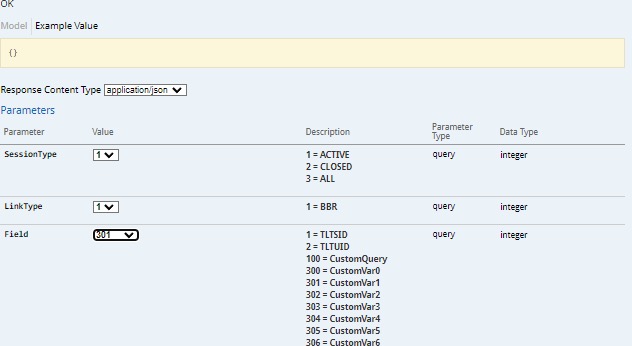 Javascript name is CustomVar1 for dcxToken.
Javascript name is CustomVar1 for dcxToken.
Everything except Value is hardcoded. If any changes need to be made, it has to be made in UIC. Screenshots from Portal while setting session attributes.
If you have a suggestion for the co-Browsing module, a new feature, enhancement or just a content update then tell us via the HCL product ideas portal.