Output Options
Setting custom output for XPath options
Websites provide visitors with selections or options that display in the page as radio buttons or similar with long titles. The titles may be required as dimension, but may not display neatly in a report. Additionally, capturing the visitor's selection of an option is only possible using the response document, sometimes with only the XPath to use and an identifier, e.g. no HTML identifier (id=option-one).
This example describes an approach to address all these obstacles.
In the screenshot below, four options exist with the second being selected. The HTML text is available in the response document, however is not fit for the purpose as the visitors selection cannot be captured.
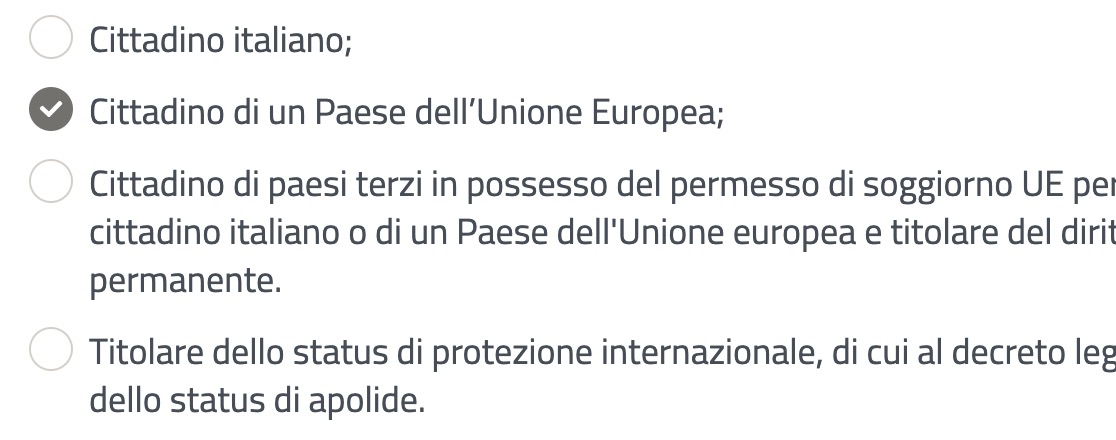
The request document for this step (where the selection happens) does however provide the visitors click for tracking. However, as shown below, the XPath target.id is the only unique way to easily identify the option clicked as no HTML ID is provided in this case. This is why an advanced event is required.
                {
                    "timestamp": 1719409847199,
                    "type": 4,
                    "offset": 112417,
                    "screenViewPath": "/AS0207/MisureInclusioneAttiva/main",
                    "screenviewOffset": 15733,
                    "count": 52,
                    "fromWeb": true,
                    "target": {
                        "id": "[[\"step-4\"],[\"div\",2],[\"div\",0],[\"fieldset\",0],[\"label\",1],[\"div\",0],[\"ins\",0]]",
                        "idType": -2,
                        "dcType": "ins",
                        "type": "ins",
                        "position": {
                            "width": 22,
                            "height": 22,
                            "relXY": "0,0"
                        },
                        "isParentLink": false,
                        "visitedCount": 1,
                        "dwell": 0
                    },
                    "event": {
                        "dcEvent": "click",
                        "type": "click"
                    },
The [\"label\",1] reflects the visitor selection of option two in the screenshot, [\"label\",0] would be the previous option, etc ...
To capture usable visitor sections an advanced event is required because we require to translate the XPath labels into something understandable.
The event below is:
| Evaluate | Track | Published | Value Type |
|---|---|---|---|
| Every Step | Every Occurrence | Immediate | Text |
| Value | Dimension | ||
At the basic event UI, add the HA Step Event Type, set the first value to equal CLICK. Add a HA Step Target Type, set the first value to equal INS. Add a HA “Step Target Id”, set the first value to equal the XPath value, repeat this last step three further times ensuring the [\"label",x] increments 0, 1,2 and 3 for the four options.
Set the Value tab to track the Step ScreenView Offset. This basic event configuration will capture the numeric value listed in ALL UNLOAD events.
Select the Advanced button and the configuration will be converted to advanced code, similar to that shown below.
// Generated by Discover Event Manager

// NOTE: Do not change event name
function CUST$E_CITIZENSELECTION__638568114610207787()
{
    if ($P["TL.STEP_EVENT_TYPE"].firstValue().toUpperCase() == "CLICK"
        && $P["TL.STEP_TARGET_TYPE"].firstValue().toUpperCase() == "INS"
        && ($P["TL.STEP_TARGET_ID"].firstValue().toUpperCase() == '[["STEP-4"],["DIV",2],["DIV",0],["FIELDSET",0],["LABEL",0],["DIV",0],["INS",0]]'
            || $P["TL.STEP_TARGET_ID"].firstValue().toUpperCase() == '[["STEP-4"],["DIV",2],["DIV",0],["FIELDSET",0],["LABEL",1],["DIV",0],["INS",0]]'
            || $P["TL.STEP_TARGET_ID"].firstValue().toUpperCase() == '[["STEP-4"],["DIV",2],["DIV",0],["FIELDSET",0],["LABEL",2],["DIV",0],["INS",0]]'
            || $P["TL.STEP_TARGET_ID"].firstValue().toUpperCase() == '[["STEP-4"],["DIV",2],["DIV",0],["FIELDSET",0],["LABEL",3],["DIV",0],["INS",0]]')
    )
    {
        var citizenshipSelect = "";

        if ($P["TL.STEP_TARGET_ID"].firstValue().toUpperCase() == '[["STEP-4"],["DIV",2],["DIV",0],["FIELDSET",0],["LABEL",0],["DIV",0],["INS",0]]'){
            citizenshipSelect = "Italian Citizen"
        }
        if ($P["TL.STEP_TARGET_ID"].firstValue().toUpperCase() == '[["STEP-4"],["DIV",2],["DIV",0],["FIELDSET",0],["LABEL",1],["DIV",0],["INS",0]]'){
            citizenshipSelect = "EU Citizen"
        }
        if ($P["TL.STEP_TARGET_ID"].firstValue().toUpperCase() == '[["STEP-4"],["DIV",2],["DIV",0],["FIELDSET",0],["LABEL",2],["DIV",0],["INS",0]]'){
            citizenshipSelect = "Foreign Citizen"
        }
        if ($P["TL.STEP_TARGET_ID"].firstValue().toUpperCase() == '[["STEP-4"],["DIV",2],["DIV",0],["FIELDSET",0],["LABEL",3],["DIV",0],["INS",0]]'){
            citizenshipSelect = "International Protection"
        }

        // Set fact for Report Group: No Dimension Report Group
        $F.setFact("CUST.F_E_CITIZENSELECTION__638568114610207787", citizenshipSelect);
    }
}