Uninstall the Tiny Editors Integration manually
Uninstalling the Tiny Editors integration manually.
Before you begin:
- Determine the host_name of the server hosting HCL Connections™.
-
Get user access as the HCL Connections installer or higher administrative permissions, on both:
- The host server.
- The WebSphere Application Server Console.
-
Stop the Common WebSphere enterprise application.
-
Log in to the web interface of the WebSphere Application Server Console.
The default address is: https://host_name:9043/ibm/console
-
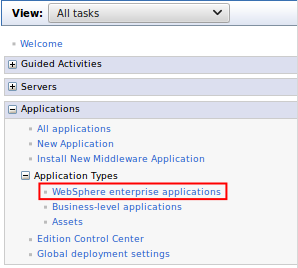
Navigate to Applications > Application Types > WebSphere enterprise applications.
-
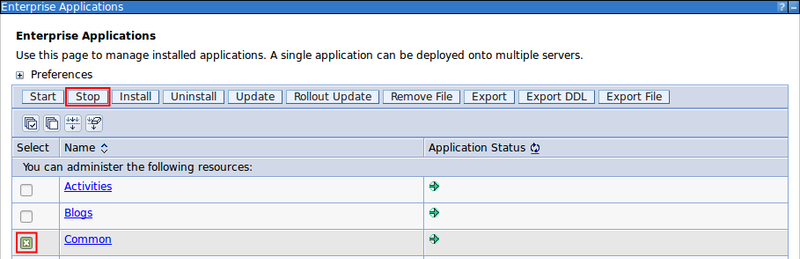
Select the checkbox for Common from the list of applications and click Stop.

-
-
Determine the Connections paths (customization_path and provision_path).
-
Log in to the web interface of the WebSphere Application Server Console.
The default address is: https://host_name:9043/ibm/console
-
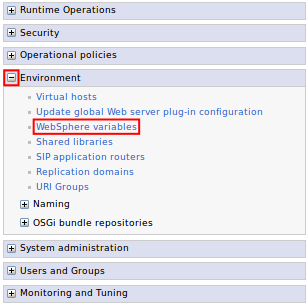
Expand Environment and click the WebSphere variables link.
-
Find the CONNECTIONS_CUSTOMIZATION_PATH in the variables list and record the value which will be referred to as customization_path from this point.

-
Find the CONNECTIONS_PROVISION_PATH in the variables list and record the value which will be referred to as provision_path from this point.

-
-
Remove the integration configuration directory and all contained files from customization_path/javascript/tiny/editors/connections.
-
Perform additional cleanup by:
-
Removing any backup folders under customization_path/javascript/tiny/editors such as:
- tiny-editors-connections-backup-time
- ephox-editors-connections-backup-time
- ephox-editlive-connections-backup-time
- Removing the editors folder if it is now empty.
-
Removing the tiny folder if it is now empty.
-
Removing configuration files for older versions of the integration by removing customization_path/javascript/ephox.
-
-
Delete the integration jar file from provision_path/webresources/tiny.editors.connections_version.jar where version is the integration version number.
Attention
When manually uninstalling on Microsoft Windows, you will be unable to delete the jar file if the Common enterprise application is running.
Tip
You can also remove any jar named ephox.editors.connections_oldVersion.jar which was the integration jar name before the 4.0.0 release.
-
Follow the post-customization steps to ensure the server cache is updated.
-
Start the Common WebSphere enterprise application.
-
Log in to the web interface of the WebSphere Application Server Console.
The default address is: https://host_name:9043/ibm/console
-
Navigate to Applications > Application Types > WebSphere enterprise applications.
-
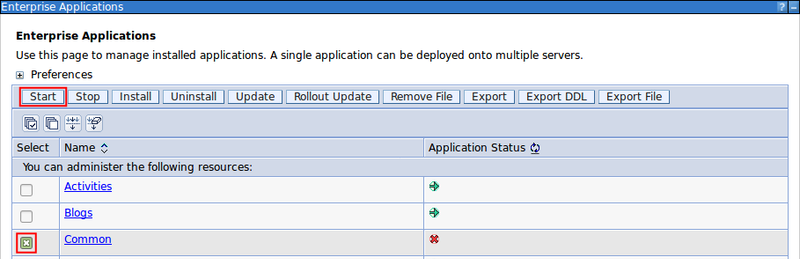
Select the checkbox for Common from the list of applications and click Start.

-
-
Verify the uninstall by browsing to the edit screen for a wiki or blog to verify that the Tiny editors are not being loaded and that it has reverted to the default editor.
Note
If after performing this step Tiny Editors for HCL Connections is still available then restarting the Common enterprise application may be necessary to force a cache update.
Parent topic: Uninstalling Tiny Editors Integration