Changing a community name and linked application's name
When you need to update the name of your community, the changes can automatically reflect in the names of associated applications, ensuring consistency across your collaborative space.
How to change a community name
- Navigate to the specific community page you wish to change the name of.
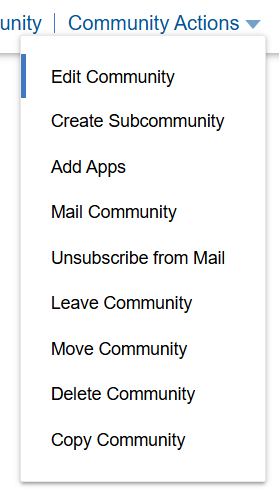
- Open the Community Actions menu.
- Click on Edit Community.
- In the dialog window that appears, ensure you are on the Community Profile tab.
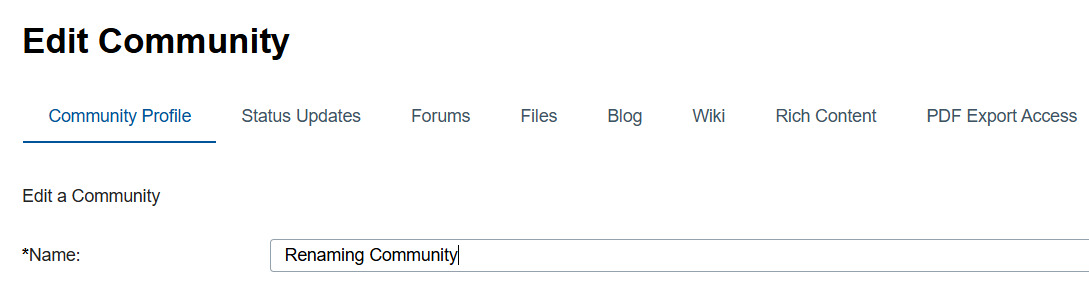
- Locate the Name field and enter the desired new name for the community.
- Click Save or Save and Close to apply the changes.
Auto update of linked applications name
By default, when you change a community name using the steps above, the system will also update the names of the following associated applications to match the new community name:
- Blog: The primary blog automatically created with the community.
- Forum: The primary forum automatically created with the community.
- Wiki: The primary wiki automatically created with the community.
- Wiki Welcome Page: The default landing page within the community's wiki.
- Top Updates Card: The community name displayed on this overview card will be updated.
This automatic synchronization helps maintain a clear connection between the community and its core tools.
When application names are Not automatically changed
If you have manually changed any of these applications name (Blog, Forum, or Wiki page) using their specific management tools (e.g., using "Manage Blogs" to give the blog a unique name), that application name will not be changed when the parent community name is changed.
-
This provides an option to give an application a name different from the community name. For example, if your community is "Marketing Team" but you manually changed the Blog name to "Campaign Updates" via Manage Blogs, changing the community name to "Global Marketing Team" will not change the Blog's name; it will remain "Campaign Updates".
-
Only the forum automatically created with the community and currently matching the community name is subject to automatic name change. Forums added later or manually changed forums names are not affected.
Re-enabling automatic name change
Interestingly, if you manually change an application name (like the Blog or the auto-created Forum) so that its name once again exactly matches the current community name, the system recognizes that you intend for them to be synchronized. From that point forward, future change in community names will automatically update that specific application's name again, unless you manually change it differently later.
Summary
Changing a community name provides a convenient way to keep associated application names synchronized. However, manual customizations made directly to application names via their respective management interfaces take precedence, allowing for flexibility when needed. Remember that a community typically has one primary Blog, one primary Wiki (with a Welcome Page), and one auto-created Forum, though additional Forums can be added manually.
Parent topic:Owners - manage your community effectively