Work Item Management
Increased Attachment Size Limit
The default maximum attachment size in HCL BigFix Service Management has increased from 5 MB to 10 MB per file, with support for file sizes up to 20 MB. The limit is now configurable per tenant via an admin setting, allowing each instance to define its own attachment size cap within the supported range based on storage capacity and business requirements.
Now Accommodating larger documentation, screenshots, and log files without requiring compression, reduces user frustration from attachment size rejections, provides tenant-level flexibility to balance storage capacity with user needs, maintains system performance through configurable limits, ensures consistent enforcement across UI and integration channels, and supports diverse use cases from lightweight environments to documentation-heavy workflows.
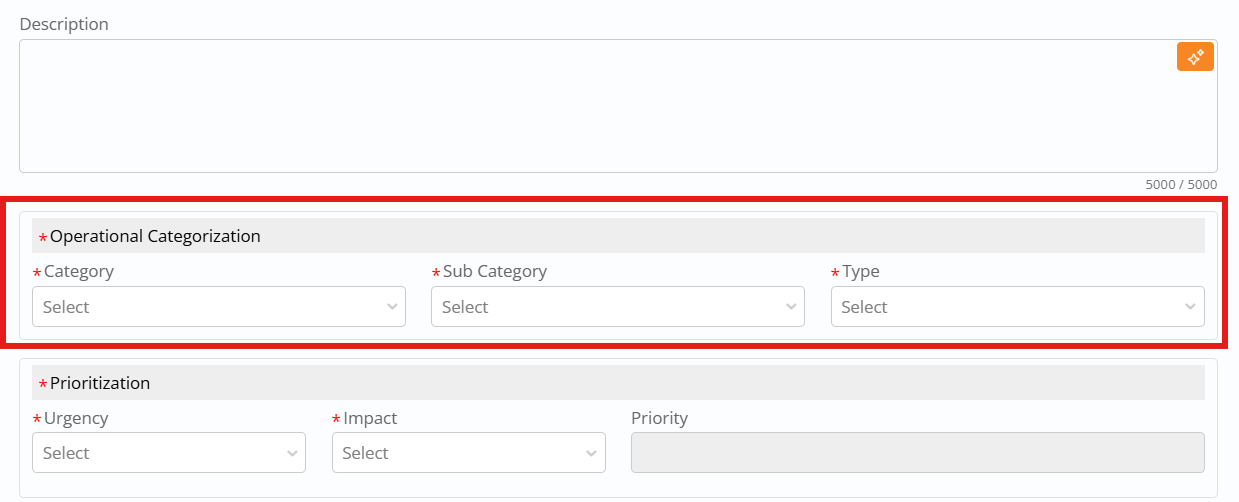
Module-Specific Operational Categorization
Operational Categories in the Incident, Problem, and Change modules now support independent configuration for each module, giving administrators granular control over categorization depth aligned with module-specific requirements.

The setting is "Operational Categorization Level" under the Foundation section of the admin settings menu, with a default value of {"Incident":0, "Problem":0, "Change":0}.
Administrators can set values for each module independently using four levels:
-
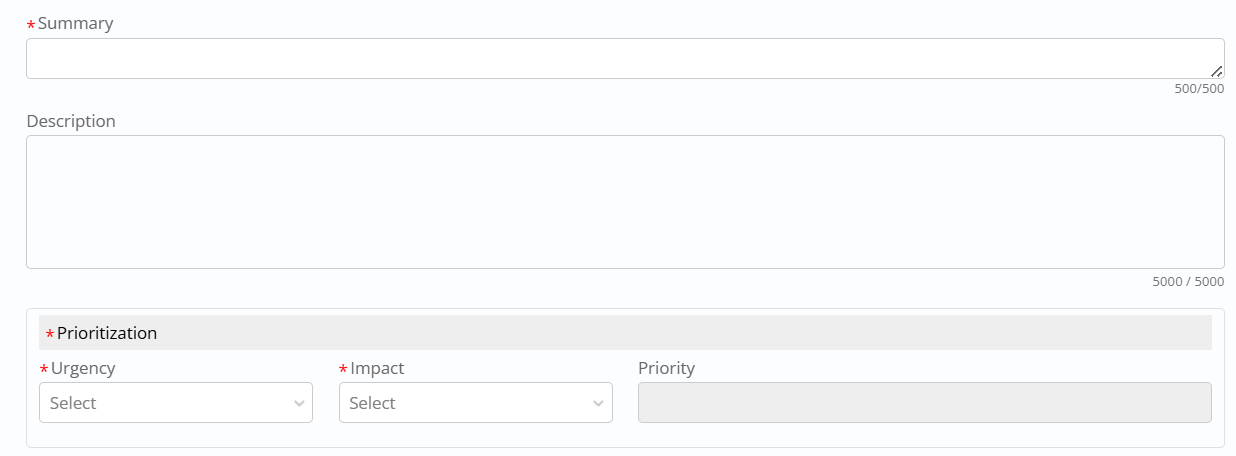
Level 0 – Operational Categorization section is not displayed on the form, suitable for organizations not using operational taxonomy or preferring simpler categorization schemes.
-
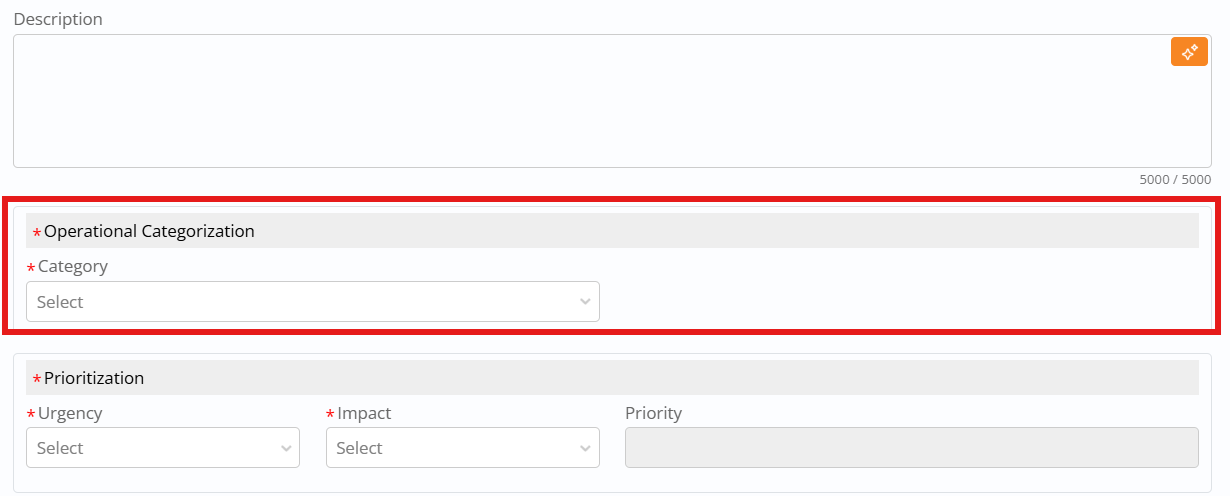
Level 1 – Only the Category field is displayed on the form, providing single-level categorization for straightforward operational classification needs.
-
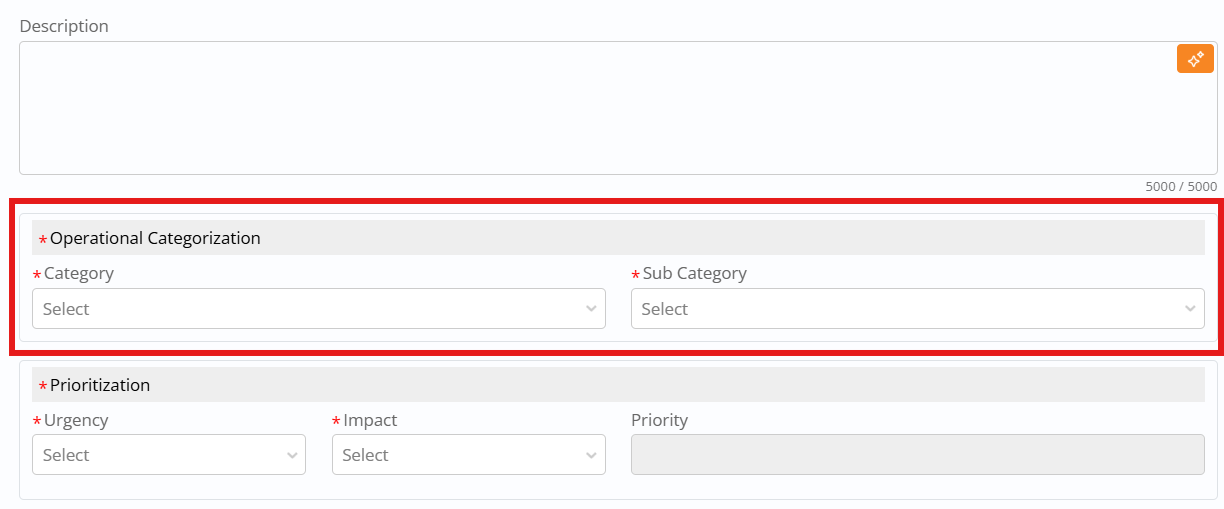
Level 2 – Category and Sub-category fields are displayed on the form, supporting two-level hierarchical categorization for moderate taxonomy complexity.
- Level 3 – All fields (Category, Sub-category, and Type) are displayed on the form, enabling three-level hierarchical categorization for detailed operational taxonomy alignment.
Out-of-the-Box Casual and Entity Relationships
This enhancement delivers a seeded set of causal relationship types in Foundation—such as Resolved by/Resolves, Creates/Created by, Retires/Retired by, Causes/Caused by, Peer of, Parent of/Child of, Related to, Used by/Uses, Impacts/Impacted by, Implements/Is Implemented, Corrects/Corrected By, Duplicate of, Mitigated By/Mitigates, Is Dependent on/Is a pre-requisite for, Successor of/Predecessor of, Deploys/Deployed By, Updates/Updated By, Decommissions/Decommissioned By, and Proposed/Proposed By—plus Interaction-specific pairs like Initiates/initiated from and Impacts/Impacted by.
These standardized options are available out of the box for use wherever relationships are configured or displayed, so customers do not need to define relationship vocabulary from scratch.
| Module | Field | Key | Value | Status |
| Foundation | Relationship Type | Resolved by | 5 | 1 |
| Foundation | Relationship Type | Resolves | 10 | 1 |
| Foundation | Relationship Type | Creates | 15 | 1 |
| Foundation | Relationship Type | Created by | 20 | 1 |
| Foundation | Relationship Type | Retires | 25 | 1 |
| Foundation | Relationship Type | Retired by | 30 | 1 |
| Foundation | Relationship Type | Causes | 35 | 1 |
| Foundation | Relationship Type | Caused by | 40 | 1 |
| Foundation | Relationship Type | Peer of | 45 | 1 |
| Foundation | Relationship Type | Parent of | 50 | 1 |
| Foundation | Relationship Type | Child of | 55 | 1 |
| Foundation | Relationship Type | Related to | 60 | 1 |
| Foundation | Relationship Type | Used by | 65 | 1 |
| Foundation | Relationship Type | Uses | 70 | 1 |
| Foundation | Relationship Type | Impacts | 71 | 1 |
| Foundation | Relationship Type | Impacted by | 72 | 1 |
| Interaction | Relationship Type | Initiates | 350 | 1 |
| Interaction | Relationship Type | initiated from | 355 | 1 |
| Interaction | Relationship Type | Impacts | 400 | 1 |
| Interaction | Relationship Type | Impacted by | 405 | 1 |
| Foundation | Relationship Type | Implements | 95 | 1 |
| Foundation | Relationship Type | Is Implemented | 100 | 1 |
| Foundation | Relationship Type | Corrects | 105 | 1 |
| Foundation | Relationship Type | Corrected By | 110 | 1 |
| Foundation | Relationship Type | Duplicate of | 115 | 1 |
| Foundation | Relationship Type | Mitigated By | 120 | 1 |
| Foundation | Relationship Type | Mitigates | 125 | 1 |
| Foundation | Relationship Type | Is Dependent on | 130 | 1 |
| Foundation | Relationship Type | Is a pre-requisite for | 135 | 1 |
| Foundation | Relationship Type | Successor of | 140 | 1 |
| Foundation | Relationship Type | Predecessor of | 145 | 1 |
| Foundation | Relationship Type | Deploys | 150 | 1 |
| Foundation | Relationship Type | Deployed By | 155 | 1 |
| Foundation | Relationship Type | Updates | 160 | 1 |
| Foundation | Relationship Type | Updated By | 165 | 1 |
| Foundation | Relationship Type | Decommissions | 170 | 1 |
| Foundation | Relationship Type | Decommissioned By | 175 | 1 |
| Foundation | Relationship Type | Proposed | 180 | 1 |
| Foundation | Relationship Type | Proposed By | 185 | 1 |
On top of the type list, the release also seeds entity-to-entity relationship mappings between core records—Incidents, Problems, Changes, Fulfilments/Service Requests, Interactions, CIs, and Walk-up—using those causal types (for example, Change ↔ CI with Impacts/Impacted by and Related to; Incident ↔ Problem/Change/Fulfilment with Related To and Causes/Caused By; Problem ↔ Change with Implements/Is Implemented and Mitigated By/Mitigates; Fulfilment ↔ Fulfilment with Peer Of, Duplicate of, and Is Dependent on/Is a pre-requisite for; and various Related To links to Walk-up).
This out-of-the-box matrix provides a ready-to-use relationship model for impact analysis, duplication control, dependency modelling, and cross-module navigation, which customers can either adopt as-is or extend for their own processes while staying aligned to a common structure.
| Source Entity Id | Related Entity | Related Entity Id | Relationship Type | Relationship Type Id | Reverse Relationship Type | Reverse Relationship ID | |
| Change | 20 | CI | 30 | Impacts | 75 | Impacted by | 80 |
| Change | 20 | CI | 30 | Related to | 60 | Related to | 60 |
| Interaction | 50 | Incident | 5 | Initiates | 85 | Initiated by | 90 |
| Interaction | 50 | Fulfilment | 15 | Initiates | 85 | Initiated by | 90 |
| Incident | 5 | Incident | 5 | Peer Of | 45 | Peer Of | 45 |
| Incident | 5 | Incident | 5 | Parent Of | 50 | Child Of | 55 |
| Incident | 5 | Incident | 5 | Child Of | 55 | Parent Of | 50 |
| Incident | 5 | Problem | 10 | Related To | 60 | Related To | 60 |
| Incident | 5 | Problem | 10 | Parent Of | 50 | Child Of | 55 |
| Incident | 5 | Change | 20 | Related To | 60 | Related To | 60 |
| Incident | 5 | Change | 20 | Causes | 35 | Caused By | 40 |
| Incident | 5 | Fulfilment | 15 | Related To | 60 | Related To | 60 |
| Problem | 10 | Problem | 10 | Peer Of | 45 | Peer Of | 45 |
| Problem | 10 | Change | 20 | Related To | 60 | Related To | 60 |
| Problem | 10 | Fulfilment | 15 | Related To | 60 | Related To | 60 |
| Change | 20 | Change | 20 | Peer Of | 45 | Peer Of | 45 |
| Change | 20 | Fulfilment | 15 | Related To | 60 | Related To | 60 |
| Fulfilment | 15 | Fulfilment | 15 | Peer Of | 45 | Peer Of | 45 |
| Interaction | 50 | Interaction | 50 | Peer Of | 45 | Peer Of | 45 |
| Interaction | 50 | Incident | 5 | Parent Of | 50 | Child Of | 55 |
| Interaction | 50 | Incident | 5 | Related to | 60 | Related to | 60 |
| Interaction | 50 | Fulfilment | 15 | Related to | 60 | Related to | 60 |
| Incident | 5 | Walkup | 19 | Related To | 60 | Related to | 60 |
| Fulfilment | 15 | Walkup | 19 | Related To | 60 | Related to | 60 |
| Change | 20 | Walkup | 19 | Related To | 60 | Related to | 60 |
| Problem | 10 | Walkup | 19 | Related To | 60 | Related to | 60 |
| Interaction | 50 | Walkup | 19 | Related To | 60 | Related to | 60 |
| Problem | 10 | Change | 20 | Causes | 35 | Caused By | 40 |
| Problem | 10 | Change | 20 | Implements | 95 | Is Implemented | 100 |
| Change | 20 | Problem | 10 | Corrects | 105 | Corrected By | 110 |
| Change | 20 | Problem | 10 | Resolves | 10 | Resolved By | 5 |
| Incident | 5 | Incident | 5 | Duplicate of | 115 | Duplicate of | 115 |
| Problem | 10 | Problem | 10 | Duplicate of | 115 | Duplicate of | 115 |
| Change | 20 | Change | 20 | Duplicate of | 115 | Duplicate of | 115 |
| Fulfilment | 15 | Fulfilment | 15 | Duplicate of | 115 | Duplicate of | 115 |
| Incident | 5 | Problem | 10 | Caused By | 40 | Causes | 35 |
| Incident | 5 | Fulfilment | 15 | Caused By | 40 | Causes | 35 |
| Problem | 10 | Change | 20 | Mitigated By | 120 | Mitigates | 125 |
| Fulfilment | 15 | Fulfilment | 15 | Is Dependent on | 130 | Is a pre-requisite for | 135 |
Company-Configurable Auto-Closure Policy for Incident and Service Request Tickets
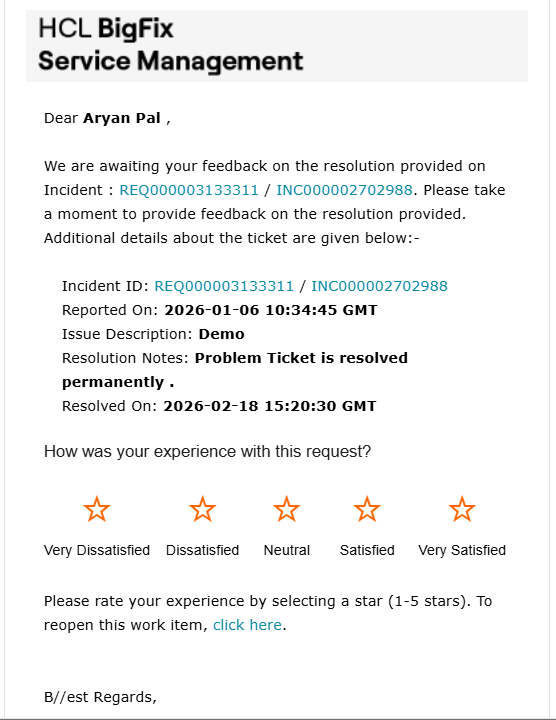
This enhancement introduces a company-specific Auto Close setting that lets each tenant define after how many hours Incident (INC) and Fulfilment/Service Request (SR) tickets are automatically closed when no survey response is received.
Auto-closure applies only once an Incident reaches Fixed or an SR reaches Fulfilled and the survey is available; from that point, the system measures elapsed time and, if no survey is submitted and the elapsed time is greater than or equal to the configured Auto Close value (in hours), the ticket is moved from Fixed/Fulfilled to Closed.
Independent Auto Close properties exist under Incident and Fulfilment/Service Request admin preferences, both as free-form numeric values with a default of 168 hours (7 days), so companies can set different auto-closure times for Incidents and SRs, including an instant-close behavior when the value is set to 0.

Admins configure Auto Close by going to the relevant module’s configuration, locating or creating the property (name Auto Close, type “Specify your own,” default 168, described as controlling auto-closure when no survey response is received), and entering the required value per company.
End users receive a feedback email inviting them to respond and can only submit survey feedback within this configured Auto Close window; if they try to respond via email after the ticket has auto-closed, their response is not saved, ensuring that feedback is only captured while the ticket remains within the defined response period.
Configurable Group Reassignment Reason and History Tracking
This enhancement lets administrators control the visibility and behavior of Group Reassignment Reason and Group Reassignment Comments and configure tenant-specific reasons alongside the default set. A new Enable Group Reassignment Reason setting under Foundation admin controls whether these fields are available: when True, the reason dropdown and comments text area are shown and fully functional for Incident and Fulfillment group reassignment, including Bulk Update from list views; when False, both fields are removed from the UI

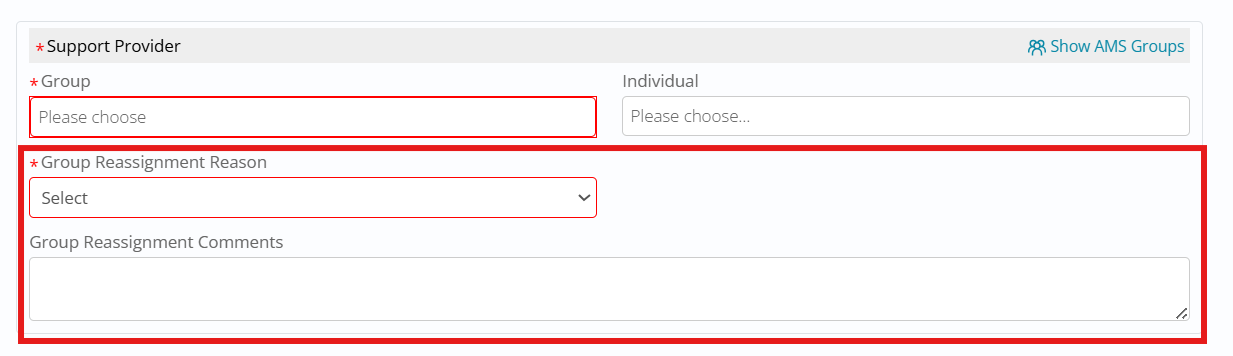
On Incident/Fulfillment edit pages, the Support Provider section adapts accordingly showing only Group and Individual when disabled, or additionally showing Group Reassignment Reason and Group Reassignment Comments under the group selection when enabled.
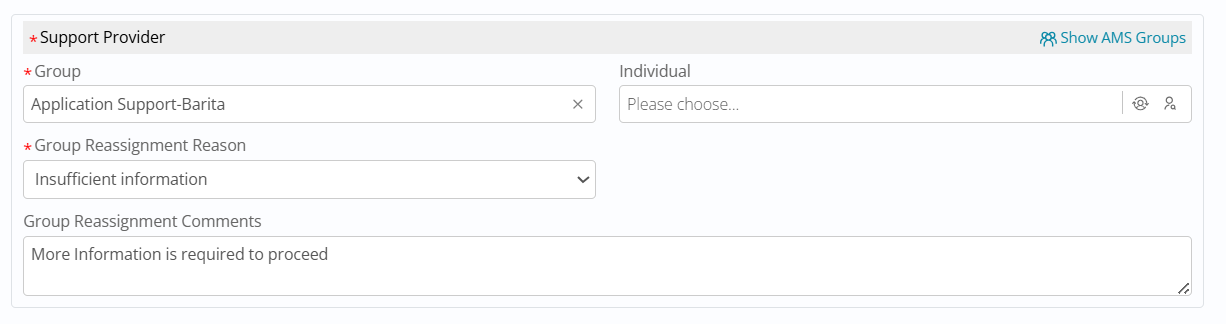
The Bulk Update panel mirrors this global setting: when enabled, users see Group Reassignment Reason and Comments while updating multiple tickets, and when disabled, they can reassign groups in bulk without providing a reason.
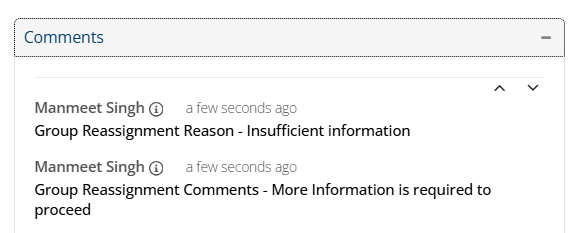
Whenever a group change occurs and values are entered, the comments section for Incident and Fulfillment captures the selected reassignment reason and comments. The feature ships with default dropdown options (Escalation required, Incorrect assignment, Insufficient information, Out of scope, Other reason) and a preconfigured underlying table, and admins can add new Reason for Reassignment values per tenant using the documented API (module Foundation, field “Reason For Reassignment,” with key, value, sequence, and visibility).
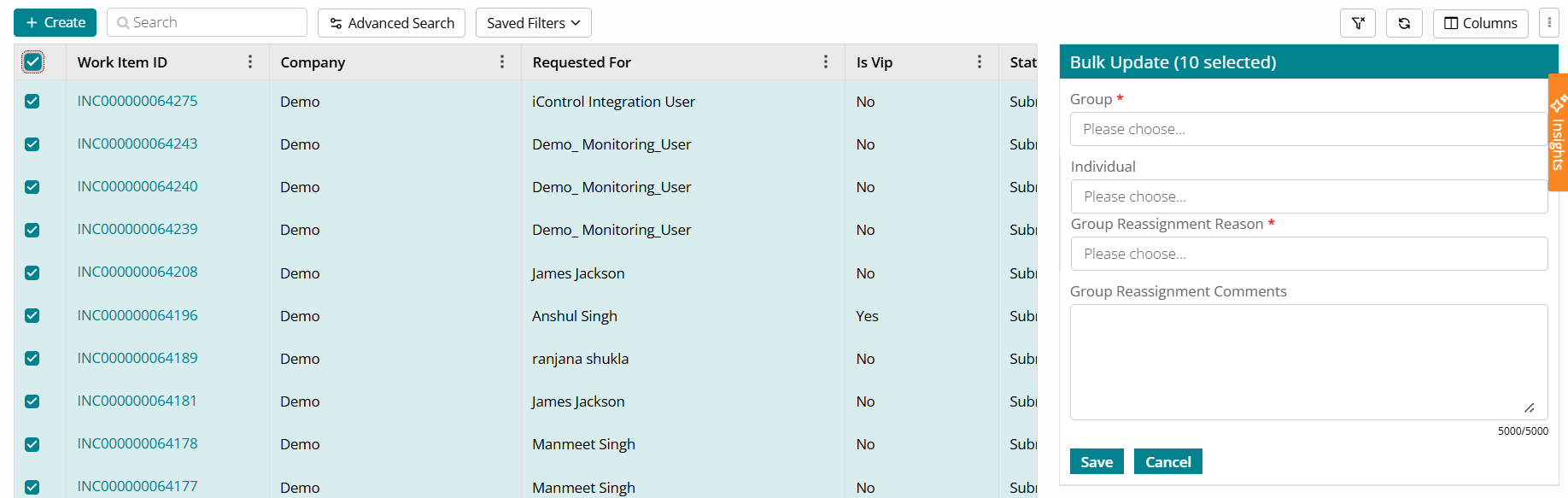
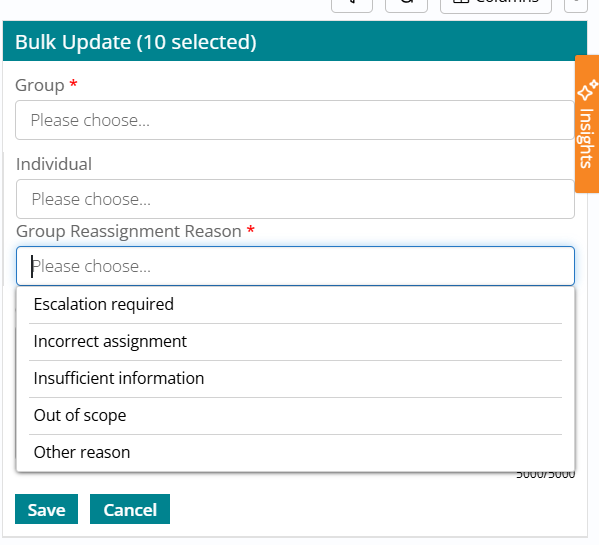
The comments section for both Incident and Fulfillment records captures the Reassignment Reason and Reassignment comments when the group is changed and the user provides some values in these fields
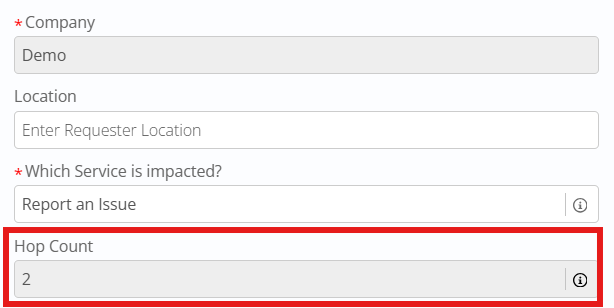
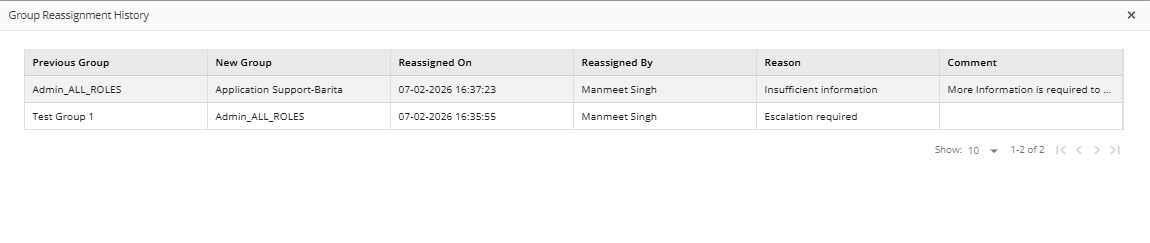
Reassignment metadata is included in outbound update payloads via the reassignment Reason, reassignment Reason Id, and reassignment Comments fields so external systems can consume this information. Each time the Assignment Group/Owner Group changes, the hop count increments by 1, and users can click the info icon next to hop count to open a Reassignment History view showing current group, previous group, reassignment reason, and other details for every hop, giving full traceability of group movements and reassignment context across the ticket lifecycle.
Requestor Location Across All Modules
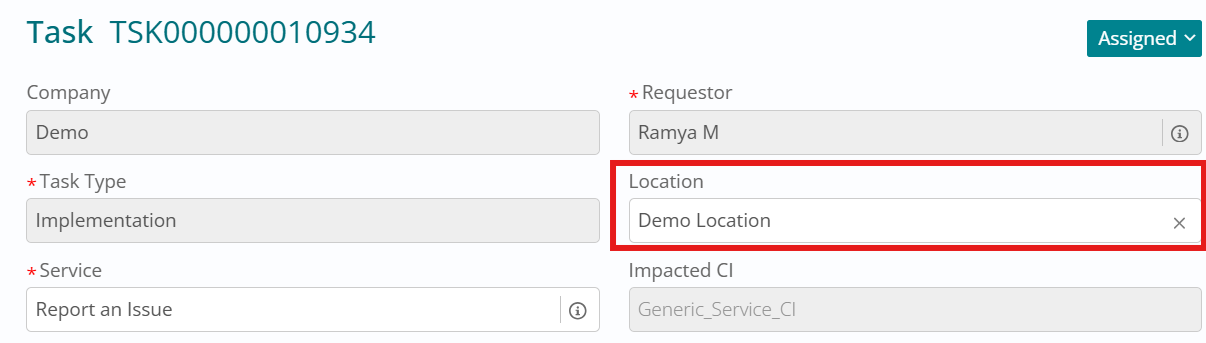
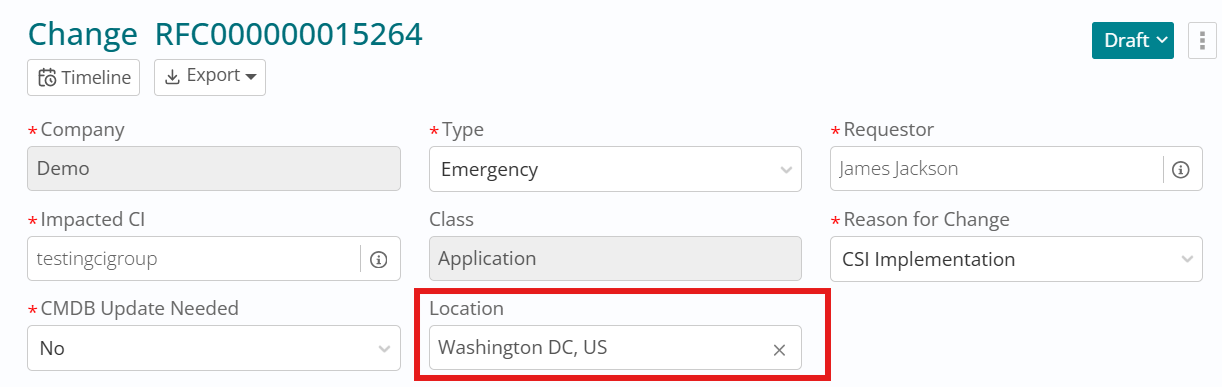
Introduction of a unified Requestor Location attribute across Incident, Problem, Change, Fulfillment, and Task, ensuring consistent location visibility and tracking for all work items. A Location column has been added to the core tables for all these modules and existing records have been backfilled with the requestor’s location.
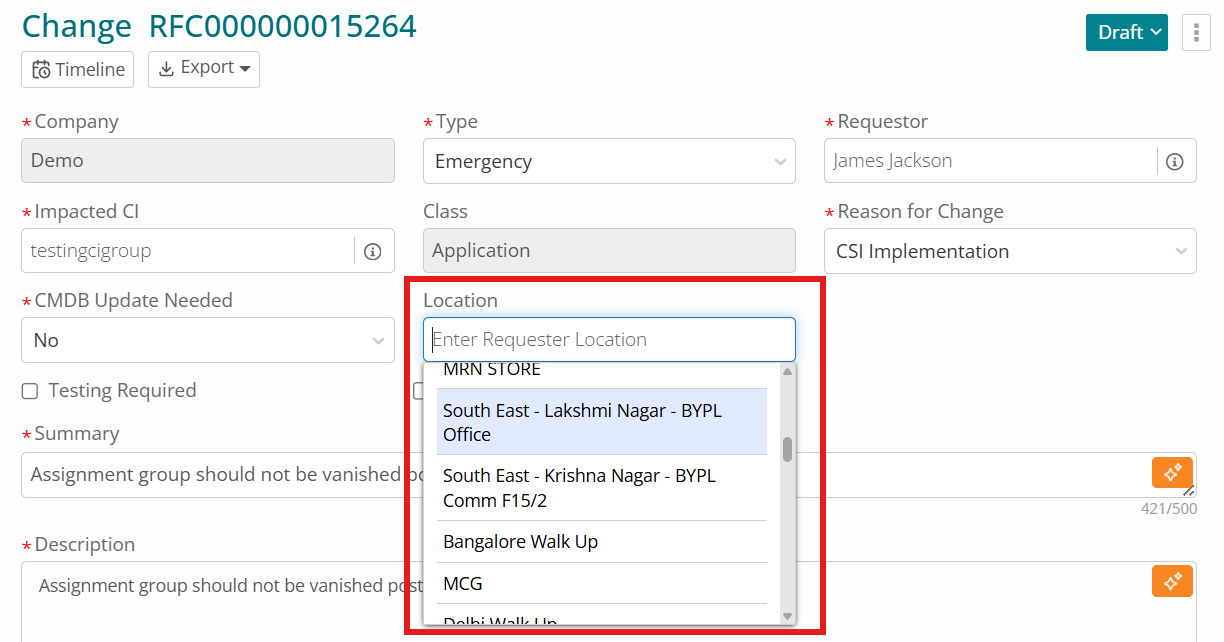
The Create and Update APIs for each module now include the Location attribute, and a Location field is available on the create/edit forms for Incident, Fulfillment, Change, Problem, and Task. When a requestor is selected, the field is auto-populated with that user’s location and is also shown in the requestor information panel on the right; support users can manually update Location in any non-terminal status, with all changes captured in audit logs.
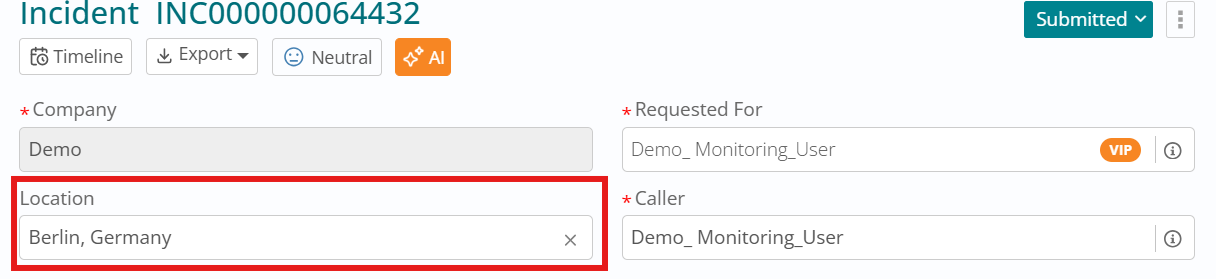
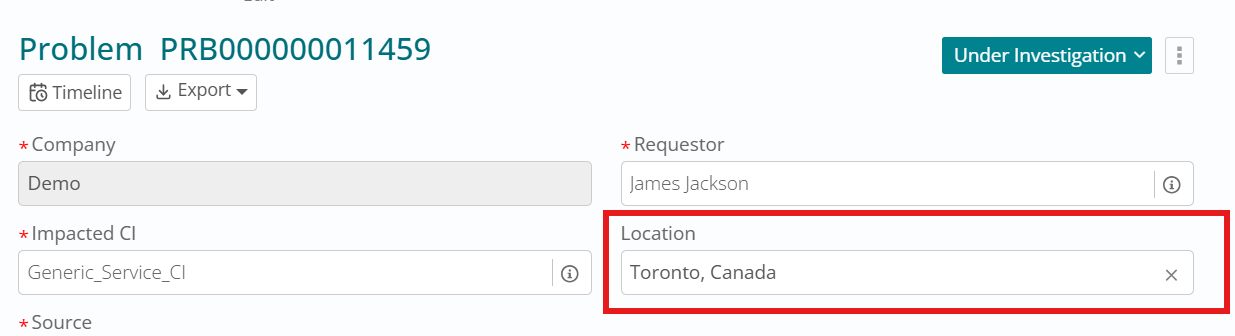
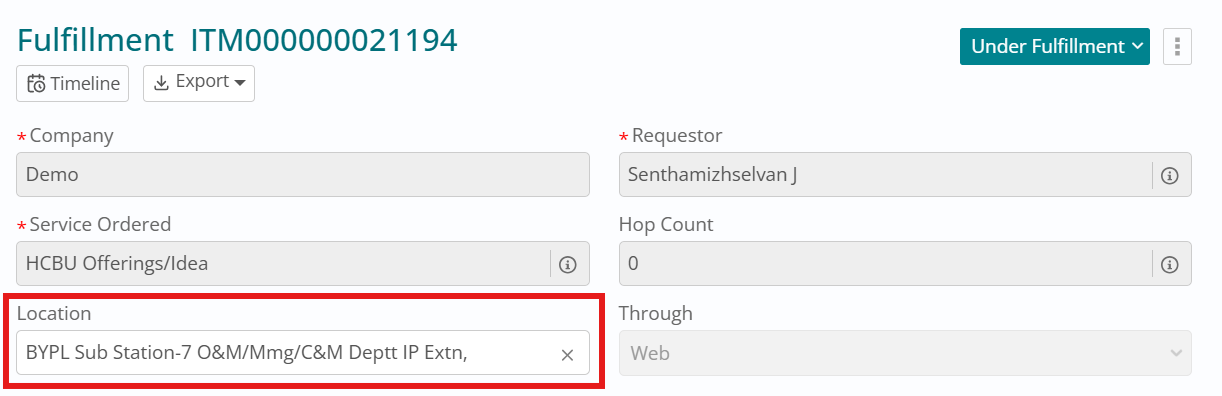
Location is also integrated into Email-to-Ticket and eBonding flows. When an Incident is created via email, the requestor’s location is automatically set on the ticket; if the email is from a guest user who does not exist in Foundation, the Location field remains blank. For inbound eBonding (create payload), if Location is provided it is used as-is; if not, the system calls Foundation to fetch the requestor’s location.
For outbound traffic, the Location field value is passed in both create and update payloads from D2C to Hub and from Hub to IE, ensuring end-to-end propagation.
For alert-based Incidents, Location is derived intelligently from CMDB. When an Incident is auto-created from monitoring alerts where userType = Service Account, the system identifies the primary CI, looks up its record in CMDB, and auto-populates the Incident’s Location from the CI’s Location field. If the CI exists but has no location, or if no matching CI is found, the Incident’s Location falls back to the requestor’s location.
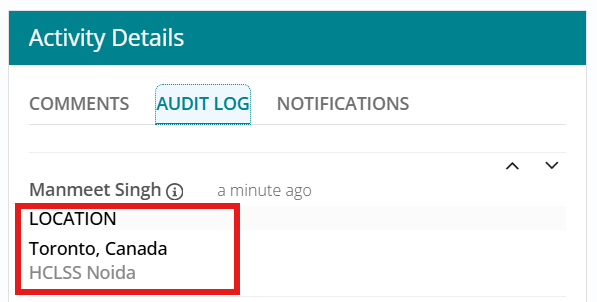
Throughout the ticket lifecycle (until terminal status), support users can edit Location as needed, with every change audited for traceability.
Enhancements to Copy Incident - Reported Through and Assignment Group
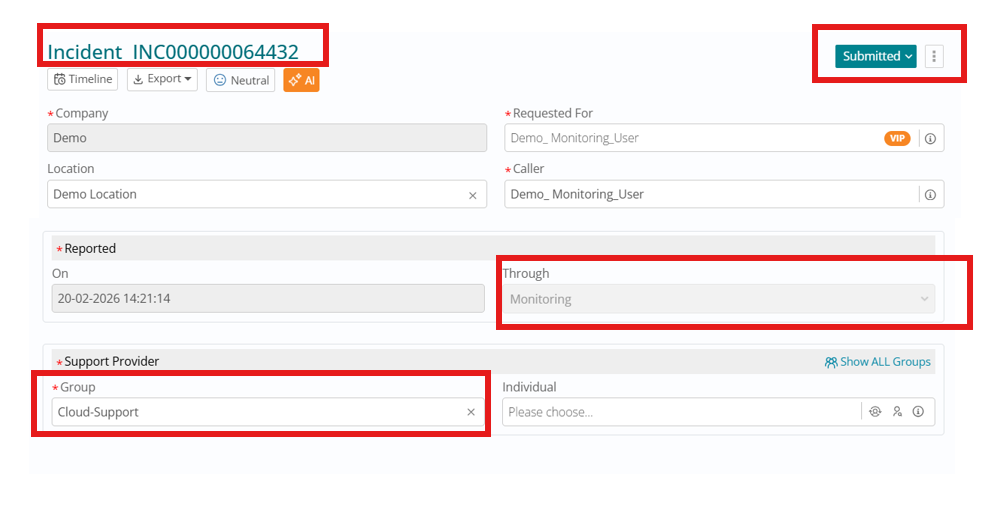
Improvement to the Copy Incident feature so that copied incidents more accurately reflect the original ticket while still allowing controlled edits where needed. Previously, incidents created via Copy Incident always had the Reported Through field set to MyService, regardless of how the original was reported; now, the copied incident inherits the same Reported Through value as the parent incident.
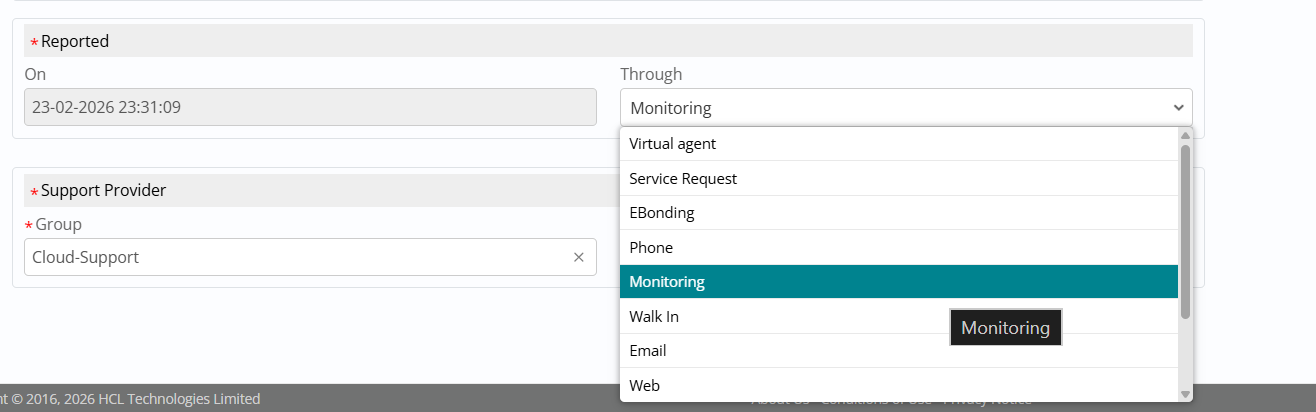
Support users with incident edit access (Incident User, Incident Manager, Service Desk, CIM) can modify the Reported Through field only while the copied incident is in Submitted status if the source differs from the original; in all other statuses, this field remains read-only.
Parent Incident:
Copied Incident -

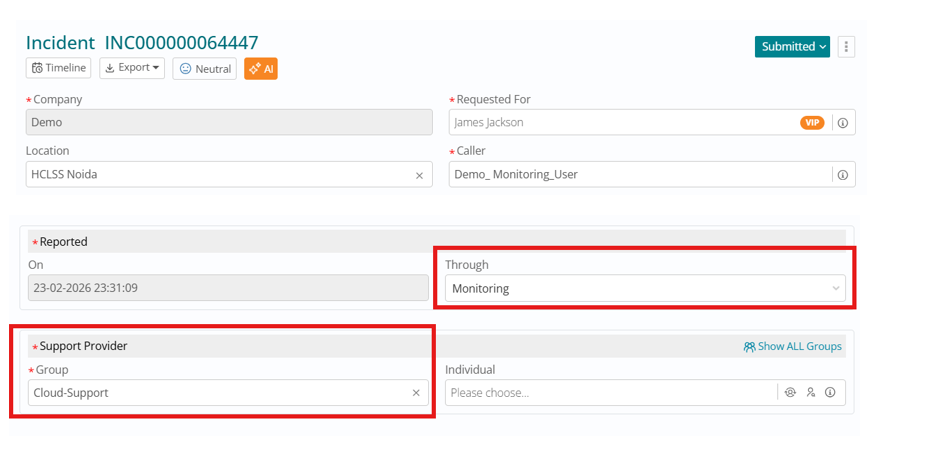
Through field is editable on Copied Incidents at Submitted status
Additionally, copied incidents now retain the same assignment group as the original incident instead of being reassigned based on predefined routing rules. This ensures continuity in ownership and speeds up handling when creating follow-up or related incidents. The assignment group on the copied incident remains editable in all non-terminal statuses, allowing support teams to re-route the ticket if required as it progresses through its lifecycle.
Improved Data Isolation for Related Tickets
This enhancement strengthens data isolation and relationship rules when linking tickets as Parent, Child, or Peer Of across different customers . Tickets belonging to one customer can no longer be related as Parent, Child, or Peer Of to tickets of another customer, ensuring that cross-customer relationships are prevented and customer boundaries are strictly enforced.
With the new validations in place, a supporter company can relate its own work items, as well as relate its work items with any work items of its consumer companies. Consumer companies, however, cannot see or relate each other’s work items, nor can they relate their work items to those of their supporter company. If a consumer company can see a supporter’s related work item because of an existing bidirectional relationship, users will still not be able to open or access that supporter ticket. These rules apply both when relating tickets within the same module and across different modules, preserving tenant and customer isolation throughout the platform.
Retain Assignment Group when Updating Mandatory Fields SM
Now we ensure that the Assignment Group value is retained when users update mandatory fields on Incident, Problem, and Change forms. Previously, updating certain mandatory attributes could result in the Assignment Group being cleared; now the system keeps the selected group intact whenever you modify required fields, reducing rework and preventing accidental loss of ownership. Existing role-based permissions and group visibility rules are unchanged, so users still only see and select groups they are authorized to access.
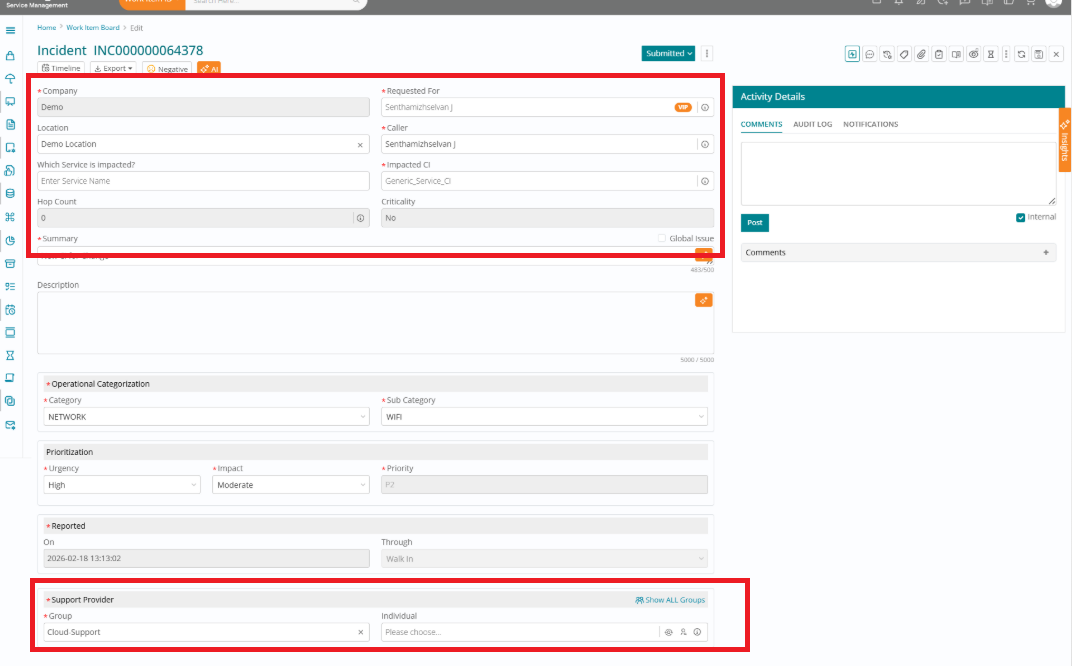
In the Incident module, mandatory fields include Consumer, Service, Impacted CI, Issue Description, Operational Categorization, and Prioritization. When a user updates any of these fields, the Assignment Group retains its selected value and is not cleared automatically; it is only removed if the user deliberately clicks the cross (X) button in the Assignment Group field, after which they can search for and select a new group.
In the Problem module, mandatory fields are Requestor, Impacted CI, Location, Source, Summary, Description, Operational Categorization, and Prioritization. Updating any of these does not change the Assignment Group: the group remains as set until the user explicitly clears it using the cross (X) icon, at which point they can choose a different group if needed.
For the Change module, the mandatory fields are Type, Requestor, Impacted CI, Location, Reason for Change, CMDB Update Needed, Urgency, Summary, Description, Risk Assessment, and Schedule. Changes to any of these required fields no longer clear the Assignment Group; it will only be removed when the user manually clicks the cross (X) button, ensuring group assignment remains stable across edits while preserving existing visibility and role rules.
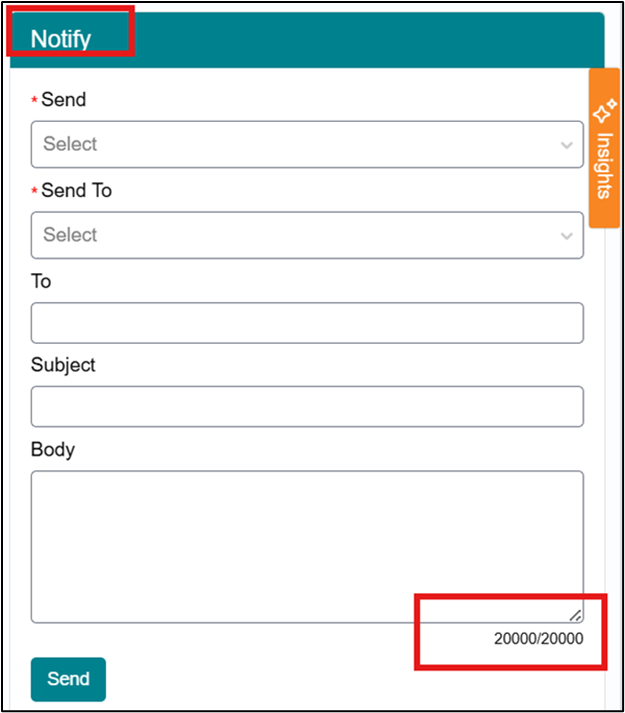
Notify Function Body Character Limit Increased to 20000
The current Body field in the BigFix SM Notify function supports a character limit of 1000, which is insufficient for users who need to send detailed notifications. The requirement is to increase the character limit from 1000 to 20000 so users can create more structured and readable communication.
Previous Behavior
| Area | State |
| Character limit | 1000 characters |
| Module coverage | Notify function in WIB modules |
Updated Behavior
| Area | State |
| Character limit | 20000 characters |
| Module coverage | All WIB modules using Notify |
| UI support | Field must allow entry and display of up to 20000 characters |
| Backend support | Backend field type must be changed to Text |
Watcher Search Enhancements
We have an enhanced watcher search so users can be found using additional identifiers such as email ID, username, and employee number, while also displaying more user details during search to help select the correct person.
The attached screenshots provides the current watcher details area where the enhancement is expected to improve user search and selection experience.
Enable user search in watcher list using email, username, employee number, and other supported identifiers in addition to full name.
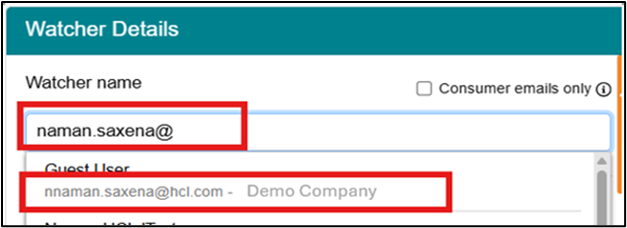
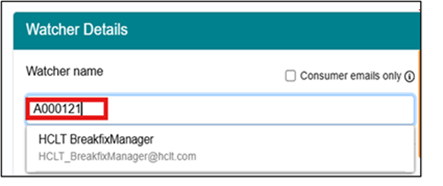
Search suggestions or results show enough contextual user information to identify the correct person before selection.
The watcher selection process becomes faster and more accurate for customers with duplicate user names across companies
Support Group Info Icon
We have introduced ‘i’ icon in the support group field for all the modules to display Group Mail ID, Description, Group Managers Detail, Group Members Detail and Roles. It defines how support group information must be presented to users from within work item modules through an information (“i”) icon and right‑panel view.
The scope covers
- Introduction of an information (“i”) icon next to the support group field across all relevant BFSM modules.
- Behavior of the right-panel Group Info section that opens when this icon is clicked.
- Navigation from the right-panel to a read‑only group page showing additional group details.
To provide quick, context-aware visibility of support group information directly from work item screens so that users can understand who owns a group, how to contact them, and what roles are present—without leaving the current module or performing separate navigation.
Functional behavior
The feature introduces an “i” information icon next to the support group field in all modules. When a user clicks the icon:

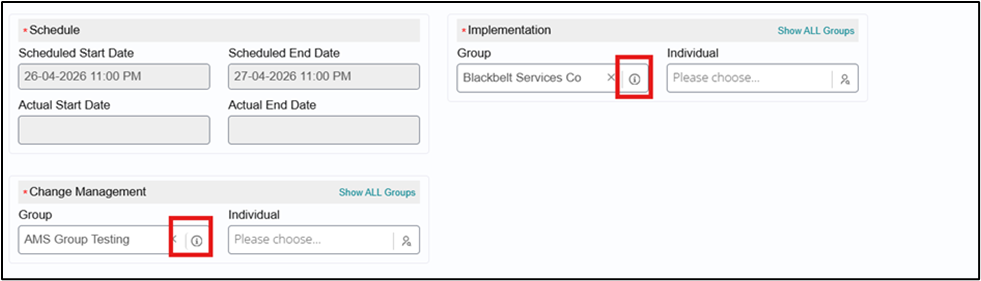
- A Group Info section opens in the right panel displaying at least:
- Group Name
- Group Description
- Group Mail ID (distribution list / DL)
- The right panel also includes a link on the Group Name
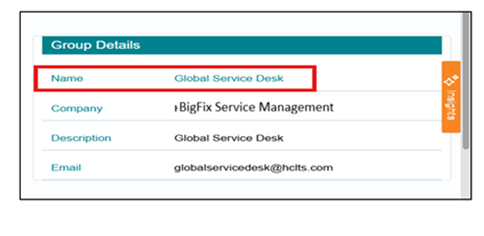
- When the user clicks that link, they are taken to a read‑only group page that
displays all required information:
- Group Mail ID
- Group Description
- Group Manager names and email IDs
- Group Member names and email IDs
- Group Roles
Process Flow
Step 1 – Select Work Item
- User opens or edits a work item (e.g., incident) that contains a support group field.
Step 2 – Access Group Info
- The support group field displays an ‘i’ icon adjacent to the selected group.
- The user clicks the ‘i’ icon.
Step 3 – Right-Panel Group Info Display
- The system loads the Group Info in the right panel.
- Right panel displays at minimum:
- Group Name
- Group Description
- Group Mail ID (DL).
Step 4 – Navigate to Full Group Details
- Within the right panel, Group Name Is hyperlinked
- The user clicks this link.
- System navigates the user to a read‑only group page that includes:
- Group Mail ID
- Group Description
- Group Manager names and email IDs
- Group Member names and email IDs
- Group Roles
Step 5 – Return to Work Item
- Users exit the read‑only group page (e.g., back navigation or close action) and can continue work on the original work item as per existing BFSM behavior.