
Business Function
Business functions are high-level groupings of organizational activities that support business objectives and help structure operations into clear, manageable units. Common business functions include Human Resources (HR), Information Technology (IT), Finance, Sales, Operations, Procurement, and Facilities, each representing a distinct area of responsibility within the organization.
In HCL BigFix Service Management, business function segregation has been introduced in the Incident and Service Request modules to ensure records are created, categorized, and routed within the correct functional context. This guide explains what business functions are, why segregation matters, and how support users should work with the Business Function field during record creation and processing.
A business function is a defined set of activities performed within an organization to achieve a specific purpose or support a broader business goal. In enterprise operations and IT systems, business functions provide a structured way to organize work, ownership, and responsibilities.
Examples of Business Functions
| Business Function | Typical Scope |
| HR | Employee onboarding, payroll queries, attendance issues, policy requests, benefits support |
| IT | Hardware, software, access, email, network, application, and system support |
| Finance | Budgeting, invoicing, reimbursements, payments, accounting, and financial compliance |
| Procurement | Purchase requests, vendor coordination, order tracking, approvals |
| Facilities | Workspace, seating, utilities, maintenance, and office infrastructure support |
| Operations | Process execution, service continuity, and day-to-day business support activities |
Why Business Function Segregation Matters
Segregating records by business function helps standardize workflows, responsibilities, and routing rules, which improves service consistency and reduces ambiguity in ITSM operations. It also supports better governance by applying access controls, approval paths, and handling rules that match the functional context of each record.
Business function segregation is especially important when multiple departments use the same ITSM platform, because it prevents records from being misclassified or sent to the wrong teams.
Company administrators can map these functions to their company. If a custom business function is required, it can be added to the master table by a Super Admin.
Defining a Business Function involves three primary attributes:
- Name
- Alias
- Description
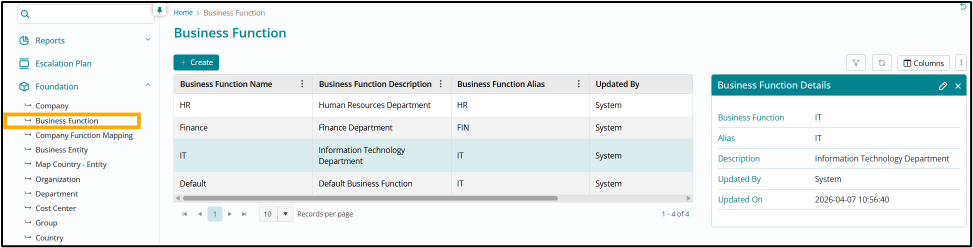
Super Admins retain exclusive rights to add new records to the master list, while Admins have read-only access.
Create Business Entity
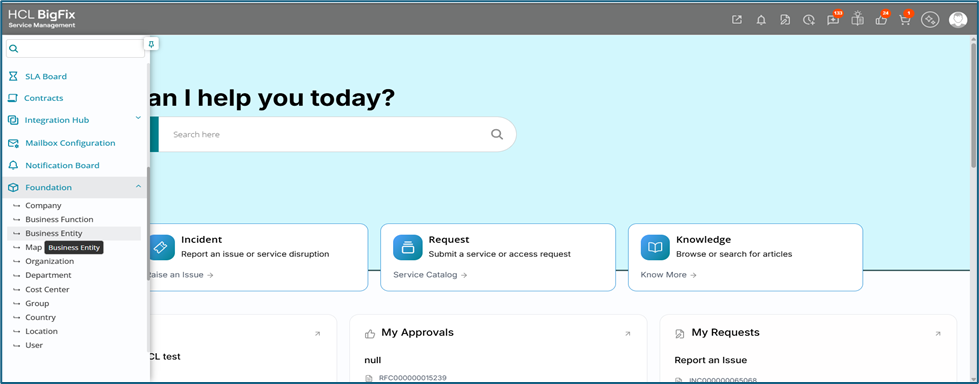
To create business entity Admin has to navigate to Foundation module and select Business Entity
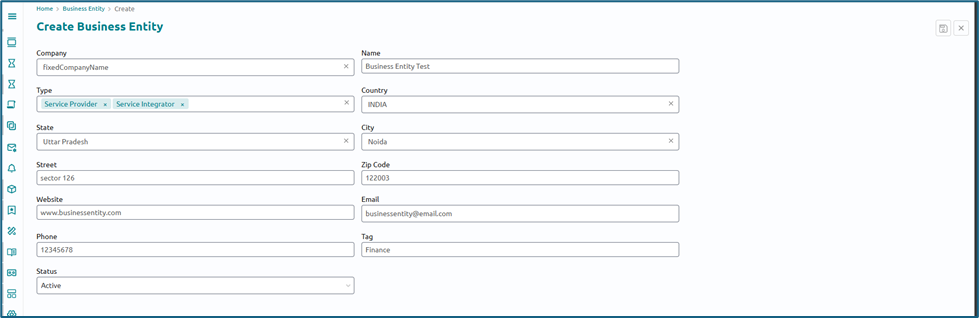
- Fill in the form with the details like Name of the Business Entity , Company it belongs to and the country it operates in also the other details like location etc.
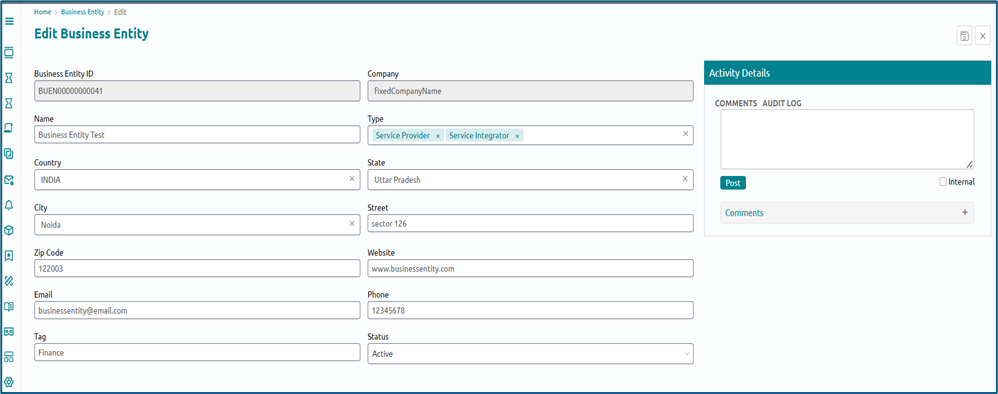
Click on the newly created record from list page to edit if required
Business Function – Company Mapping
Once business functions are defined in the master table, they must be mapped to your company via the 'Company Function Mapping' module in the Foundation menu.
Existing companies are mapped to the 'IT' function by default
Respective administrators are responsible for configuring mappings for all new companies and new BFs.
To establish a mapping, create a record specifying the following:
- Company: The company for which the mapping applies.
-
Parent Business Function: Select the Business Function from the list available. This can be utilized if the company has a parent-child structure for their business functions
Parent Business Functionss must be mapped with the company separately, along with the respective child BFs.
- Business Function Name: Select from the available master list.
-
Status: Set Active / Inactive to control usage
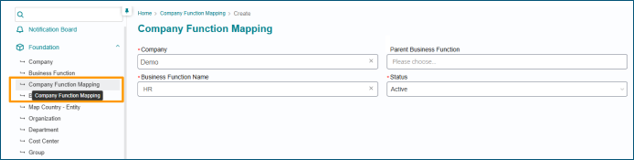
Admins can manage mappings only for themselves or associated companies. Mapping records for the 'Default' company are view-only for them.
Default Business Function for the Company
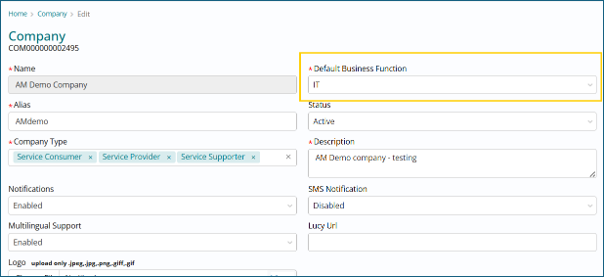
In cases of multiple business functions mapped with a company, one must be set as default. This is critical for E-bonding integrations where no function is explicitly passed.
On the company form, 'Default Business Function' field has been introduced as a mandatory attribute. For existing companies, 'IT' will be selected here by default. Admins can select from the Master BF list. If the mapping with that function is not yet created, a record will be created when we save the company record.
Business Function on Groups
Once Company to Business Function mapping is completed, Groups have to be mapped with the Business Functions they support.
Pre-requisite- Companies must be mapped with their respective BFs. Only these mapped BFs can be associated with the groups of those companies.
- Each group has to be mandatorily associated with one Primary Business
Function.
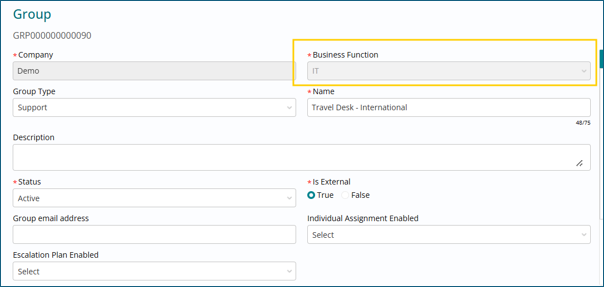
- Apart from the Primary BF, Groups can be mapped with other associated Business Functions of associated companies if they provide multi-function support.
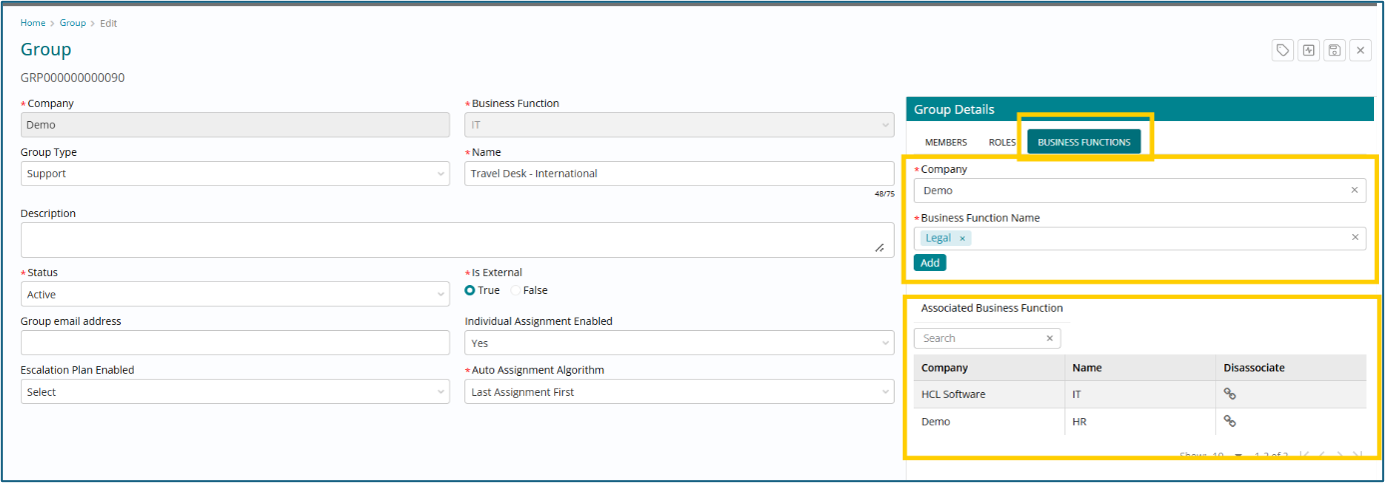
By default, all existing groups have been mapped with 'IT' Business Function as primary. Admins have to map other associated Business Functions to groups as required.
A group must be mapped with Business functions of consumer companies to which it provides support. If the mapping is missing, the group won’t be available to select on work item records of respective consumer company and business function.
Every support user / fulfiller must be mapped with a group to gain access to the required records belonging to respective Business Functions, including Admins. If a user is not part of any group, then they are not mapped to any Business Function and thus will not be able to access any records.
If a consumer company has multiple BFs (IT / HR / Finance), and Admins are different for each BF, respective Admin groups must be mapped with respective BFs. If there is only one admin, the admin group should be mapped with All BFs of the company.
Business Function Cost Centers
Cost centers must also be associated with a Business function of the selected company. Existing cost centers will be mapped with ‘IT’ BF by default.
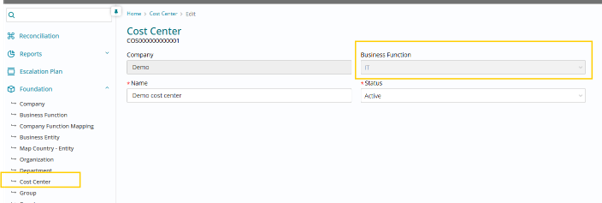
Business Function on Cost Centers is solely for grouping and organization and there is no functional impact.
Business Function Introduction for Multiple Modules
The Business Function attribute has been introduced in the below modules as well, and the 'IT' Business Function is mapped by default in all respective existing records
- Company Priority Matrix – Admins can define specific Impact Urgency Priority Matrix for different functions.
- Cost Centers – Cost centres must be associated with Business Functions.
-
Custom Attributes – Custom attributes on respective modules will be visible based on record Business Function
-
Group Functions – Group functions used in location-based assignment rules must also be mapped with Business Functions
Business Function on SLAs
SLAs are now determined based on the combination of a ticket's Company and Business Function, ensuring precise service level targeting and functional separation.
The Business Function attribute has been added to the following SLA forms:
- SLA Target Definition
- Work Schedule
- Holiday Schedule
To ensure consistency, only Work and Holiday schedules that match the Company and Business Function of the SLA will be available for association.
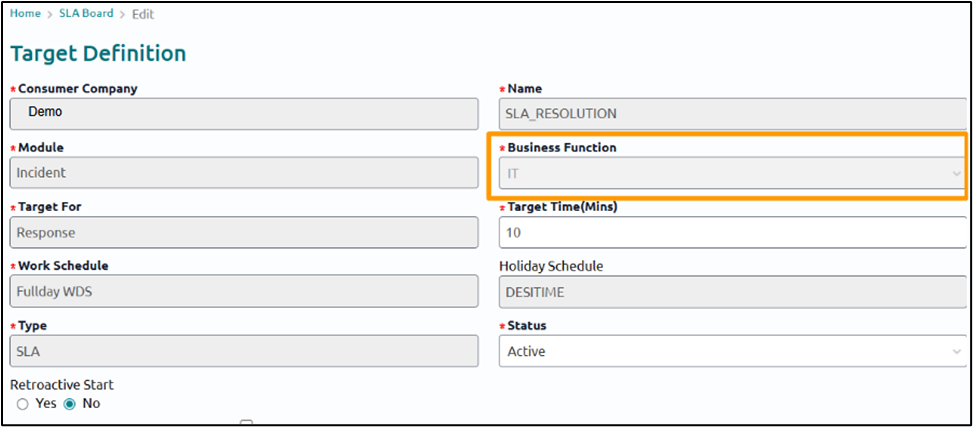
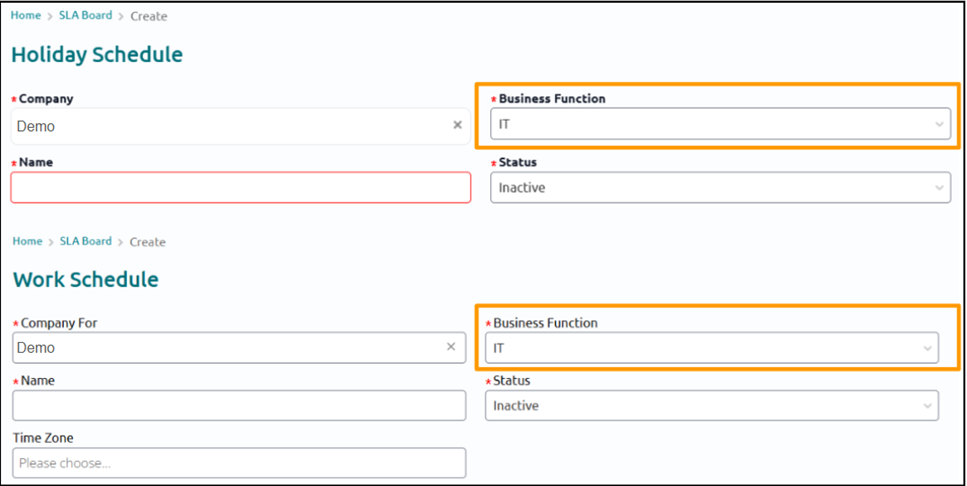
Existing SLAs and schedules have been automatically mapped to the 'IT' Business Function by default.
If SLA does not exist for the ticket's BF, no SLA will be attached.
While creating an SLA, users will, by default, only see the Business Functions (BFs) they are associated with. If an SLA needs to be created for a different Business Function, users can enable the "Show All BFs" option and select the required Business Function from the complete list. Once the Definition or Schedule record is saved, the selected Business Function cannot be modified.
Business Function in Knowledge Management
The Business Function (BF) attribute has been introduced for Knowledge Bases (KB) and Knowledge Articles to enforce functional separation and maintain targeted access.
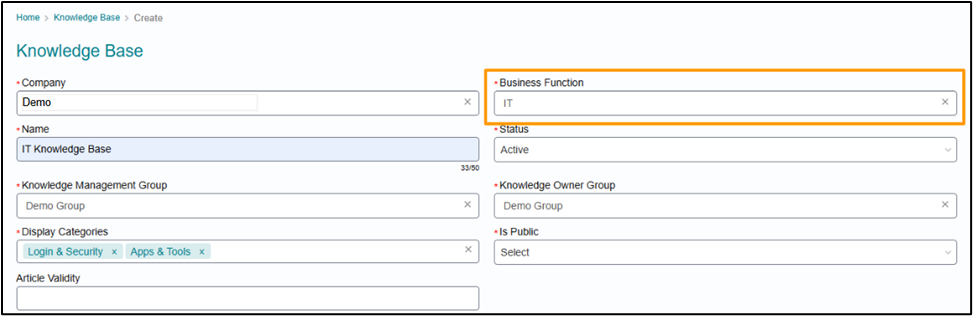
- A Business Function (mapped to the KB's company) must be selected when creating a KB. Once saved, the BF cannot be modified.
- All articles within a KB are automatically mapped to the same BF as the KB.
- Only Knowledge Manager and Knowledge Owner groups associated with the KB's Business Function can be selected on the KB.
- Knowledge Managers are restricted to managing only the KBs and Articles associated with their assigned groups and Business Functions.
Existing KBs and Articles have been automatically mapped to the 'IT' Business Function by default. This functional separation does not affect knowledge access for end users. End users can view articles based on the access rules defined.
Business Function on Scheduled Jobs
The Business Function attribute has been added to Scheduled Jobs as well for categorization. Product-default jobs are mapped to the 'Default' Company and 'Default' Business Function.
- Administrators can create company and business function specific jobs for new use cases.
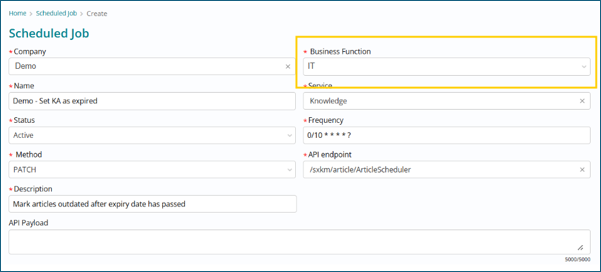
Default scheduled jobs will continue to run for all companies and business functions
New jobs, if created for a specific entity, must specify the company and/or business function in the API payload and the API in use should be accepting the company and business function keys.
Business Function on Authorization Rules
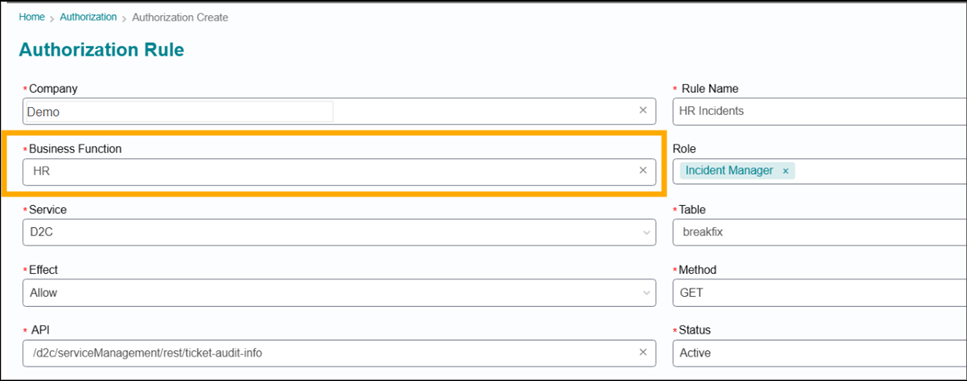
The Business Function attribute has been introduced to Authorization (AuthZ) rules to enable precise evaluation filtering.
- Rules are now evaluated based on the Business Function a user is associated with (derived from their group memberships). This ensures that only relevant rules run for evaluation.
- If a user is not mapped to a Business Function (e.g., a service consumer, or a fulfiller in an unassigned group), the system will evaluate all AuthZ rules associated with the "Default" Business Function.
All existing AuthZ rules are mapped to ‘Default’ Business Function.
Menu List and Priority Matrix Tables in Business Function
Different values for a field can be defined for different Business Functions. BF has been added as a mandatory attribute on the Menu List table. When creating a new menu list item, the BF key must be passed through the API, along with the company to which the BF is already mapped in the Company Function Mapping table.
On a record, the available values for a field coming from the Menu list table will be filtered as per the Company and Business function of the record.
Example Use Case - Consider Impact field on Incident record with Company as ‘Demo’ and BF as ‘IT’
- Menu list values for Impact field where Company = ‘Demo’ and BF = ‘IT’ will be available to select.
- If no values are found in the above scenario’, values where Company = ‘Demo’ and BF = ‘Default’ will be available to select.
- If no values are found in the above scenario’, values where Company = ‘Default’ and BF = ‘IT’ will be available to select.
- If no values are found in the above scenario’, values where Company = ‘Default’ and BF = ‘Default’ will be available to select.
Similarly, BF has been added as a mandatory attribute on the Priority Matrix table and the same logic will be used to fetch priority matrix values for a record.
The filtering order for values will be -
- Company = Record.Company, BF = Record.BF
- Company = Record.Company, BF = Default
- Company = Default, BF = Record.BF
- Company = Default, BF = Default
All existing menu list and priority matrix records are mapped to ‘Default’ Business Function.
Approvals in Business Function
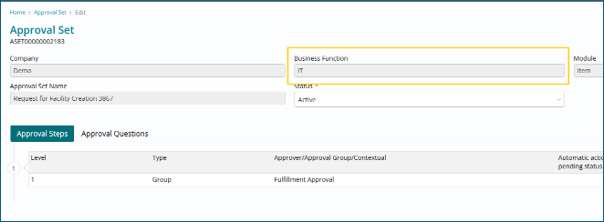
Approvals can be defined separately for different business functions.
It is mandatory to select a Business Function when defining an approval set. Approvals will be attached to records based on the record’s Business Function.
All existing Approval Sets are mapped to ‘IT’ Business Function.
Escalation Plan in Business Function
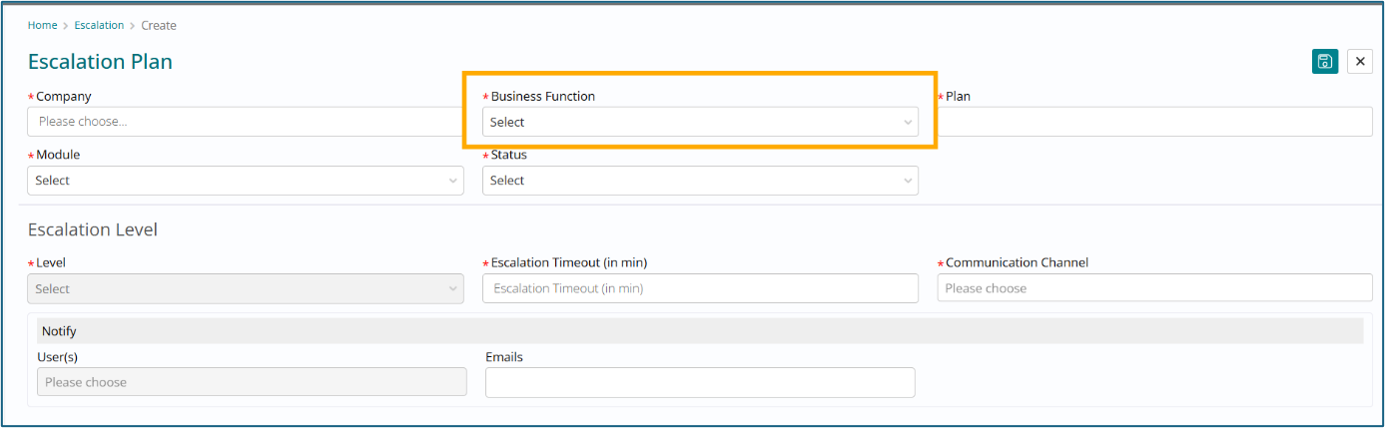
Escalation plans can be defined separately for different business functions.
It is mandatory to select a Business Function when defining an Escalation plan, and they will be attached to records based on the record’s Business Function.
All existing Escalation Plans will be mapped to ‘IT’ Business Function.
Custom Attributes in Business Function
Custom attributes can be defined separately for each Business Function. Custom attributes on respective modules will be visible based on record business function i.e. For IT BF records, only IT BF custom attributes can be added.
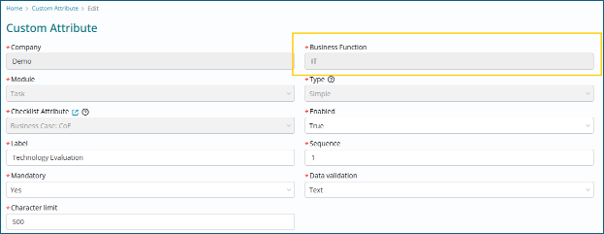
All existing custom attributes have been mapped to ‘IT’ Business function by default.
CMDB records are not separated by Business Functions. All Records are mapped to ‘Default’ BF. Custom attributes will continue to return based on Company only.
Business Function on Service Offerings & Categories
Service Offerings now include the Business Function (BF) attribute to ensure clear functional separation.
- Selecting a Business Function is mandatory and filtered by the Service's Company. If only one Business Function exists for a company, it will auto-populate.
- This attribute enforces that only groups associated with the selected Business Function can be assigned as Service Owner group or Support/Provider groups under Chain Entities.
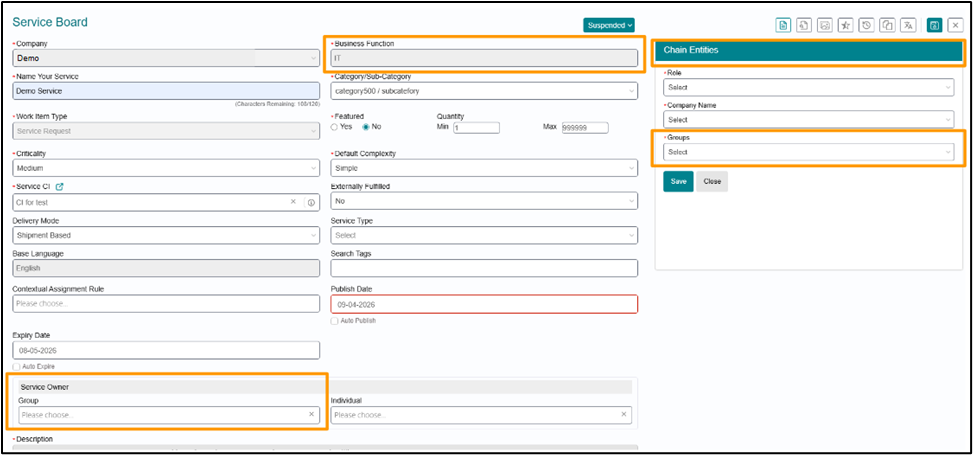
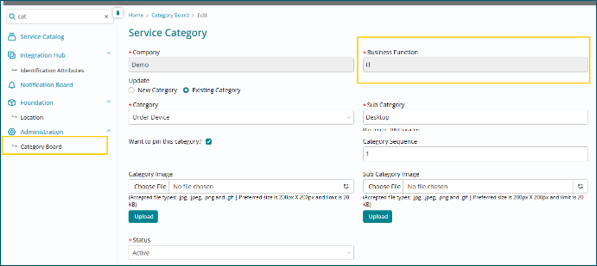
The categories for the Service are also populated based on the BF of the Service. When defining categories, you need to map the Business function as well.
On the Service form, the Contextual Assignment Rules available to select will also be based on the Business Function of the Service.
Catalog managers can see and manage services if they are associated with the Business Function of the Service. If they are not associated with the service's Business Function, they would not be able to see the service offering
This separation does not affect service entitlements. End users can still view and order services based on existing entitlement rules regardless of Business Function mapping.
Business Function Segregation for Incident, Service Request, and Task Records
Working with the Business Function Field
- It's based on the Company: Users have to pick the Company first. Then, the system only shows Business Functions relevant to that company.
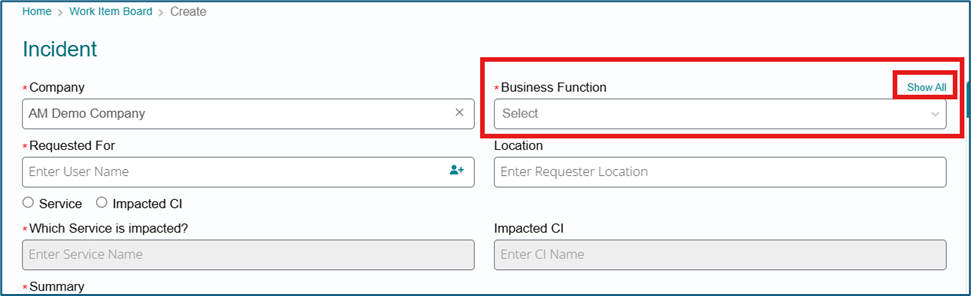
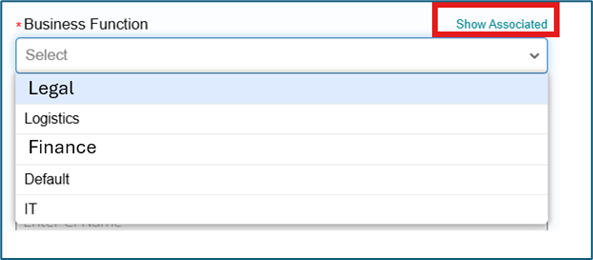
- Mandatory Field: You have to choose a Business Function when creating/editing any records. For now the same has been introduced in Incident /Fulfillment /Task
- Locked Down: Once the record is submitted, the Business Function field becomes Read-only.

- What if I can't find it? There's a "Show All" toggle link to display all BFs, not just the company-specific ones. It will display the list of all Master business functions . If you want to go back to the associated business functions click on the toggle “ Show Associated”.
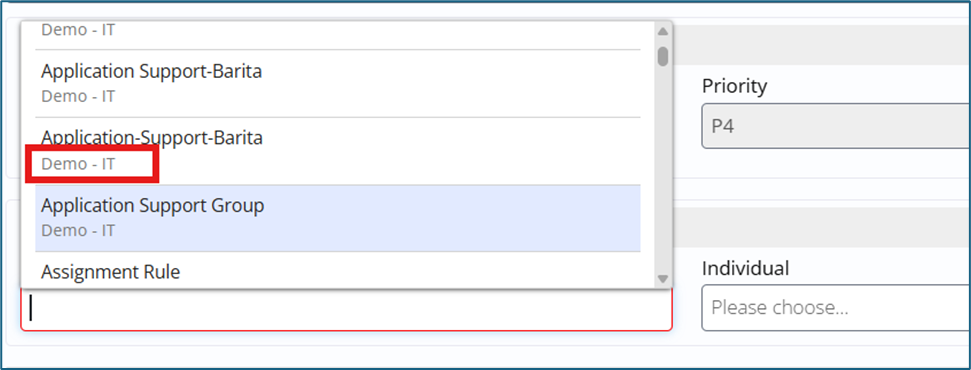
- Metadata Help: When creating an Incident or SR, the Business Function dropdown will show the Business Function of the associated Support Group or Service Offering to choose the right one.
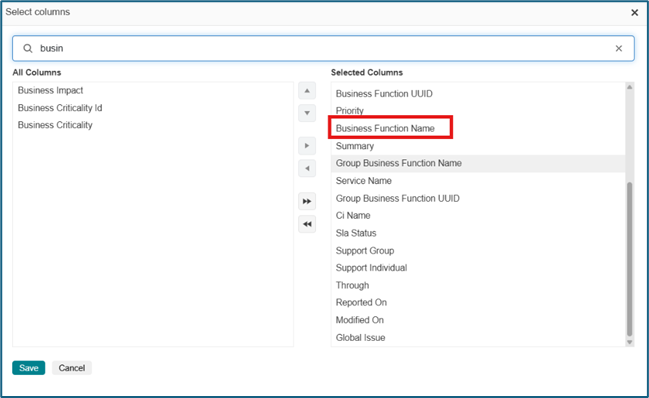
- List View:Users can add the business function columns on the lists for Incident / SR and Tasks lists from the column selector.
- Advanced Search : In Advanced search , attribute has been provided on each list to help users apply the filters on data basis business function
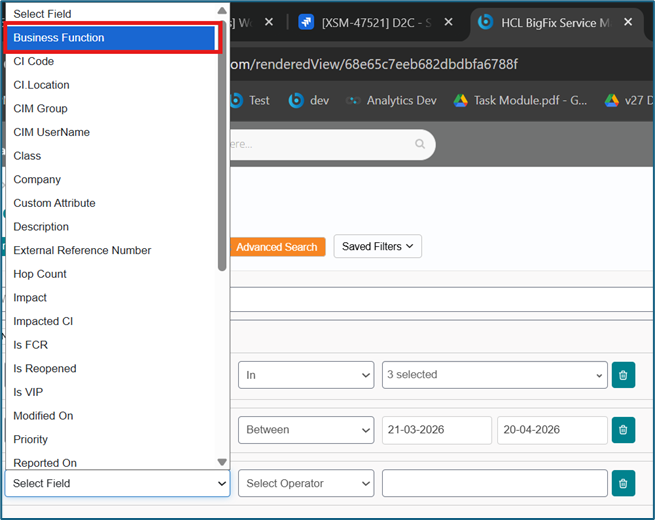
Rules Engine Updates (Important for Admins)
- BF is a Must-Have: When creating ANY system rule, Business Function is now a mandatory dimension.
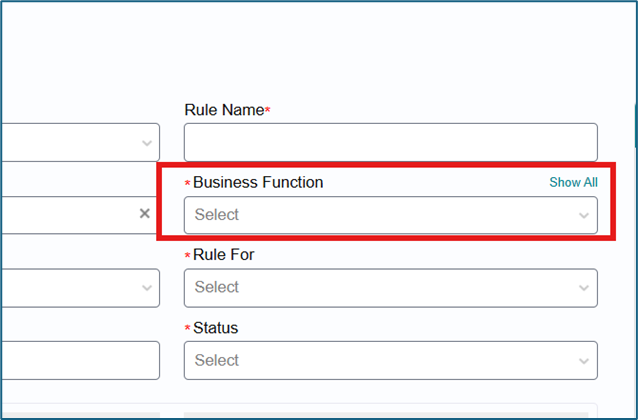
- Smarter Rules: Rule evaluation now looks at both the Company and the Business Function of the record.
- Backward Compatible: If the old records don't have the Business Function , the system still runs the rules the old way—so everything keeps working!
- There is no need to introduce the Business function as an attribute in the Rule condition builder since the evaluation is already based on the business function selected in the record .
- Assignment Rules: The support Groups list is filtered based on the selected Business function and the Support company selected in the Rules records. There is no provision to see all Groups.
- All the data evaluated in the Rules is done based on the Business function.
Task-Specific Details
- Task Templates & Plans: Business Function is also mandatory here.
- It's filtered by the Company and the logged-in user's associated Business Functions
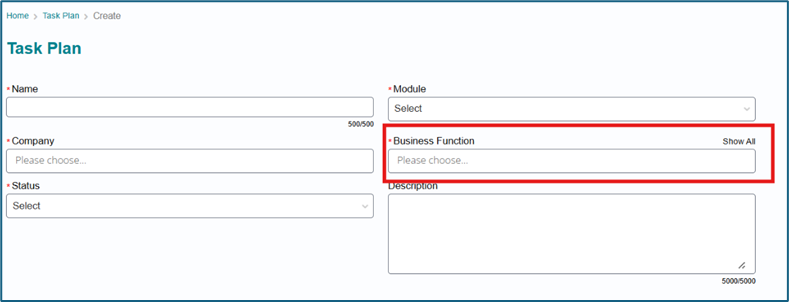
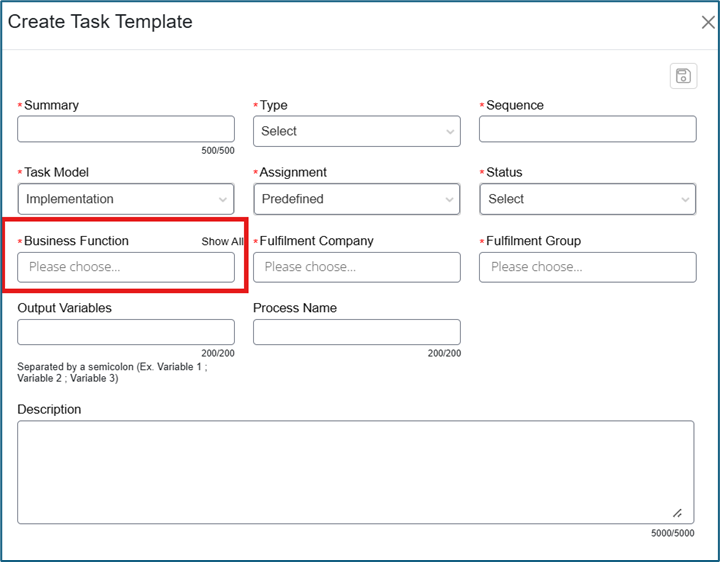
- Flows Down: The Business Function chosen on a Task Template automatically flows to the default tasks created from it.
- Adhoc Tasks:
- It defaults to the Business Function of the parent record.
- BUT, you can still edit it to choose a different one if needed.
- Edit Task: Once a task is created, the Business Function field is displayed but is read-only.
Assignment groups visible basis selected Business function:
- Incident Create and Edit : The Users can see two toggle options to choose the correct business function . By default the groups visible are the basis of the associated Business function of the record . Users can click on the “Show AMS Groups” toggle to select from the AMS groups


- Fulfillment Edit: The Users can see two toggle options to choose the correct business function. By default, the groups visible are on the basis of the associated Business function of the record . Users can click on the “Show AMS Groups” toggle to select from the AMS groups

- Task Edit: The Users can see two toggle options to choose the correct business function . By default, the groups visible are the basis of the associated Business function of the record . Users can click on the “Show AMS Groups” toggle to select from the AMS groups

Adhoc Task: The default groups visible on the Task page are the associated groups w.r.t the selected Business function on the ad hoc task form.
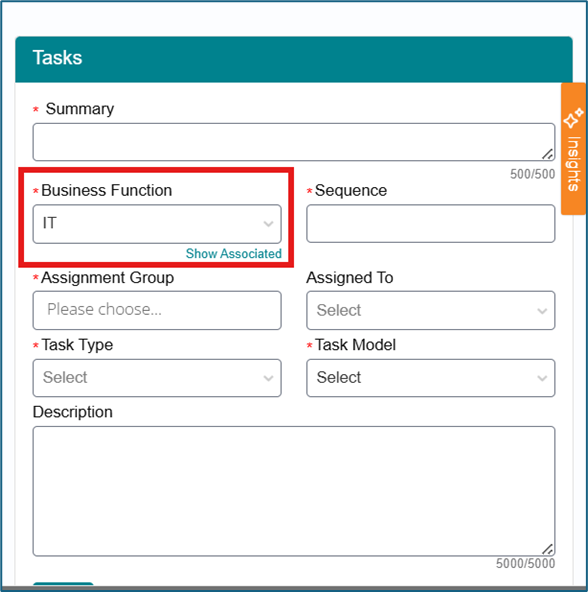
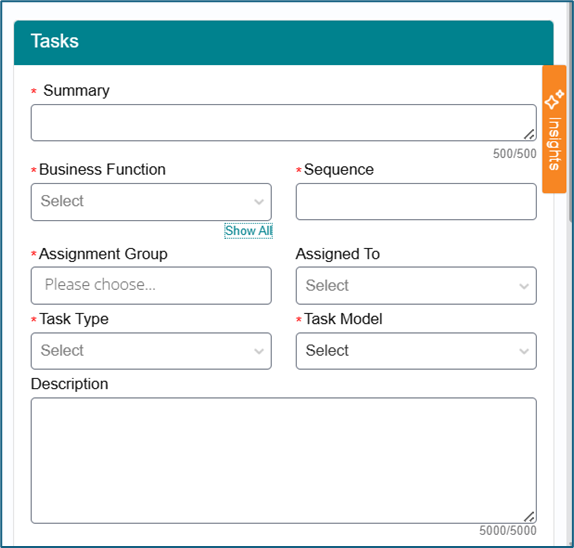
- Contextual Assignment: The contextual assignment rules are returned basis the selected business function on the form (service offering / task template)
Default data update
All records have been updated with Business function = IT