
Problem Management
RCA and Attachments on Problem Approval Page
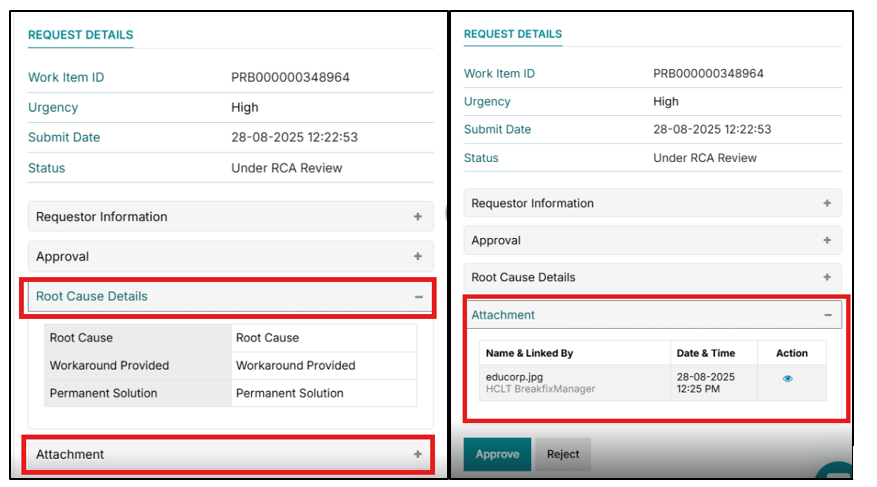
This enhancement adds dedicated RCA and Attachments accordions to the Problem Approval page so approvers can review full root cause details and supporting files without leaving their approval workspace.
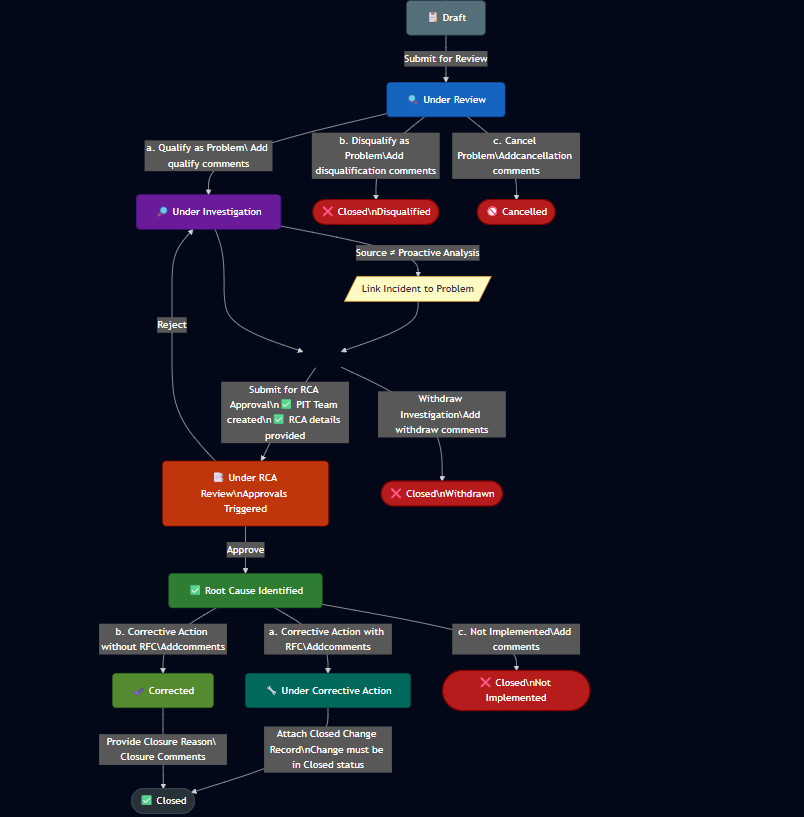
In the enhanced Problem Management flow with approvals, a problem moves from Draft to Under Review, can then be qualified or disqualified, and once in Under Investigation must have a PIT team and RCA details defined before the support user selects Submit for RCA Approval, which moves the ticket to Under RCA Review and triggers approvals.
Approvers can then either Approve the RCA (moving the problem to Root Cause Identified) or Reject it (returning the ticket to Under Investigation), after which corrective actions with or without RFC are taken and the problem is ultimately moved through Under Corrective Action, Corrected, and Closed as per the configured flow.
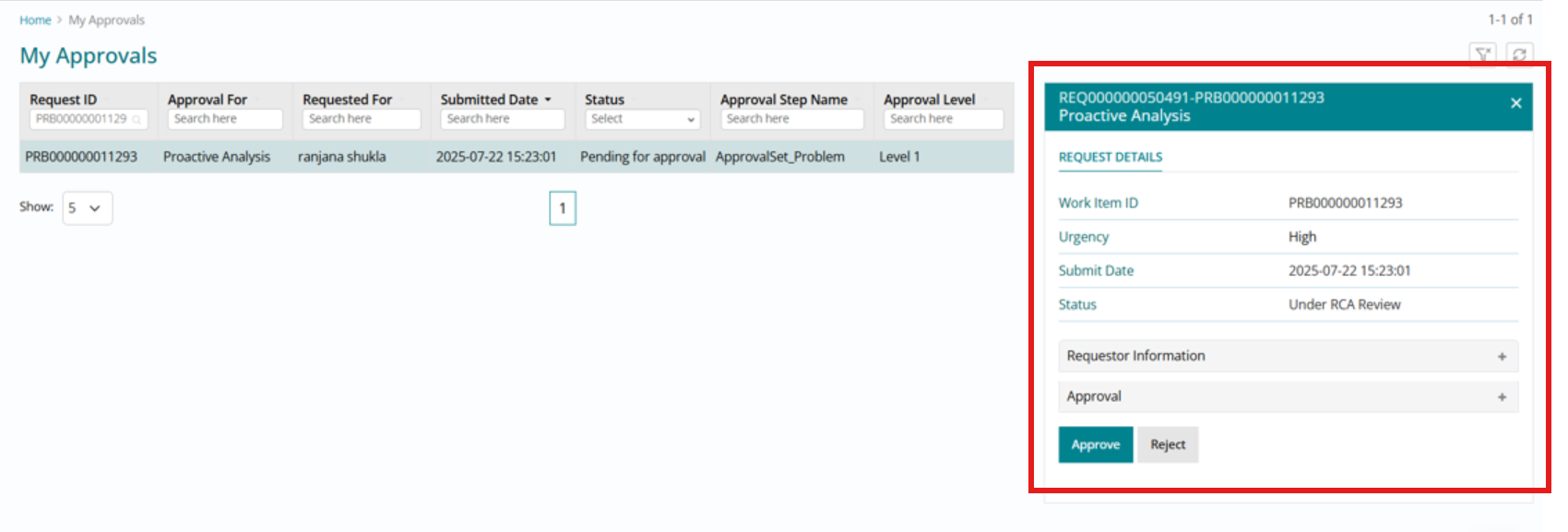
On the My Approvals page, problem tickets now appear with enriched detail in the right-hand panel, where approvers can expand the new RCA and Attachments sections for each problem awaiting their decision.
This gives approvers direct access to the documented root cause, investigation notes, and all attached evidence (logs, diagrams, reports, etc.) while reviewing the approval request, helping them make faster, better-informed approve/reject decisions and reducing back-and-forth with support teams.
Auto create Problem on P1/ P2 Incident Resolution
The functional and process design for enabling automatic creation of Problem tickets upon resolution of high-priority incidents (P1/P2) in BigFix Service Management.
Customers prefer not to create Problem tickets manually during or after resolving high-priority incidents. Automating this process reduces manual effort, improves consistency, and ensures major incidents are routed into Problem Management more reliably while addressing the below pain points for Support persona.
- Manual Problem creation after fixing high-priority incidents.
- Risk of forgetting to create a Problem after resolution.
- Inconsistent behavior across different resolution channels.
Because this behavior may not suit every customer equally, the feature is controlled through a company-level admin setting
Support Experience
When the Support user resolves a qualifying P1 or P2 incident and saves it in Fixed status, the system should automatically create a Problem ticket if the company configuration allows it.
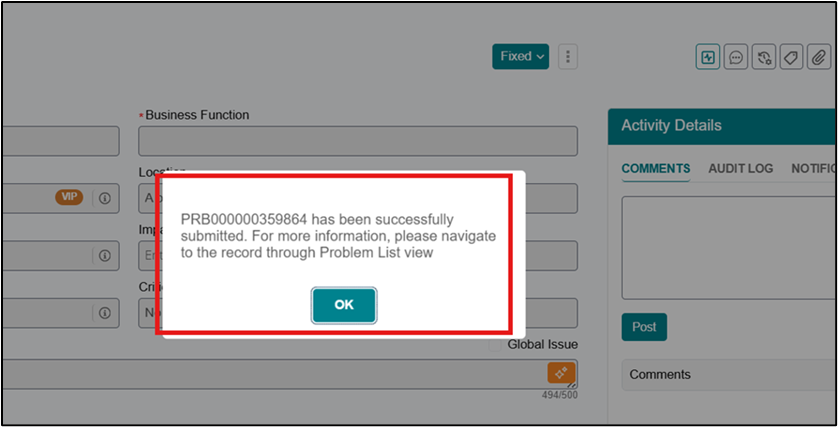
The user should see the same existing Problem creation message on save, and the Incident comments should show that the related Problem was auto-created from the Incident.
The created Problem must appear in the Related WI section of the Incident record using relationship type Caused by, and the Problem record must show the reverse relationship Causes.
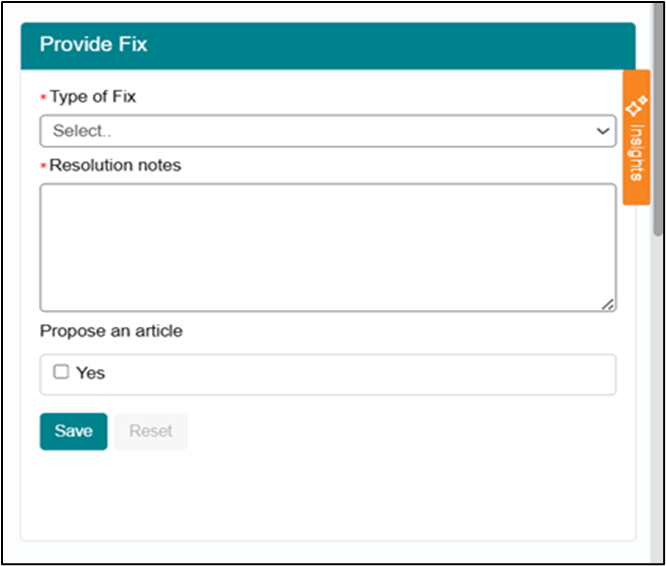
If company-level auto-creation is enabled for the applicable criteria, the manual field Do you want to Create a Problem – Yes/No in the Fix section should be hidden or disabled.
This prevents duplicate user decisions and makes the Support workflow cleaner and more consistent.
Admin Configuration Behavior
The admin persona manages company-level settings and controls how incident and problem automation behaves for the organization.
For this feature, the admin needs a configurable property that determines whether Problem tickets are auto created and under what conditions the automation should apply.
Created a new admin setting in Incident configuration.
- Name: Auto-create problem ticket
- Description: Auto-create a Problem on incident resolution for the specified priority when a chosen “Type of Fix” value is selected; if no value is set, a Problem is created every time.
- Default value:{ "Enable": "False", "Incident Priority": ["P1", "P2"], "Type of Fix": []}

The property should support the following configuration models:
- All Priority incidents
- Only selected priorities such as P1 and P2
- All Type of Fix values
- Only selected Type of Fix values
If Enable = False, the automation remains off.
If Enable = True and the incident matches the configured Incident Priority and Type of Fix rules, the Problem ticket must be auto-created.
If Type of Fix is blank, the auto-creation must apply for all Type of Fix values.
Process Flow
- Incident is resolved with status Fixed
- System checks admin configuration:
- Auto-create enabled
- Priority match (P1/P2 or configured values)
- Type of Fix match (if specified)
- If criteria met:
- System automatically creates a Problem ticket
- Fields are inherited from Incident
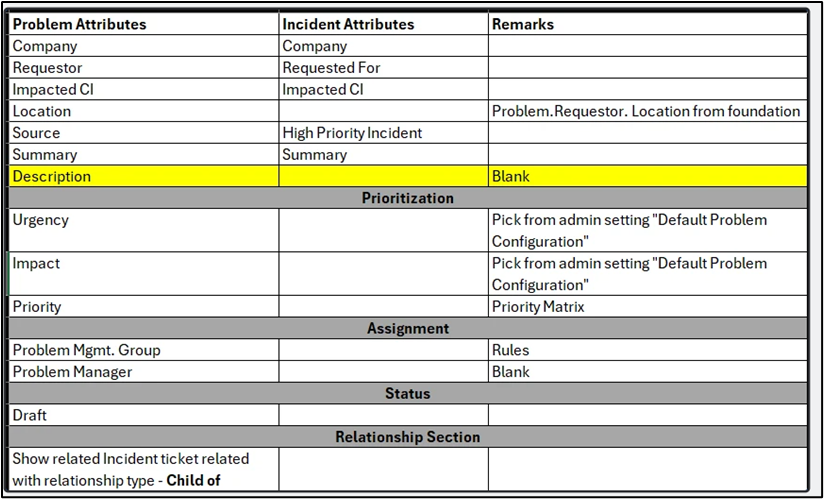
- Source field populated based on priority . For P1 and P2 Incident-based Problem creation, the Source field on the Problem must be High Priority Incidents. For other priority values, the Source field should remain Recurring Incidents
- For service-based incidents, the Impacted CI (mandatory for Problem records) should be retrieved from SPCM. The Problem created from the incident should automatically use the CI associated with the corresponding Offering.
- Displays auto-creation message
- Relationships created:
- Incident → Problem: Caused by
- Problem → Incident: Causes
- System updates Incident:
- Displays auto-creation message
- Adds comment with Problem reference
- Displays Problem in Related Work Items
- Displays auto-creation message
- UI Behavior:
- Manual Problem creation field is hidden/disabled
- Process applies to:
- UI-based resolution
- eBonding-based resolution