Request Fulfillment
Historical Request Identification
Requestors and support users can now identify duplicate tickets in open status already raised for the same issue or request, reducing redundant ticket creation and improving support efficiency by surfacing related historical requests during ticket submission.
Service Catalog Implementation
When a requestor orders any request from the Service Catalog page and selects a user in the Requesting For field, the system automatically looks up all open tickets previously ordered by the same Requestor (Requested For) for the same Service (Offering) and displays them in the Previously requested records section.
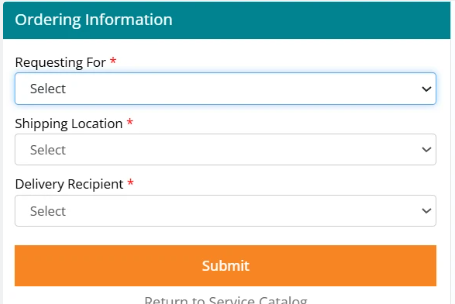
This functionality applies only to offerings of type Incident and Fulfillment. For Fulfillment records, all tickets not in terminal status (Closed, Cancelled, Fulfilled, Rejected) are displayed as Previously Requested Records. For Incidents, all tickets not in terminal status (Closed, Cancelled, Fixed) are displayed.
Previously Requested Records are displayed in chronological order with the latest submitted record at the top, enabling users to quickly review the most recent related activity.
In cart functionality scenarios, duplicate tickets are fetched for the same Requestor across all Service Offerings being ordered via the cart, providing comprehensive visibility into all pending requests.
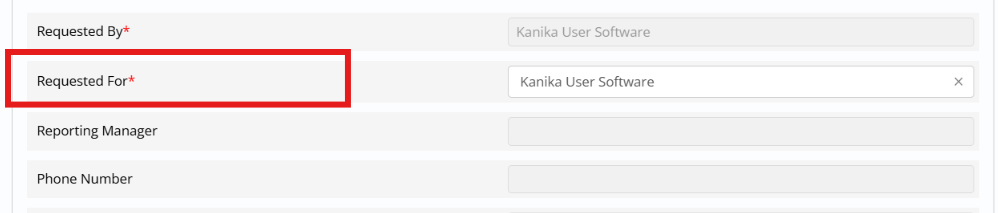
This behavior also applies when the Requested For information is captured as a Smart Form question. However, this feature works only for Smart Forms; native offering forms do not support this capability.
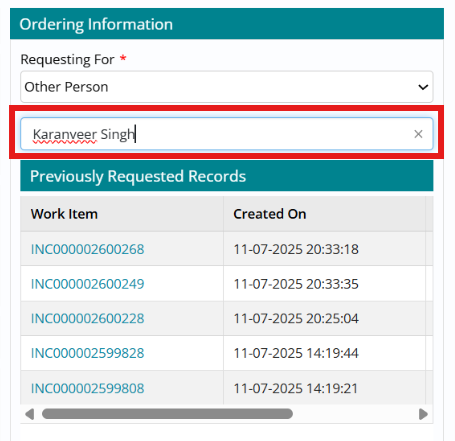
Work Item Board Implementation
This feature is also enabled on the Work Item Board for support users in the Incident module. When users create a new Incident record and complete the Company and Requested For user details, the "Previously Requested Records" tab is displayed in the right panel.
Support users can view all previous records (both Incidents and Fulfillment) for the Requested For user that remain in open status, providing complete context about the user's active service requests.
For other modules (Incident, Change, Fulfillment, and Problem), Previously Requested Records are visible on the Edit page by clicking the Historical Records icon in the right panel, ensuring support users have access to comprehensive historical context when working tickets.
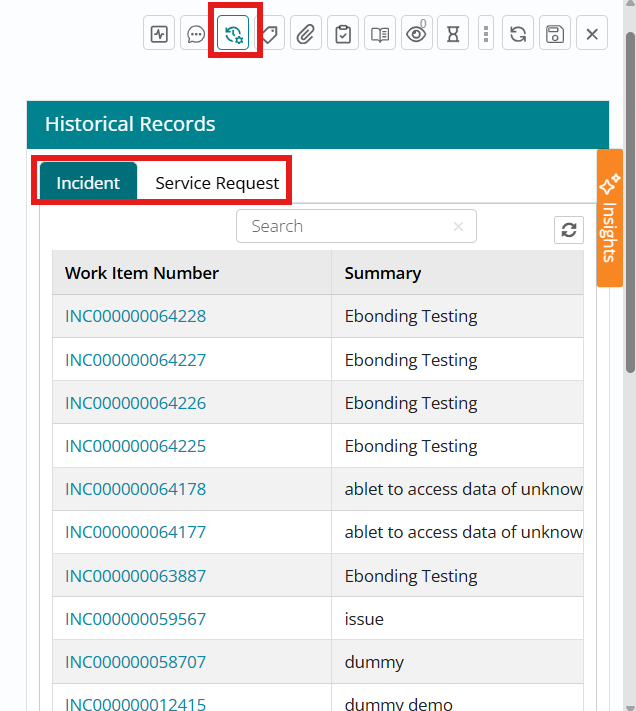
Records are displayed in chronological order from latest to oldest based on Created Date, prioritizing the most recent and potentially most relevant historical information.
The benefits this enhancement brings: Prevents duplicate ticket creation for the same issue, reduces support workload by eliminating redundant investigations, improves first-contact resolution through visibility into previous attempts, enhances user experience by surfacing related historical context, supports accurate impact assessment by identifying recurring issues, enables proactive identification of systemic problems through duplicate detection, and facilitates knowledge transfer by connecting support users with previous resolution attempts.
Priority Enablement for Service Request Fulfillment
Priority functionality in the Fulfillment module that enables priority-based handling of Service Requests (SR). The feature introduces Impact and Urgency fields that can be configured on Service Request smart forms, allowing consumers to specify these values during request submission. The system automatically calculates Priority based on Impact and Urgency using a configurable priority matrix from Foundation, enabling better prioritization and resource allocation for fulfillment activities.
Enhancements in different Microservices:
SPCM
Impact and Urgency can be added (as non-mandatory fields) to SR smart forms in SPCM, with UI builder pulling valid values from Foundation; consumers may select Impact/Urgency at submission time or leave them blank, in which case defaults from Foundation are applied.

D2C:
Priority is then auto-calculated in D2C using a configurable priority matrix maintained in Foundation, improving resource allocation, SLA adherence, consistent decision-making, and visibility of critical requests in Fulfillment lists.

Configuration is completed in Foundation. Admins can use the postCompany_menulist API to add or adjust Impact, Urgency, and Priority values for the Fulfillment module, defining how specific Impact–Urgency combinations map to Priority levels. The end-to-end data flow is: consumer submits an SR with or without Impact/Urgency; SPCM passes these (or null) to D2C; D2C persists Impact/Urgency (or fetches defaults from Foundation), calculates Priority via the matrix, displays all three fields in Fulfillment, allows fulfillers to update Impact/Urgency within allowed statuses, and logs all changes in the audit trail.

Summary Information Added to All Fulfillment Notifications
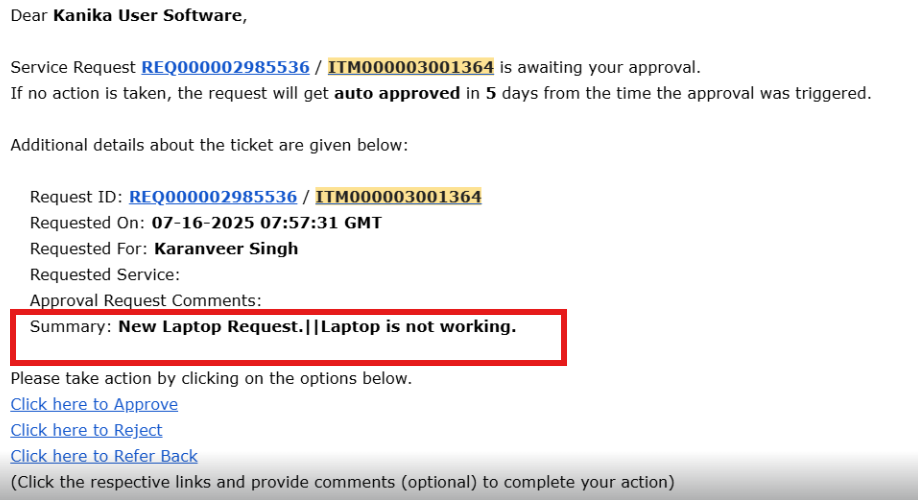
Introduced a new Summary template variable in all fulfillment-related email notifications, ensuring key request details are clearly surfaced to recipients. For each offering, the questions that should appear in the email summary can be marked with the Include in Summary checkbox; when selected, their responses are automatically rendered in the email against the Summary label, giving approvers, fulfillers, and requestors a concise view of the most important information.
The Summary attribute has been added to the following Fulfillment module email templates: Order Submission, Approved, Rejected, Referred Back, Under Fulfillment, On Hold, Assigned to Individual, Assigned to Group, Item Activity (New Comment), Fulfilled, Cancelled, Closed, Reopened, On Behalf Of, Reminder, Auto Rejected, Item with Survey, Approval Pending – Submit with Link, Approval Pending – Submit, Reminder for Pending Approval, and Reminder for Pending Approval – Submit with Link.
This ensures that from initial submission through approvals, fulfillment, reminders, and closure, all stakeholders see a consistent Summary section that reflects the key inputs captured on the fulfillment request form.