SLA Management
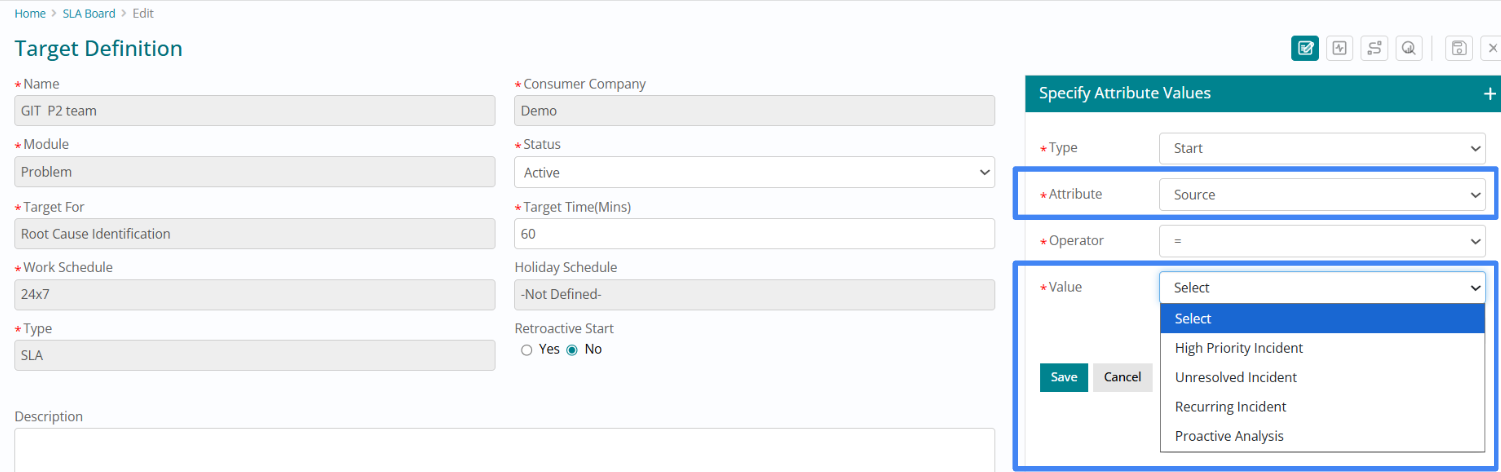
'Source' Attribute for Problem SLAs
The 'Source' field is now available as a configuration attribute for Problem SLAs, enabling organizations to define distinct service level commitments based on the origin or detection method of the problem record.
Different problem sources often warrant different SLA commitments:
Proactive Problems: Detected through monitoring tools may have longer resolution timeframes since they haven't yet impacted users
Reactive Problems: Identified after user impact typically require more aggressive response and resolution commitments
Vendor-Reported Problems: Issues escalated from vendors may have different SLA requirements aligned with contractual obligations
Administrators can now create multiple SLA Target Definitions for the Problem module, each with different response and resolution targets based on the Source field value.
'Assignee' as SLA Configuration Attribute
The 'Assignee' field has been introduced as a configuration attribute for Incident, Problem, Fulfillment, and Task SLAs. Additionally, a new 'is not empty' operator is available for this attribute, enabling sophisticated business logic around assignment-based SLA tracking.
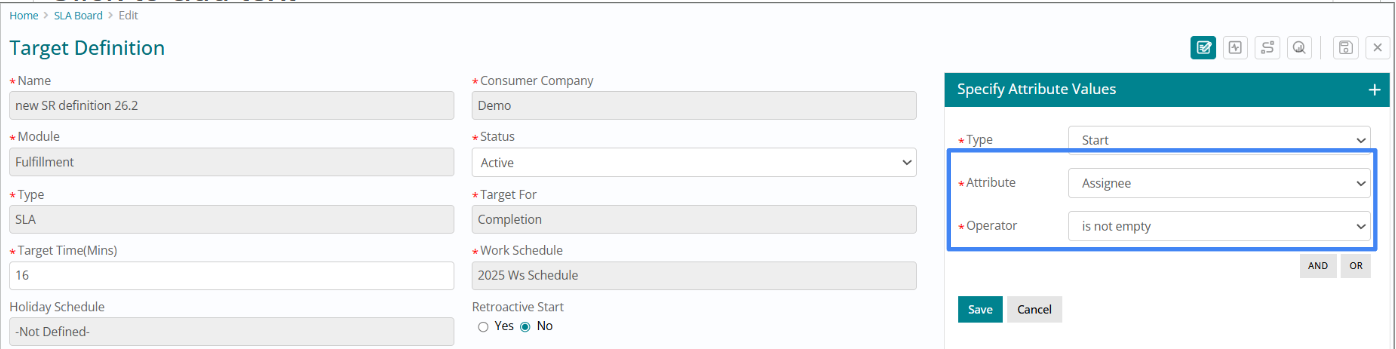
Many organizations distinguish between "acknowledgment" of a ticket and active "response" to a ticket. The new 'is not empty' operator enables tracking Response SLAs only after a ticket has been actively assigned to an agent or group, rather than from the moment of ticket creation.
Example Configuration:
- Acknowledgment SLA: Starts at ticket creation, measures time until first status change or assignment
- Response SLA: Configured with condition "Assignee is not empty," starts only after assignment
This enhancement aligns SLA measurement with real-world workflows where initial triage or routing is handled by automated systems, and the "response clock" should only start when a resolver actively begins working the ticket.
This functionality is available for Incident, Problem, Fulfillment, and Task modules.
Multi-event SLA with Flexible Work Schedule Windows
Work Schedules now support multiple time windows within a single day, enabling accurate modeling of complex shift patterns, split schedules, and lunch hour exclusions that reflect real-world operational hours.
Administrators can define discontinuous operating hours for any day of the week. For example:
- Split Shift: Saturday: 10:00 AM - 1:00 PM and 2:00 PM - 6:00 PM
- Lunch Exclusion: Monday-Friday: 9:00 AM - 12:00 PM and 1:00 PM - 5:00 PM (excluding lunch hour)
- Extended Coverage with Breaks: 24-hour operations with scheduled maintenance windows excluded
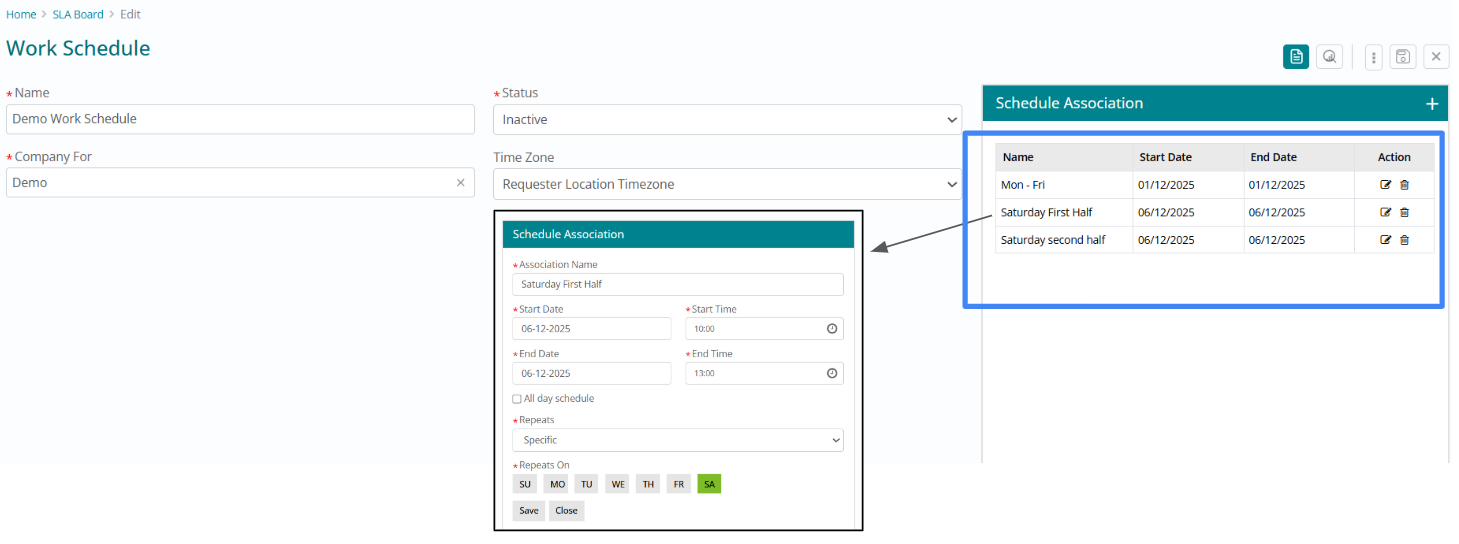
This enhancement ensures SLA elapsed time calculations accurately reflect when support resources are actually available, preventing misleading metrics.
Organizations with follow-the-sun support models or multiple regional support centers can now model each region's unique operating hours with precision. Each day of the week can have its own set of time windows, and different work schedules can be defined for different support teams, services, or customer segments.
Default 'Inactive' Status on SLA Target Definition
To ensure better control during configuration, new SLA Target Definitions are now created in an ‘Inactive’ state by default.
This prevents unintended activation during setup. Administrators must first save the definition before manually changing its status to ‘Active’.
.png)
Configurable Threshold % for SLA Milestone
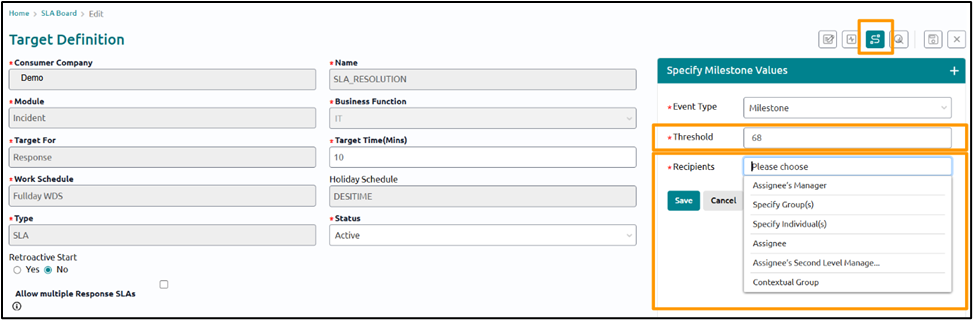
SLA managers can now configure custom threshold percentages (0–100%) for milestone event notifications. This provides greater flexibility in tracking SLA progress. Additionally, the thresholds will remain editable even after a milestone record has been saved.
Updates to Recipient List
The notification Recipient List for Breach and Milestone events has been updated with clearer naming conventions and a new management level option:
- Assignee Manager → Renamed to Assignee's Manager
- Specify Individual → Renamed to Specify Individual(s)
- Assignee Individual → Renamed to Assignee
- Select Group → Renamed to Specify Group(s)
- Contextual Group → As it is
- Assignee's Second Level Manager → Newly added
Admin Setting for Max Allowed Milestone Event per Company
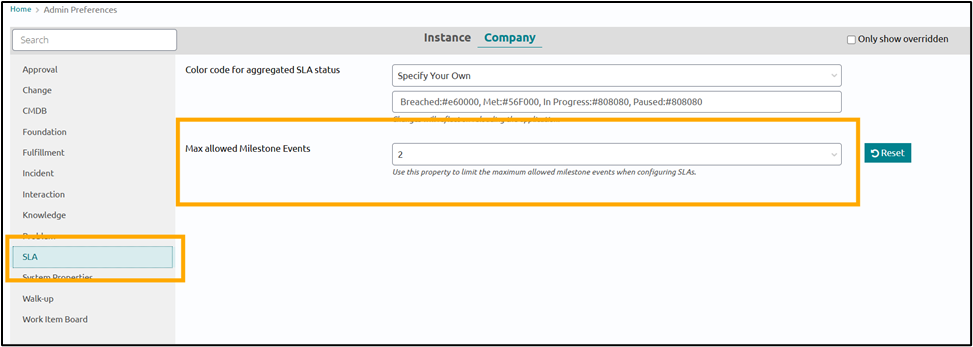
To maintain system performance with the new flexible thresholds, a new admin setting, "Max Allowed Milestone Events," has been introduced. Admins can restrict the number of milestone events per SLA to a value between 0 and 5.
SLA Managers will not be allowed to create milestone events more than the specified limit.
Additonal Attributes to Configure SLAs
New attributes are now available for fine-tuning SLA conditions across various modules:
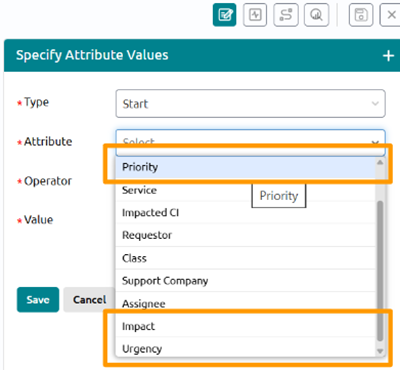
- Urgency & Impact: Added to Incident, Problem, and Fulfillment modules.
- Priority: Now available for the Fulfillment module.
- IsVIP: Now available for the Incident module.