

Configure BES Explorer
Use this step to configure the BES Explorer instance for secure communication with the BigFix UI application.
About this task
Procedure
-
After completing MTLS Certificate Configuration, click
Next button to open the BES Explorer
Configurations screen.
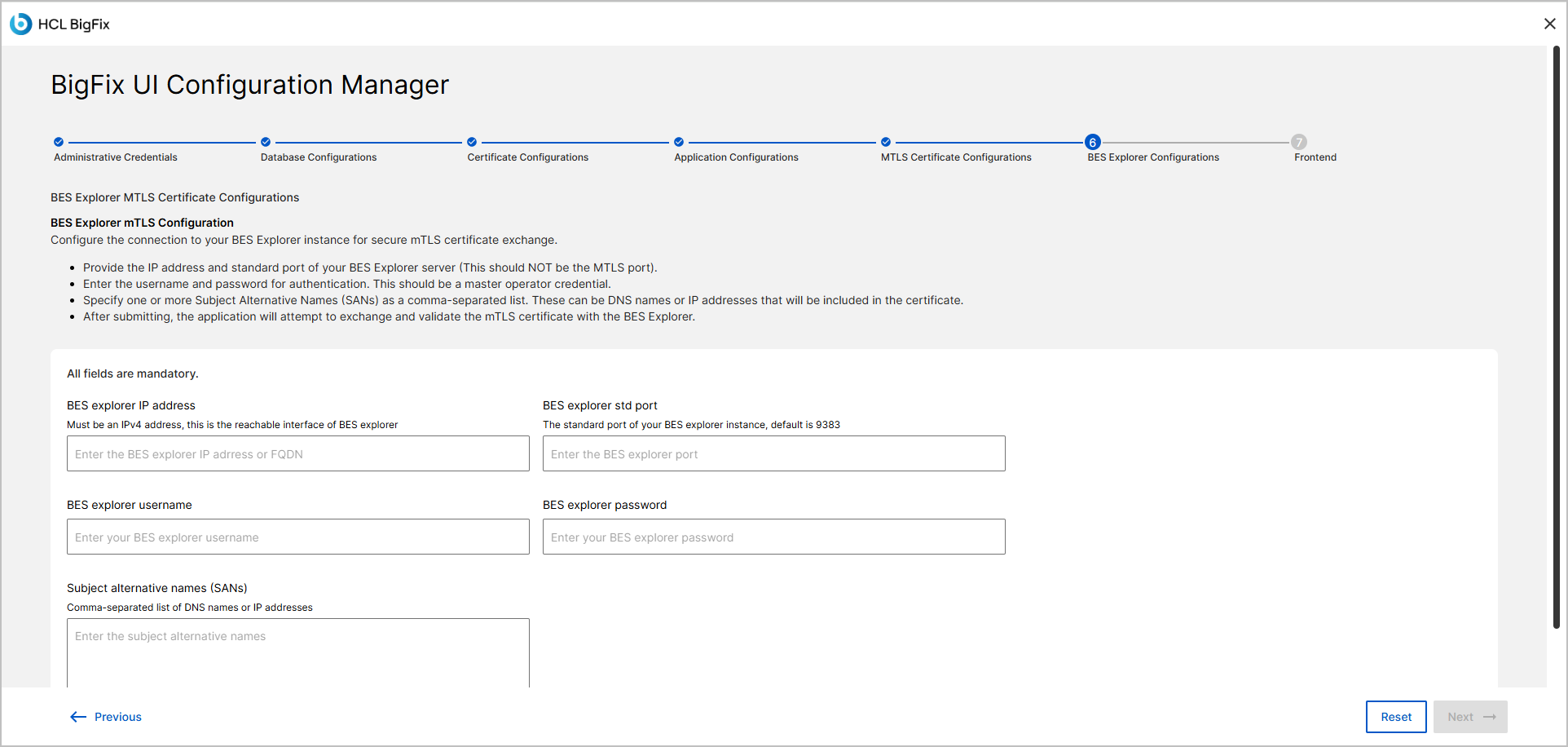
- In the BES Explorer IP address field, enter the resolvable IP address or FQDN of the BES Explorer instance.
-
In the BES Explorer std port field, specify the port
number for the BES Explorer instance.
The default port is 9383.
Note:This port is the default port used for the initial certificate exchange between BigFix and BES Explorer. After the certificate exchange is complete, communication with the BES Explorer uses port 9387.
If a custom port is specified for the initial certificate exchange, the port used for subsequent communication is the custom port + 4.
- In the BES Explorer username field, type the username that refers to username and password of bigfix console operator.
- In the BES Explorer password field, type the associated password that refers to username and password of bigfix console operator.
-
In the Subject alternative names (SANs) field, enter one
or more DNS names or IP addresses.
- Separate multiple values with commas.
- Verify all values, then click Next to proceed to the Frontend Deployment step.