Affichage des informations de TVA sur les pages d'affichage des articles de commande
Exemple
Le calcul de la TVA se fait déjà du côté du serveur. Cet exemple montre quelles informations de TVA peuvent être récupérées à partir du serveur. Vous pouvez mettre à jour votre propre JSP pour afficher les informations dont vous avez besoin.
Une personnalisation typique est fournie.
- Personnalisation d'OrderCalculateCmd
Si VATPromotionEngineOrderCalculateCmdImpl est utilisé comme implémentation de OrderCalculateCmd après l'activation du modèle de TVA, vous pouvez écrire un nouveau com.ext.commerce.order.commands.ExtVATPromotionEngineOrderCalculateCmdImpl qui étend à partir de VATPromotionEngineOrderCalculateCmdImpl.
Si VATOrderCalculateCmdImpl est utilisé comme implémentation de OrderCalculateCmd après l'activation du modèle de TVA, vous pouvez écrire un nouveau com.ext.commerce.order.commands.ExtVATOrderCalculateCmdImpl qui étend à partir de VATOrderCalculateCmdImpl.
L'exemple ci-dessous utilise VATPromotionEngineOrderCalculateCmdImpl. La personnalisation pour les deux implémentations est la même.
Écrivez un ExtVATPromotionEngineOrderCalculateCmdImpl qui étend PromotionEngineOrderCalculateCmdImpl, remplacez la méthode performExecute() pour lire les informations de taxe de la propriété personnalisée de la commande de calcul dans ORDERITEMS.field2.
                   /**	 Main logic **/
public void performExecute() throws ECException
   final String strMethod = "performExecute";
        ECTrace.entry(       ECTraceIdentifiers.COMPONENT_ORDER,
                CLASS_NAME,
                strMethod);
        // call super's main logic first to get the custom property populated

		     super.performExecute();

        // get the hash map which saves each order item's tax information from custom property
        // using key->'itemTaxInfo' (ITEM_TAX_INFO = ‘itemTaxInfo'). The key in this hasp map is each
        // order item's id. The value is an object called ItemTaxInfo. You can go to ItemTaxInfo's
        // API to get the APIs you need.


        HashMap hshItemTaxInfo = getCustomProperties()==null? null:
        (HashMap)getCustomProperties().get(ITEM_TAX_INFO);
        if(hshItemTaxInfo == null) { return; }
        try {
          OrderItemAccessBean[] abOrderItems = getOrderItems(getOrders()[0]);
           for(int i=0; i<abOrderItems.length; i++) {
               ItemTaxInfo iti =
(ItemTaxInfo)hshItemTaxInfo.get(abOrderItems[i].getOrderItemIdInEJBType());
               if(iti == null) { continue;}

        // In order to make the codes simple, here we suppose there is only one product tax category
        // defined for one single catalog entry, one shipping tax category defined for the shipping
        // charge. This should reflect most customers situations.

               Integer[] taxCategoryIds = iti.getAppliedTaxCategories();

        // First product tax rate, and shipping tax rate-->ORDERITEMS.FIELD2

                BigDecimal taxRate = null;
                String taxCategoryName = null;
                BigDecimal shippingTaxRate = null;
                String shippingTaxCategoryName = null;
                for(int j=0; j<taxCategoryIds.length; j++) {
                    TaxCategoryAccessBean abTaxcgry = new TaxCategoryAccessBean();

                abTaxcgry.setInitKey_nCategoryId(taxCategoryIds[j].toString());
           			   abTaxcgry.refreshCopyHelper();

       // Get the tax rate from ItemTaxInfo object.

	if(abTaxcgry.getTypeIdInEJBType().compareTo(CalculationConstants.USAGE_SALES_TAX)==0)
                  {
                  if(taxRate == null) {
                     taxRate = iti.getTaxRateForCategory(taxCategoryIds[j]);
                     taxCategoryName = abTaxcgry.getName();
                  }
             }
             else if
 (abTaxcgry.getTypeIdInEJBType().compareTo(CalculationConstants.USAGE_SHIPPING_TAX)==0)
                 {
                 if (shippingTaxRate == null) {
                     shippingTaxRate = iti.getTaxRateForCategory(taxCategoryIds[j]);
                     shippingTaxCategoryName = abTaxcgry.getName();
                 }
             }
          }
				// String strTaxRate = (taxRate==null?new String("0"):taxRate.toString());

       // Compose the tax rate information into a string object.
       // You can define your own string structure to save the tax rates.
       // Here we have one tax rate for sales tax, one for shipping tax.
       // We define the structure as: taxName1, taxRate1,taxName2,taxRate2,
       // then we can use ‘,' to get each value.

          String strTaxRate = new String("");
          if(taxCategoryName!=null) {
              strTaxRate += taxCategoryName;
          }
          strTaxRate += ",";
          strTaxRate += (taxRate==null?new String("0"):taxRate.toString());
          strTaxRate += ",";
          if(shippingTaxCategoryName!=null) {
              strTaxRate += shippingTaxCategoryName;
          }
          strTaxRate += ",";
          strTaxRate += (shippingTaxRate==null?new String("0"):shippingTaxRate.toString());
          strTaxRate += ",";

          // set the string info ORDERITEMS.field2.
          abOrderItems[i].setField2(strTaxRate);
                 abOrderItems[i].commitCopyHelper();
              }
          }
          catch (CreateException e) {
             throw new ECSystemException(ECMessage._ERR_CREATE_EXCEPTION, CLASS_NAME, strMethod,
                   new Object[] { e.toString()}, e);
        } catch (FinderException e) {
             throw new ECSystemException(ECMessage._ERR_FINDER_EXCEPTION, CLASS_NAME, strMethod,
                   new Object[] { e.toString()}, e);
        } catch (NamingException e) {
             throw new ECSystemException(ECMessage._ERR_NAMING_EXCEPTION, CLASS_NAME, strMethod,
                   new Object[] { e.toString()}, e);
        } catch (RemoteException e) {
             throw new ECSystemException(ECMessage._ERR_REMOTE_EXCEPTION, CLASS_NAME, strMethod,
                   new Object[] { e.toString()}, e);
               }
}
Vous devrez mettre à jour la table CMDREG à l'aide de l'instruction SQL suivante pour enregistrer cette nouvelle implémentation.
update cmdreg set CLASSNAME='com.ext.commerce.order.commands.ExtVATPromotionEngineOrderCalculateCmdImpl' where interfacename = 'com.ibm.commerce.order.commands.OrderCalculateCmd' and storeent_id=@customer's store id - Personnalisation des actifs de service Order SOI
Deux commandes doivent être étendues afin que les détails de l'article de commande et les pages récapitulatives affichent les informations de TVA. Les deux commandes sont les suivantes : com.ibm.commerce.order.facade.server.commands.ComposeOrderDetailsCmdImpl et com.ibm.commerce.order.facade.server.commands.ComposeOrderSummaryCmdImpl
L'exemple ci-dessous utilise ComposeOrderDetailsCmdImpl. La personnalisation des deux commandes est la même.
Écrivez un nouveau com.ibm.commerce.order.facade.server.commands.ExtComposeOrderDetailsCmdImpl qui prolonge ComposeOrderDetailsCmdImpl.
Remplacez la méthode composeOrderItemCharges :
//This method sets the tax rate into user data for each order item.
protected OrderItemChargesType composeOrderItemCharges(String orderItemId)
       throws ECException {
   final String strMethodName = "composePaymentInstruction";
   if (LoggingHelper.isEntryExitTraceEnabled(LOGGER)) {
       LOGGER.entering(CLASSNAME, strMethodName);
   }

   // Get the OrderItemChargesType from super class.

   OrderItemChargesType oiCharge = super.composeOrderItemCharges(orderItemId);
   try {
       OrderItemAccessBean abOrderItem = new OrderItemAccessBean();
       abOrderItem.setInitKey_orderItemId(orderItemId);
       abOrderItem.refreshCopyHelper();

   // Get the tax rate info from ORDERITEMS.field2

       String taxInfo = abOrderItem.getField2();

  // retrieve the tax rates according to the field2's structure.

       if(taxInfo!=null) {
       StringTokenizer st = new StringTokenizer(taxInfo, ",");
          String taxName = (String)st.nextElement();
          String taxRate = (String)st.nextElement();
          String shippingTaxName = (String)st.nextElement();
          String shippingTaxRate = (String)st.nextElement();

   // Set the tax rate information into user data. You can specify the keys themselves.
   // These values are used in JSP to display VAT information.

         UserDataType userData = CommerceFoundationFactory.eINSTANCE.createUserDataType();
         userData.getUserDataField().put("taxName", taxName);
         userData.getUserDataField().put("taxRate", taxRate);
         userData.getUserDataField().put("shippingTaxName", shippingTaxName);
         userData.getUserDataField().put("shippingTaxRate", shippingTaxRate);

         oiCharge.setUserData(userData);
       }
     }
			catch (CreateException e) {
        throw new ECSystemException(ECMessage._ERR_CREATE_EXCEPTION, getClass().getName(),
                  strMethodName,new Object[] { e.toString() }, e);
   } catch (FinderException e) {
        throw new ECSystemException(ECMessage._ERR_FINDER_EXCEPTION, getClass().getName(),
                  strMethodName,new Object[] { e.toString() }, e);
   } catch (NamingException e) {
        throw new ECSystemException(ECMessage._ERR_NAMING_EXCEPTION, getClass().getName(),
                  strMethodName,new Object[] { e.toString() }, e);
   } catch (RemoteException e) {
        throw new ECSystemException(ECMessage._ERR_REMOTE_EXCEPTION, getClass().getName(),
                  strMethodName,new Object[] { e.toString() }, e);
   } catch (Exception e) {
      if (LoggingHelper.isTraceEnabled(LOGGER)) {
          LOGGER.logp(LoggingHelper.DEFAULT_TRACE_LOG_LEVEL, CLASSNAME, strMethodName, e.toString());
      }
        throw new ECApplicationException(ECMessage._ERR_GENERIC, getClass().getName(),strMethodName,
                  new Object[] { e.getMessage() });
          }

      return oiCharge;
}
Remplacer la méthode composeTaxByTaxCategory
// This method adds the tax rate to tax category's name for display usage. An example to demonstrate
// how to get the order level tax rate.

protected TaxByTaxCategoryType composeTaxByTaxCategory(OrderTaxAccessBean aabOrderTax, String astrCurrency)
          throws ECException {final String strMethodName = "composeTaxByTaxCategory";
          if (LoggingHelper.isEntryExitTraceEnabled(LOGGER)) {
              LOGGER.entering(CLASSNAME, strMethodName);
          }

   // Get the TaxByTaxCategoryType from super class.

          TaxByTaxCategoryType taxByTaxCategory =
          super.composeTaxByTaxCategory(aabOrderTax,astrCurrency);

          try {String taxCategoryName = taxByTaxCategory.getTaxCategoryCode();
          OrderItemAccessBean[] abOrderItems = getOrderItems(aabOrderTax.getOrdersIdInEJBType());

   // One tax category has one corresponding rate corresponding at one time therefore we retrieve
   // the rate from ORDERITEMS.field2 using the tax category name.

          for(int i=0;i<abOrderItems.length; i++) {
            String taxInfo = abOrderItems[i].getField2();
               if(taxInfo!=null) {
               StringTokenizer st = new StringTokenizer(taxInfo, ",");
               String taxName = (String)st.nextElement();
               String taxRate = (String)st.nextElement();
               String shippingTaxName = (String)st.nextElement();
               String shippingTaxRate = (String)st.nextElement();

               if(taxName.equals(taxCategoryName)) {
               taxCategoryName += " ";
               taxCategoryName += taxRate;
               taxCategoryName += "%";
               break;
               }
               else if(shippingTaxName.equals(taxCategoryName)) {
               taxCategoryName += " ";
               taxCategoryName += shippingTaxRate;
               taxCategoryName += "%";
               break;
               }
               }

        }

        taxByTaxCategory.setTaxCategoryCode(taxCategoryName);

        } catch (CreateException e) {
            throw new ECSystemException(ECMessage._ERR_CREATE_EXCEPTION, getClass().getName(),
                      strMethodName,new Object[] { e.toString() }, e);
        } catch (FinderException e) {
            throw new ECSystemException(ECMessage._ERR_FINDER_EXCEPTION, getClass().getName(),
                      strMethodName,new Object[] { e.toString() }, e);
        } catch (NamingException e) {
            throw new ECSystemException(ECMessage._ERR_NAMING_EXCEPTION, getClass().getName(),
                      strMethodName,new Object[] { e.toString() }, e);
        } catch (RemoteException e) {
            throw new ECSystemException(ECMessage._ERR_REMOTE_EXCEPTION, getClass().getName(),
                      strMethodName,new Object[] { e.toString() }, e);
        }

        if (LoggingHelper.isEntryExitTraceEnabled(LOGGER)) {
            LOGGER.exiting( CLASSNAME, strMethodName, taxByTaxCategory);
        }

        return taxByTaxCategory;

}
La méthode gerOrderItems est définie pour la méthode ci-dessus.
/**
     * Returns the OrderItems of the specified Order.
     * <br>
     * @param aabOrder the Order.
     * @return the OrderItems.
     * @exception ECException
     */
    protected OrderItemAccessBean[] getOrderItems(Long nOrderId)
        throws ECException {
        final String strMethodName = "getOrderItems";
        try {
        OrderAccessBean abOrder = new OrderAccessBean();
        abOrder.setInitKey_orderId(nOrderId.toString());
        abOrder.refreshCopyHelper();
           return abOrder.getOrderItems();
        } catch (CreateException e) {
            throw new ECSystemException(ECMessage._ERR_CREATE_EXCEPTION, getClass().getName(),
                    strMethodName,new Object[] { e.toString() }, e);
        } catch (FinderException e) {
            throw new ECSystemException(ECMessage._ERR_FINDER_EXCEPTION, getClass().getName(),
                    strMethodName,new Object[] { e.toString() }, e);
        } catch (NamingException e) {
            throw new ECSystemException(ECMessage._ERR_NAMING_EXCEPTION, getClass().getName(),
                    strMethodName,new Object[] { e.toString() }, e);
        } catch (RemoteException e) {
            throw new ECSystemException(ECMessage._ERR_REMOTE_EXCEPTION, getClass().getName(),
                    strMethodName,new Object[] { e.toString() }, e);
        }
    }
Vous devrez mettre à jour la table CMDREG à l'aide de l'instruction SQL suivante pour enregistrer cette nouvelle implémentation.
update cmdreg set
CLASSNAME='com.ext.commerce.order.facade.server.commands.ExtComposeOrderDetailsCmdImpl' where
interfacename = 'com.ibm.commerce.order.facade.server.commands.ComposeOrderCmd+IBM_Details' and
storeent_id=@customer's store id
Vous devrez effectuer la même personnalisation pour com.ibm.commerce.order.facade.server.commands.ComposeOrderSummaryCmdImpl, puis mettre à jour la table CMDREG.
update cmdreg set CLASSNAME='com.ext.commerce.order.facade.server.commands.ExtComposeOrderSummaryCmdImpl' where interfacename = 'com.ibm.commerce.order.facade.server.commands.ComposeOrderCmd+IBM_Summary' and storeent_id=@customer's store id - Modification du JSP pour afficher les taux de taxe des pages de commande ou des pages d'articles de commandeVous devrez modifier chaque page d'article de commande ou de commande qui devrait afficher un taux de TVA. Les trois JSP suivants sont un exemple :
- /Stores/WebContent/Madisons/Snippets/Order/Cart/OrderItemDetail.jsp
- /Stores/WebContent/Madisons/ShoppingArea/CheckoutSection/SingleShipment/OrderItemDetails.jsp
- /Stores/WebContent/Madisons/ShoppingArea/CheckoutSection/SingleShipment/OrderItemDetailSummary.jsp
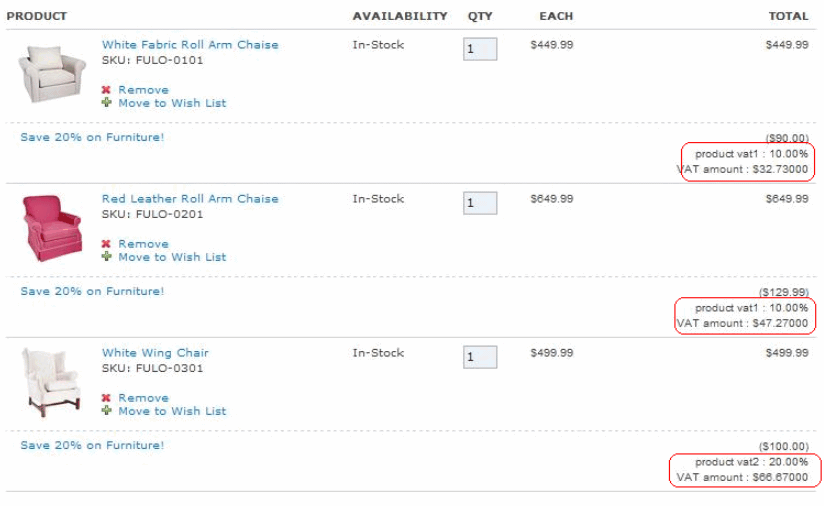
Ajoutez l'extrait suivant dans le JSP existant :
<c:out
value="${orderItem.orderItemAmount.userData.userDataField['taxName']}"/> : <c:out
value="${orderItem.orderItemAmount.userData.userDataField['taxRate']}"/>%
                         <br />
                         VAT amount : $<c:out
value="${orderItem.orderItemAmount.salesTax.value}"/>
Cela produira ce qui suit :
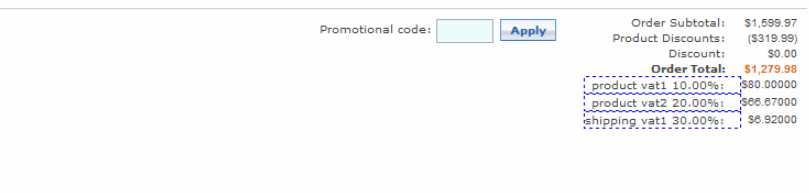
Modifier /Stores/WebContent/Madisons/ShoppingArea/CheckoutSection/SingleShipment/SingleShipmentOrderTotalsSummary.jsp pour afficher les informations sur le taux de TVA au niveau de la commande :
<c:forEach var="categoryTax"
items="${order.orderAmount.totalTaxByTaxCategory}">
			     <tr>
              <td style="border:1px dashed blue" class="total_details" id="WC_SingleShipmentOrderTotalsSummary_td_15"><c: out
value="${categoryTax.taxCategoryCode}" />:</td>
              <td class="total_figures" id="WC_SingleShipmentOrderTotalsSummary_td_16">$<c:out value="${categoryTax.value}" /> </td>
               </tr>
           </c:forEach>
Cela produira ce qui suit :
- Personnalisation d'OrderCalculateCmd