Uninstall WDAC Components from Target Endpoints
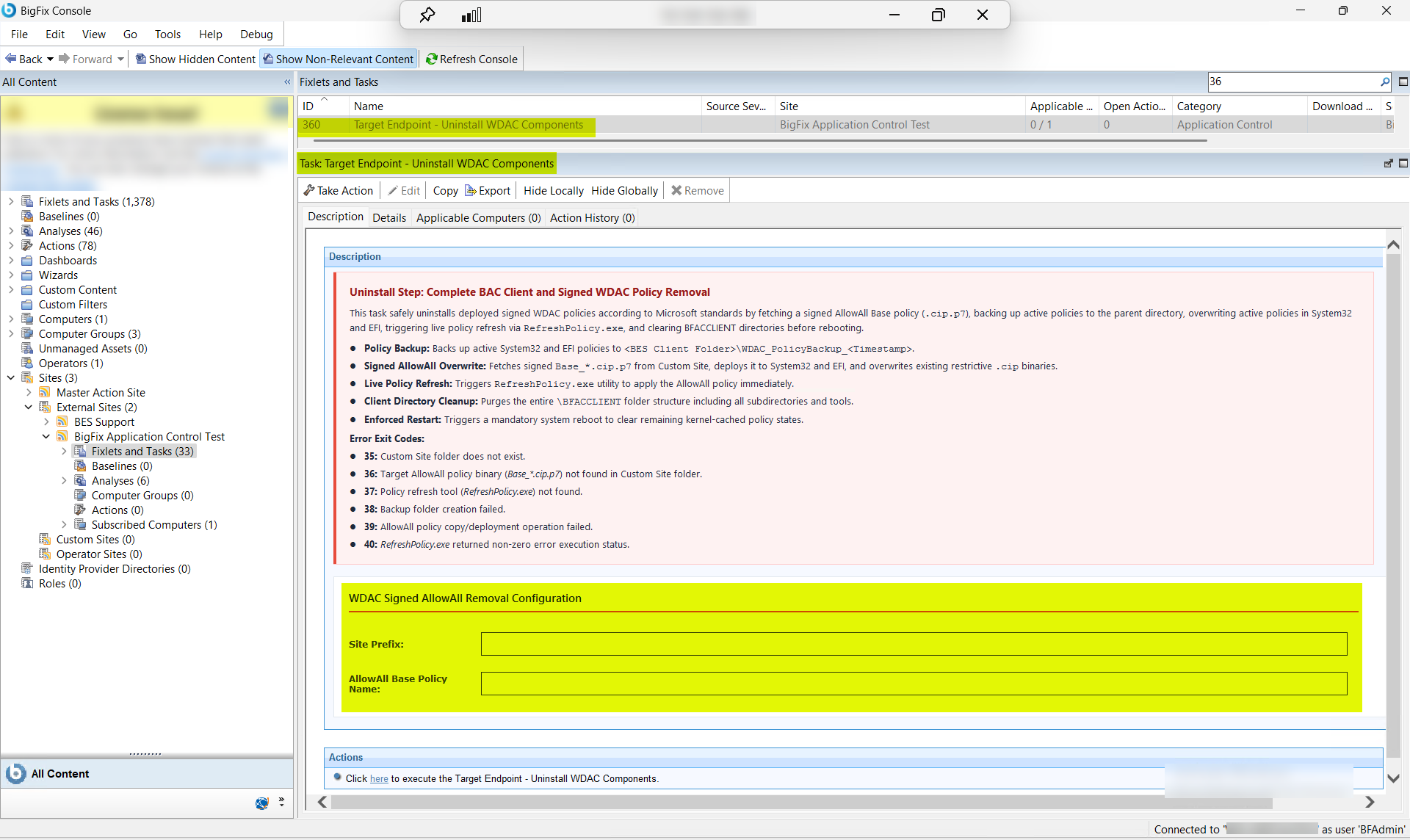
Remove all deployed signed WDAC policies from target endpoints following Microsoft legacy uninstall standards by fetching a signed AllowAll_*.cip.p7 policy from the BigFix Custom Site identified by Site Prefix, deploying it using the filename specified in AllowAll Policy Name to overwrite active restrictive policies in System32 and EFI partitions, triggering RefreshPolicy.exe to apply the permissive overwrite immediately, purging all binaries and tools from the \BFACCLIENT\BAC_CLIENT directory, and enforcing a mandatory system reboot to flush kernel-cached policy states.
About this task
- Policy Backup: Backs up active System32 and EFI policies to <BES Client Folder>\WDAC_PolicyBackup_<Timestamp>.
- Signed AllowAll Overwrite: Fetches signed AllowAll_*.cip.p7 from Custom Site, deploys it to System32 and EFI, and overwrites existing restrictive .cip binaries.
- Live Policy Refresh: Triggers RefreshPolicy.exe utility to apply the AllowAll policy immediately.
- Client Directory Cleanup: Purges binaries, tools, and folders from \BFACCLIENT\BAC_CLIENT.
- Enforced Restart: Triggers a mandatory system reboot to clear remaining kernel-cached policy states.
| Exit Code | Description |
|---|---|
| 35 | Custom Site folder does not exist. |
| 36 | Target AllowAll policy binary (Base_*.cip.p7) not found in Custom Site folder. |
| 37 | Policy refresh tool (RefreshPolicy.exe) not found. |
| 38 | Backup folder creation failed. |
| 39 | AllowAll policy copy/deployment operation failed. |
| 40 | RefreshPolicy.exe returned non-zero error execution status. |
Procedure
- In the BigFix® Console, navigate to .
- From the Fixlets and Tasks pane, select Task: Target Endpoint - Uninstall WDAC Components.
-
From the Task: Target Endpoint - Uninstall WDAC
Components pane, under WDAC Signed AllowAll Removal
Configuration, enter the following.
Figure 2. Target Endpoint WDAC Uninstall — Configuration Options: Site Prefix and AllowAll Policy Name 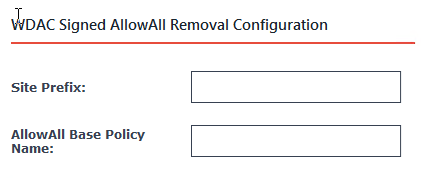
Table 2. Target Endpoint WDAC Uninstall — Configuration Options Field Descriptions Field Name Description Site Prefix The name prefix of the BigFix Custom Site hosting the signed AllowAll_*.cip.p7 policy file — the Custom Site from which the task fetches the AllowAll overwrite policy. This must match the Custom Site created during Task ID 353 (TPM signing certificate provisioning) and used to publish WDAC policies. The task uses this prefix to construct the download URL for the AllowAll policy file. AllowAll Policy Name The exact filename of the signed AllowAll policy file (in AllowAll_*.cip.p7 format) hosted on the Custom Site. This file was generated by the WDAC Management Node signing pipeline and published to the Custom Site for use in endpoint enforcement and uninstall procedures. The task fetches this file, deploys it to the \Windows\System32\CodeIntegrity\CiPolicies\Active directory and the EFI partition, and triggers RefreshPolicy.exe to apply it immediately. - From the Task: Target Endpoint - Uninstall WDAC Components pane, click the Applicable Computers(n) tab and view the endpoints on which you want to run the task.
- Select the Take Actions tab and select the endpoints on which you want to apply this task.
- Click OK.
Results
A successful execution of this task produces the following outcomes on each target endpoint:
- AllowAll policy deployed and active: The signed AllowAll_*.cip.p7 policy is fetched from the BigFix Custom Site, deployed to \Windows\System32\CodeIntegrity\CiPolicies\Active and the EFI partition, and the existing restrictive .cip policy binaries are overwritten. Application execution restrictions are immediately removed.
- Policy refresh applied immediately: RefreshPolicy.exe is triggered and the AllowAll policy is applied without waiting for the next Group Policy refresh cycle. All previously blocked applications are permitted to run on the endpoint.
- BAC_CLIENT directory purged: All BigFix Application Control client binaries, tools, and utilities are deleted from the \BFACCLIENT\BAC_CLIENT directory hierarchy. The BAC_CLIENT folder structure is removed from the endpoint.
- Mandatory system reboot triggered: The endpoint is restarted to flush any remaining kernel-cached WDAC policy states. After the reboot, no WDAC enforcement is active on the endpoint and all application execution restrictions are cleared.
- Endpoint fully decommissioned from WDAC enforcement: After the reboot, the target endpoint operates without any active WDAC policy. The endpoint is removed from the pool of WDAC-managed devices. To re-enroll, re-run Task ID 356 (Set Up and Initialize WDAC on Target Endpoints) followed by Task ID 357 (Deploy and Refresh WDAC Policies on Target Endpoints).