Configure and Install BigFix Application Control on the Root Server
Task ID 351 is the first required step in the BigFix Application Control deployment
sequence. It installs BACPolicyDeploymentServices.exe on the BigFix Root
Server — configuring Windows DPAPI credential encryption for the BigFix REST API, creating
the Deployed, Archive, and Review policy custom sites for the specified site prefix, and
starting the Background Watcher Publisher Windows Service that continuously watches for
incoming policy archives and publishes active policies to the custom sites.
About this task
- Credential Encryption: Securely stores BigFix REST API operator credentials using Windows DPAPI (machine scope).
- Custom Site Creation: Automates the creation of Deployed, Archive, and Review BigFix custom sites matching your specified site prefix.
- Background Watcher Publisher: Runs continuously as an auto-starting Windows Service to watch for incoming policy archives, version them, and publish active policy files to the custom sites.
Procedure
- In the BigFix Console, navigate to .
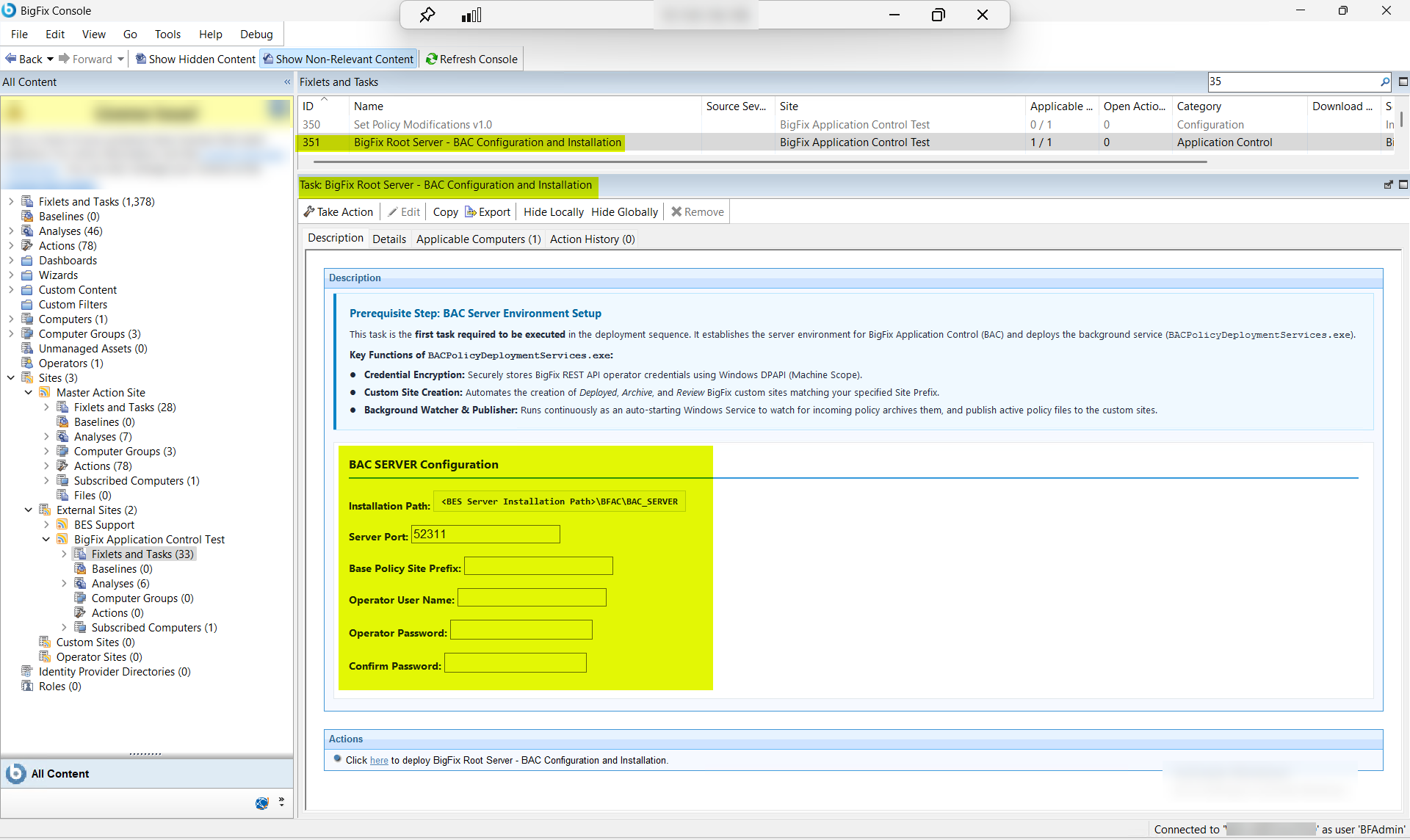
- From the Fixlets and Tasks pane, select Task: BigFix Root Server - BAC Configuration and Installation.
-
From the Task: BigFix Root Server - BAC Configuration and
Installation
Description tab, under BAC SERVER
Configuration, enter the following information:
Figure 2. BAC Server Configuration Fields — Root Server Installation Parameters 
Table 1. BAC Server Configuration: Root Server Installation Parameter Descriptions Field Name Description Installation Path The local file system path on the BigFix Root Server where BACPolicyDeploymentServices.exe and supporting components will be deployed (e.g., C:\Program Files\...\BAC or D:\Applications\BAC). Ensure adequate disk space and that the path exists or is writable by the executing account. Server Port The network port used by BACPolicyDeploymentServicesto connect to the BigFix® REST API on the Root Server. This must match the REST API port configured during BigFix Platform installation.Base Policy Site Prefix A user-defined namespace prefix for custom site names created during this installation. This prefix is prepended to generate site names: <prefix>_Deployed,<prefix>_Archive, and<prefix>_Review. This standardizes site naming across multi-environment deployments (e.g.,PROD_generatesPROD_Deployed,PROD_Archive,PROD_Review).Operator User Name The BigFix operator credentials (username) used to authenticate with the BigFix REST API. This account must hold sufficient console access to create custom sites and manage policy publication. The credentials will be securely encrypted using Windows DPAPI (machine scope) after installation. Operator Password The password associated with the BigFix operator account. This password is encrypted and stored securely for use by BACPolicyDeploymentServices during policy archive processing and custom site publication. Do not store this password elsewhere after task completion. Confirm Password Verification of the operator password to prevent entry errors. Both password fields must match exactly for the installation to proceed. - From the Task: BigFix Root Server - BAC Configuration and Installation pane, click the Applicable Computers(n) tab and view the endpoints on which you want to run the task.
- Select the Take Actions tab and select the endpoints on which you want to apply this installer task.
- Click OK.
Results
- BACPolicyDeploymentServices.exe is installed and configured at the specified path on the BigFix Root Server.
- The Background Watcher Publisher Windows Service is installed and set to auto-start on system boot.
- BigFix REST API operator credentials are securely encrypted using Windows DPAPI (machine scope) and stored for service use.
- Three custom BigFix sites are automatically created using the specified site
prefix:
<prefix>_Deployed,<prefix>_Archive, and<prefix>_Review. - The WDAC Deployment Service is ready to receive, version, and publish policy archives to the custom sites.
- The Root Server is now ready for the next deployment step (Task ID 352: Configure and Install the WDAC Management Node).