Uninstall BigFix Application Control Configuration from the Root Server
Uninstall the BigFix Application Control (BAC) Server component from the BigFix Enterprise Root Server by stopping and removing the BACPolicyDeploymentServices background Windows service, deleting the BAC_SERVER folder structure and associated executables, and purging DPAPI-encrypted operator credentials and config.properties files. Use the Target Path Removal field to specify the BAC_SERVER installation path.
About this task
The task performs the following uninstall activities:
- Service Termination: Stops and removes the continuous background service (BACPolicyDeploymentServices).
- Directory Cleanup: Purges the complete
BAC_SERVERfolder structure including all binaries, configurations, and logs. - Config & Credential Purge: Deletes stored DPAPI encrypted operator credentials and config.properties files.
Procedure
- In the BigFix® Console, navigate to .
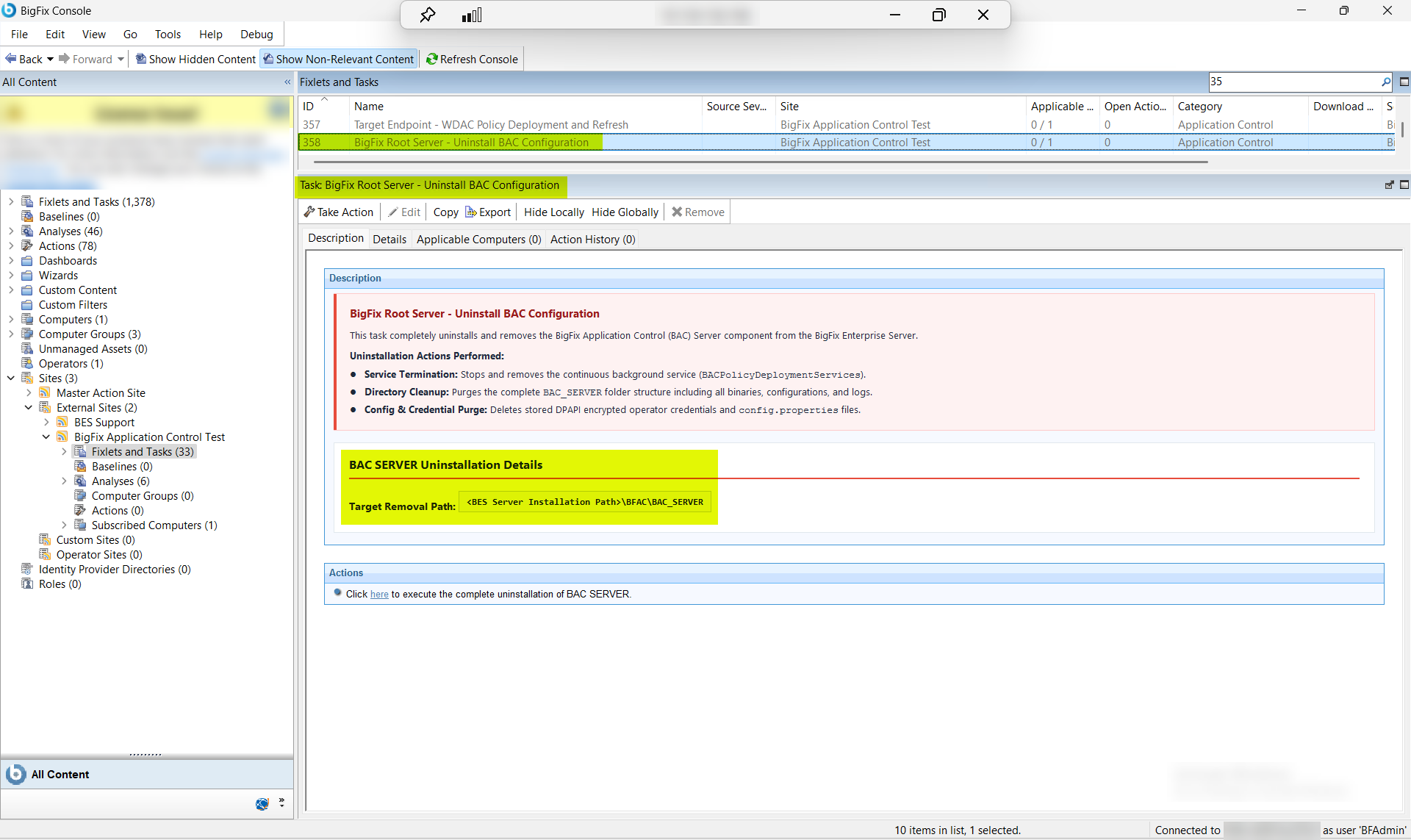
- From the Fixlets and Tasks pane, select Task: BigFix Root Server - Uninstall BAC Configuration.
-
From the Task: BigFix Root Server - Uninstall BAC
Configuration pane, under BAC SERVER Installation
Details, enter the following.
Figure 2. Root Server BAC Uninstall — Configuration Options: Target Path Removal and Cleanup Mode 
Table 1. Root Server BAC Uninstall — Configuration Options Field Descriptions Field Name Description Target Path Removal The full installation path of the BAC_SERVER folder on the BigFix Enterprise Root Server — the directory specified when Task ID 351 (Root Server BAC configuration) was installed. The task removes the BAC_SERVER folder structure, all executables, DPAPI-encrypted credential files, config.properties, and the BACPolicyDeploymentServices service from this location. Defaults to the standard BigFix Enterprise Server installation path if left blank. - From the Task: BigFix Root Server - Uninstall BAC Configuration pane, click the Applicable Computers(n) tab and view the endpoints on which you want to run the task.
- Select the Take Actions tab and select the endpoints on which you want to apply this installer task.
- Click OK.
Results
A successful execution of this task produces the following outcomes on the BigFix Enterprise Root Server:
- BACPolicyDeploymentServices stopped and removed: The continuous background Windows service (BACPolicyDeploymentServices) is stopped and unregistered from the Windows Service Control Manager. The service no longer runs on the Root Server and does not restart on reboot.
- BAC_SERVER folder structure removed: The complete BAC_SERVER directory — including all executables, binaries, and configuration files — is deleted from the path specified in Target Path Removal.
- DPAPI credentials and config.properties purged: All DPAPI-encrypted operator credentials and config.properties files stored by the BAC Server component are permanently deleted. These credentials cannot be recovered after this step — document any required operator credentials before running the task.
Warning:
This task permanently deletes DPAPI-encrypted
operator credentials. Ensure all required credentials are documented before running
this task. After completion, target endpoints remain in their last enforced WDAC
policy state until their BAC_CLIENT components are also removed via Uninstall
WDAC Components from Target Endpoints.