
License Report
This screen shows the information regarding Licensing of the product and CI usage
and entitlement
Note:
If the logged in user is super admin, then this
page shows the collective data of all organizations present in the environment. For all
other kinds of users, only their organization data will be visible.
- On the main menu bar, Click Configuration and then click License
Report.
Figure 1. License report 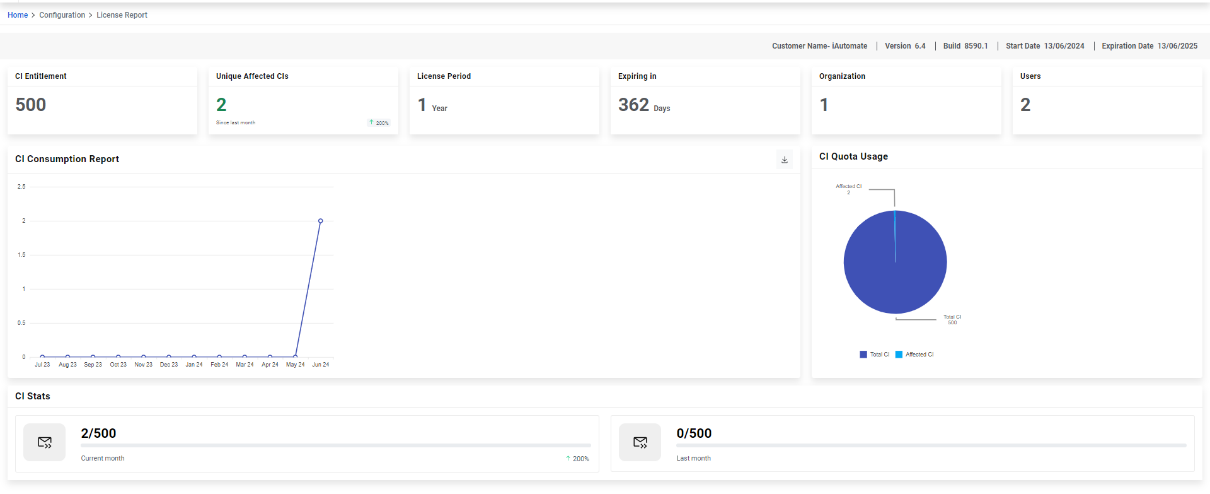
- The page when opened shows the below data:
- CI Entitlement: It displays the total CI count present in the system.
- Unique Affected CIs: It displays the no. Unique affected CIs in the system since last month.
- License Period: Shows the period for which the current license is valid.
- Expiring In: Shows the no. of days which is left for the license to expire.
- Organization: Shows the no. of organization present in the system (For Super Admin) and shows the no. of organizations mapped to the logged in user (For Org Admin)
- Users: Shows the no. of users present in the system (For Super Admin) and shows the no. Of users under the organizations mapped to the logged in user (For Org Admin)
- CI Consumption Report: It displays the graphical representation of the CIs consumed over the last one year. Users can download the CSV report for this graphical data.
- CI quota usage: It displays the % of CIs that have been utilized by the system among the total no. Of CIs present.
- CI Stats: Shows the no. Of CIs consumed in the current month out of the total CIs and the no. Of CIs consumed last month out of the total CIs.