
Setting up device maintenance window
The Device Maintenance Window feature enables administrators to schedule specific time frames for executing actions on devices, ensuring controlled and predictable deployments, updates, and remediations. It supports daily, weekly, and monthly schedules with configurable time zones and execution conditions, minimizing disruptions while allowing flexibility for urgent remediations when needed.
Key capabilities
-
Scheduled Execution: Define daily, weekly, or monthly maintenance windows based on client time, UTC, or a custom day to ensure actions run only within designated periods.
-
Time-Based Validation: Prevent actions from running outside the window unless explicitly configured, ensure accurate execution at the window’s start, and handle invalid time entries.
-
Flexible Execution: Allow scheduled actions to bypass the maintenance window when permitted and enable multiple actions to run simultaneously outside window constraints.
-
End-to-End Workflow Verification: Validate full remediation behavior with and without maintenance windows, ensuring correct execution in all scenarios.
-
Integration: Ensure proper application of maintenance window settings within Fixlet Explorer, Fixlet Streams , and CyberFocus Remediation workflows.
Accessing the maintenance window widget
-
Logging in
Log in to BigFix SaaS using your Admin credentials.
-
Go to the Device Explorer Section
- In the BigFix SaaS application, from the left pane expand Explore and select Device.
- Click the
 List button to view the devices in
list view.
List button to view the devices in
list view. - Select the devices that you want to target, the Set
maintenance windows button becomes active.
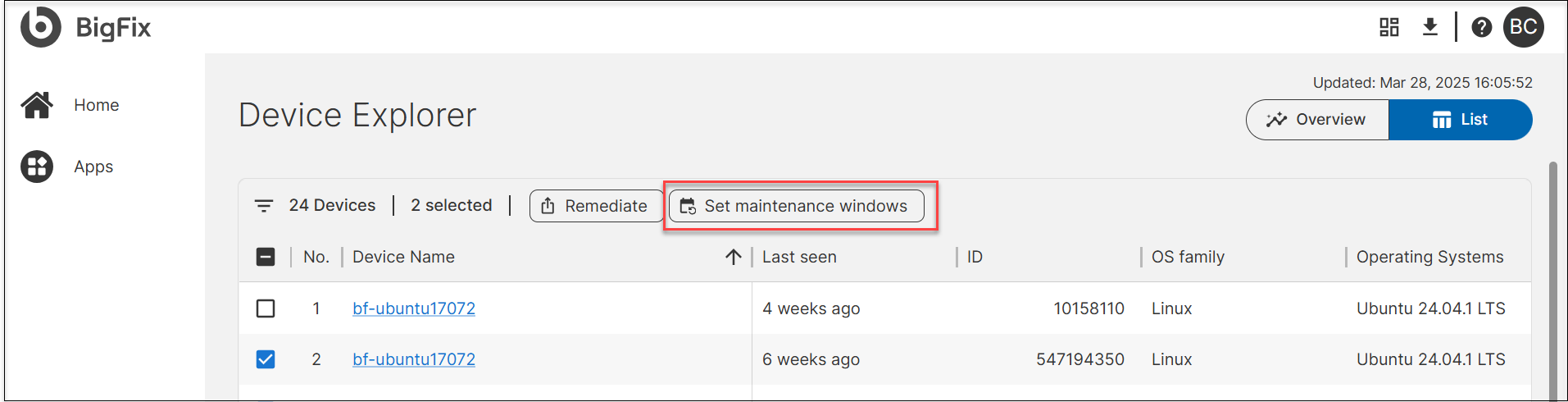
- Click on Set maintenance windows to open the widget.
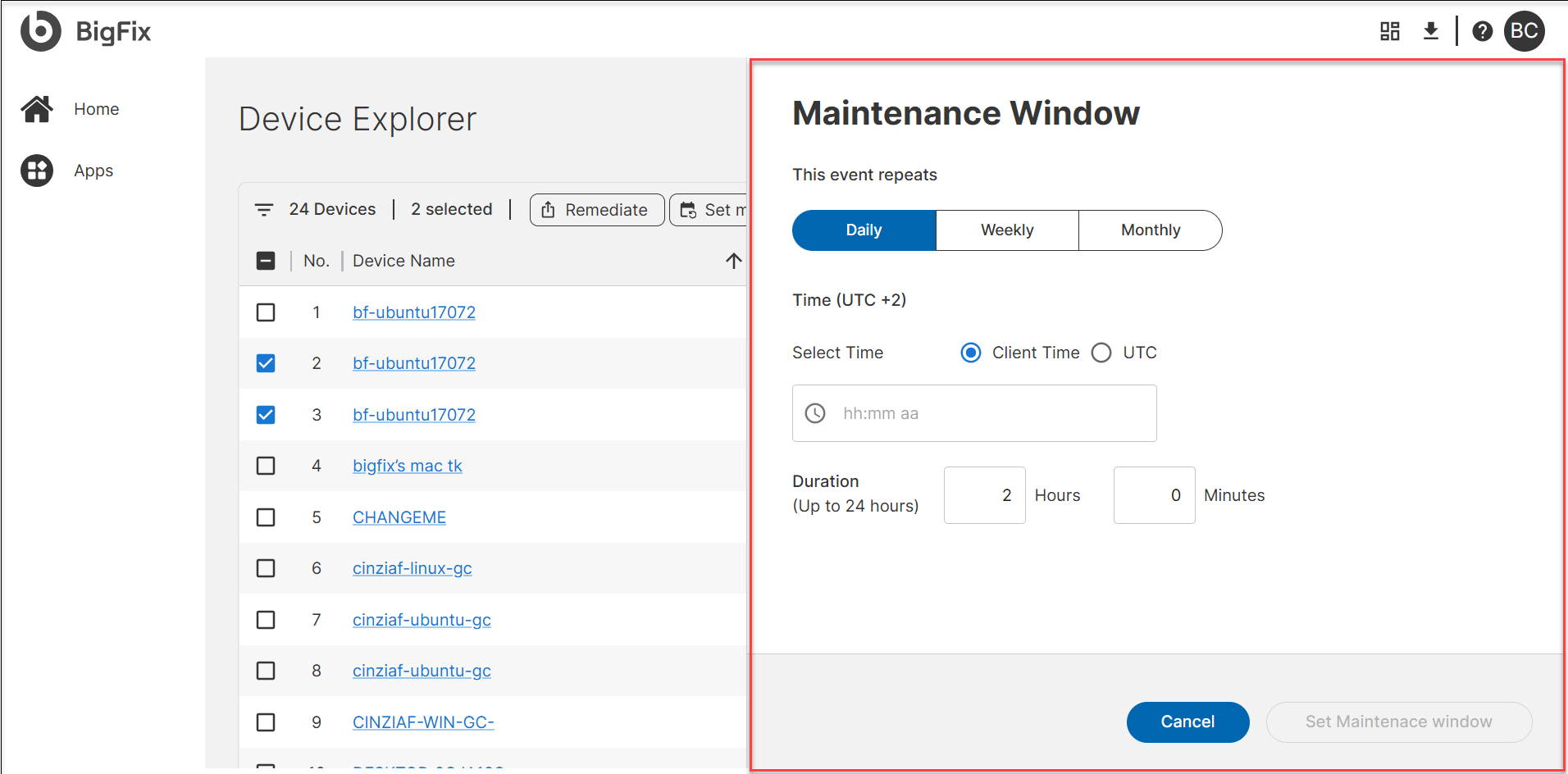
Setting up maintenance window
-
Define a Maintenance Window: Choose frequency (daily, weekly, or monthly) and configure time, duration, and interval as necessary.Tip:Click
 to set time.
 -
Click Set Maintenance Window. The maintenance window is successfully created.
-
Execution Handling:
-
Updates and remediations occur within the scheduled window.
-
If a failure occurs, it retries in the next available window.
-
-
Deployment Integration:
-
While deploying Fixlet Streams, select "Run during agent’s configured maintenance window".
-
Verify execution status within the Deployment Manager.
-
-
Monitor and Modify as Needed: Adjust schedules based on system needs.
Editing maintenance window
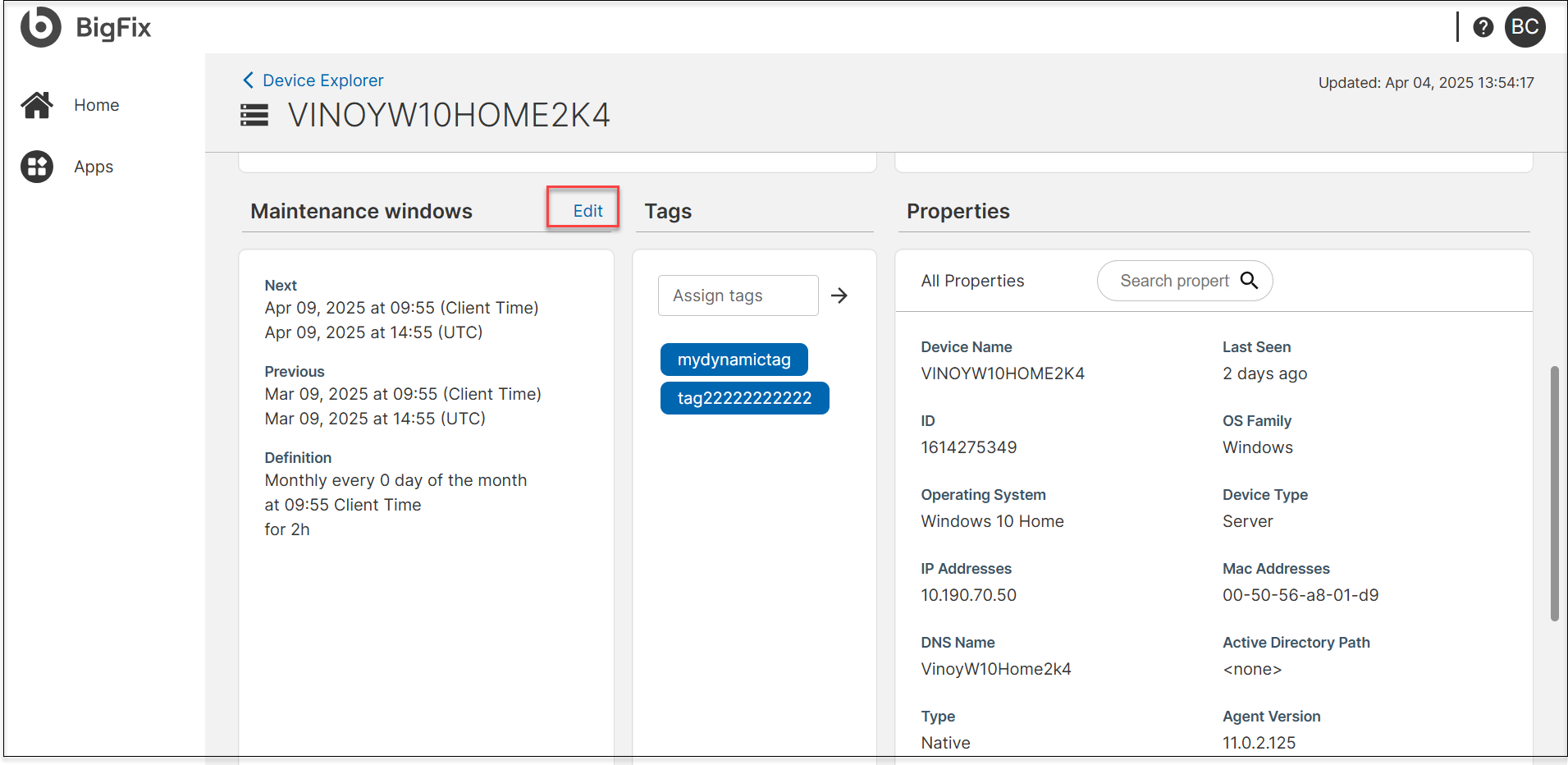
- From the list of devices in the Device Explorer, click on the device to which you want to edit the maintenance window.
- If a maintenance window was previously set, the Maintenance windows section
of the device details page displays the Edit button.
Click the Edit button and make the necessary changes, and click
Set maintenance window.
Integrations
-
Fixlet Streams: Configure Fixlet deployments to run only within maintenance windows.
-
CyberFOCUS Remediation: Align critical security updates within maintenance windows.
-
Deployment Manager: Monitor action execution and reschedule if needed.
- Fixlet Explorer Identify and schedule Fixlets to run within defined maintenance windows for controlled and compliant deployments.
Next steps
-
Monitor and adjust maintenance windows based on device availability and update requirements.
-
Explore integration with deployment workflows for better automation.
-
Refer to the detailed configuration guide for step-by-step instructions on defining maintenance windows.
Frequently Asked Questions
- 1. What happens if a device is powered off during a maintenance window?
- If the device is offline, the action will retry in the next available maintenance window as long as the action is still open.
- 2. Can I run actions outside the maintenance window?
- Yes, if the "Run during agent’s configured maintenance window" option is not selected, actions will execute immediately.
- 3. Can I configure different maintenance windows for different devices?
- Yes, you can apply maintenance windows to individual devices or groups of devices as needed.
- 4. What happens if an update fails during the maintenance window?
- The update will retry in the next scheduled maintenance window, provided the action is still open.
- 5. How long does it take for a new maintenance window to take effect?
- Once set, the maintenance window is applied after the server processes the action, which may take a few minutes.