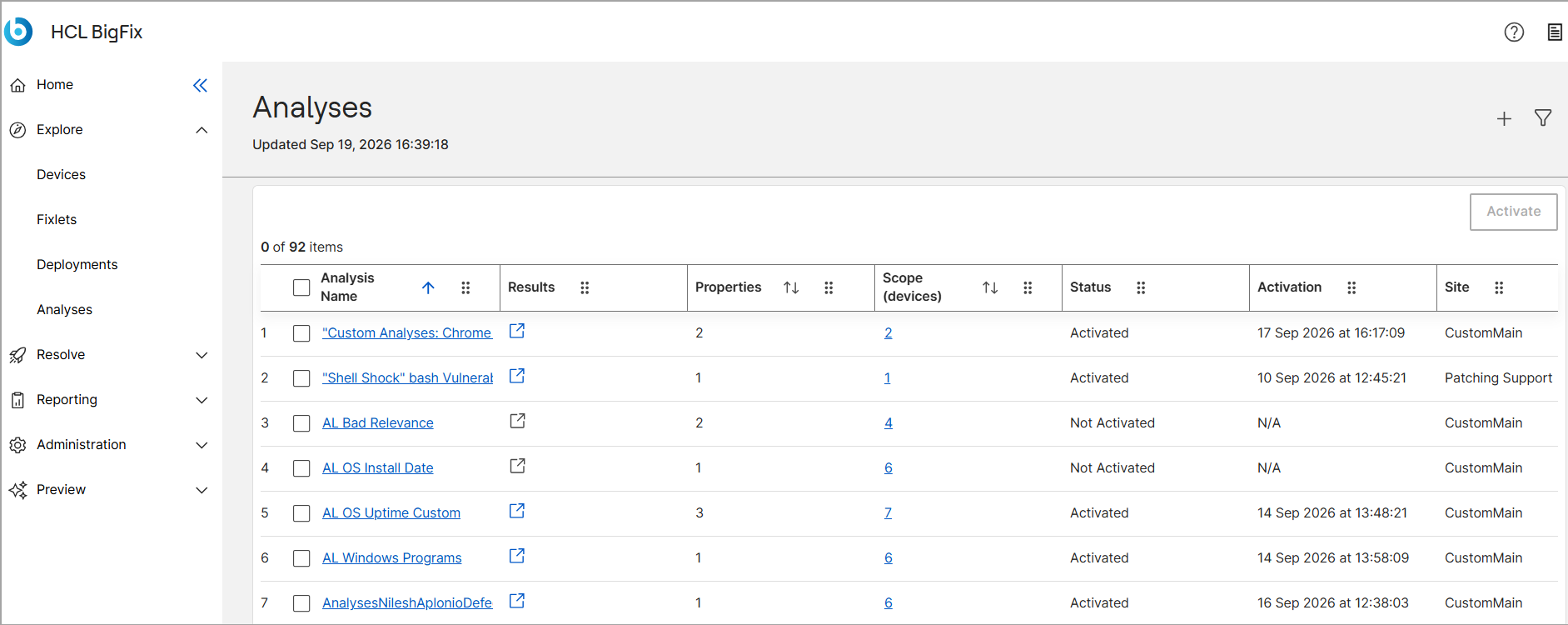
Analyses
The Analyses app lets you collect and review device data in BigFix. Use it to create analyses, define the devices they apply to, and manage the properties that each analysis reports.
Key Benefits
-
Gather device data on a schedule that you control, from every report to once a day.
-
Target only the devices that matter by defining a device scope for each analysis.
-
Reuse the collected properties in filters.
-
Review all analyses and all properties from a single workspace.
Viewing the Analyses Dashboard
When you navigate to the Analyses dashboard, BigFix displays a centralized data grid containing all the available Analyses for your deployment.
The grid allows you to monitor the state of your network at a glance by summarizing the following information for each Analyses:
- Analysis Name:
- The labeled identifier of the collection.
- Results:
- The number of retrieved property results displays data specific to each evaluated property.
- Properties:
- The total number of individual property expressions evaluated within the analysis.
- Scope (devices):
- The number of targeted BigFix Client computers.
- Status:
- Indicates whether the analysis is currently Activated or Not Activated. BigFix only evaluates properties for activated analyses.
- Activation:
- Displays the activation timestamp or status for the analysis, showing "N/A" for items that are currently "Not Activated" in the Analyses_grid_details_latest.png snapshot.
- Site:
- Identifies the specific content site hosting the analysis, such as "Enterprise Security" or "Updates for Windows Applications Middleware".
- Modified:
- Shows the exact date, time, and timezone when the analysis was last updated (e.g., "Fri, 17 Apr 2026 00:00:00 +0000").