
Creating a Route
This is the section for the admin user to create a new route.
To do that,
- Click Add Route Access under the Routes pull-down menu.
Figure 1. Create Route 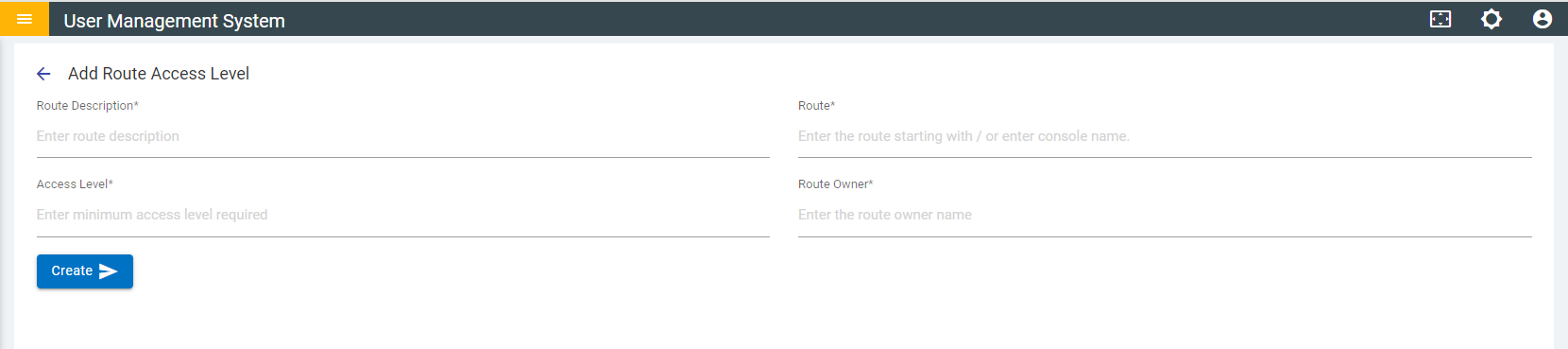
- Add the following details:
- Route Description: A brief description about the route.
- Route: The endpoint page for the route starting with / or the route can be selected from the autocomplete dropdown list.
Figure 2. Autocomplete Dropdown List for Route Selection 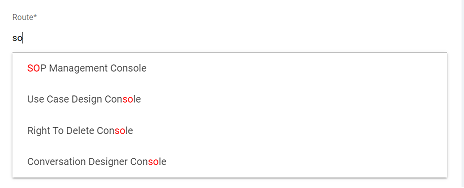
- Access Level: The minimum number required to grant/limit access to a route.
- Route Owner: Route owner’s name.
Note:Single owners can own multiple routes.
- Click Create.