
Webex Channel Integration
The main objective of this channel integration is to utilize the capability of BigFix AEX over Webex channel.
- To start using BigFix AEX over Webex, the user needs to access Global Admin Console
and navigate to the Tenants tab.
Figure 1. Tenants Tab in the Global Admin Console .png)
- Click on the
 button.
 Figure 2. Selection of the Configure Button
- Click on Open on the Choose Channels card on the Tenant Configuration page.
Figure 3. Choose Channels Card on the Tenant Configuration Page .png)
- Go to Webex card and enable the toggle.
Figure 4. Webex Toggle .png)
- Click on Save.
Figure 5. Save Button .png)
- Once the changes are saved, it will be available for the selected tenant under the
Channel Configuration Console to configure the Webex channel.
Figure 6. Channel Configuration Console 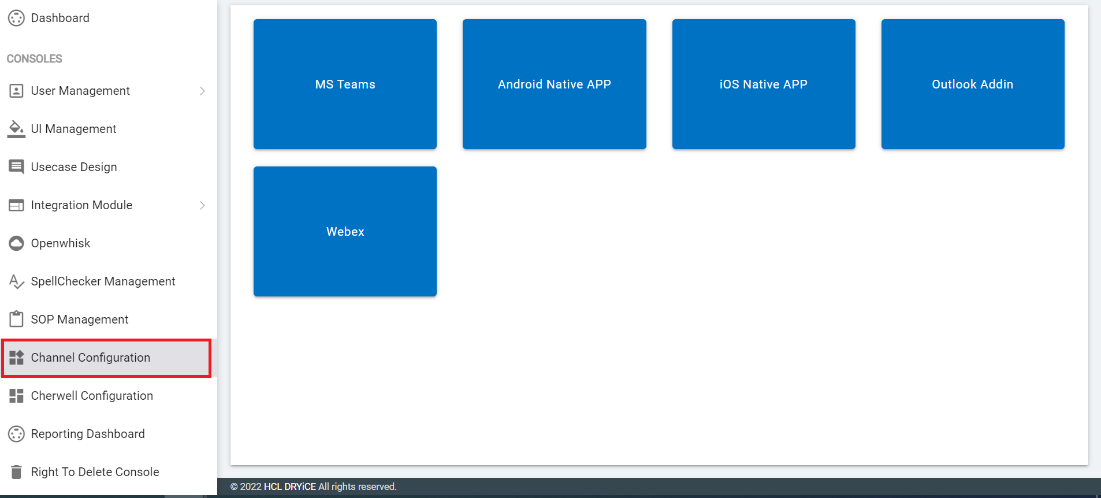
- Click on Webex to configure the Webex channel and you can connect any of your
Webex bot to run BigFix AEX use cases.
Figure 7. Configuring Webex Channel 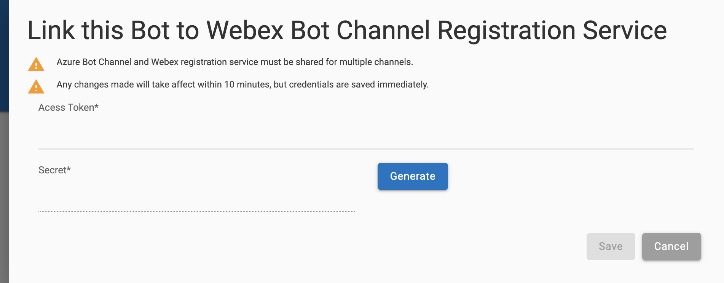
- Fill the Access Token and click on Generate to generate a 5-digit random secret which will be disabled after generating the secret.
- Click on Save and once it is done the bot is configured for your selected tenant and you will be able to use BigFix AEX over the same.