High Level Architecture
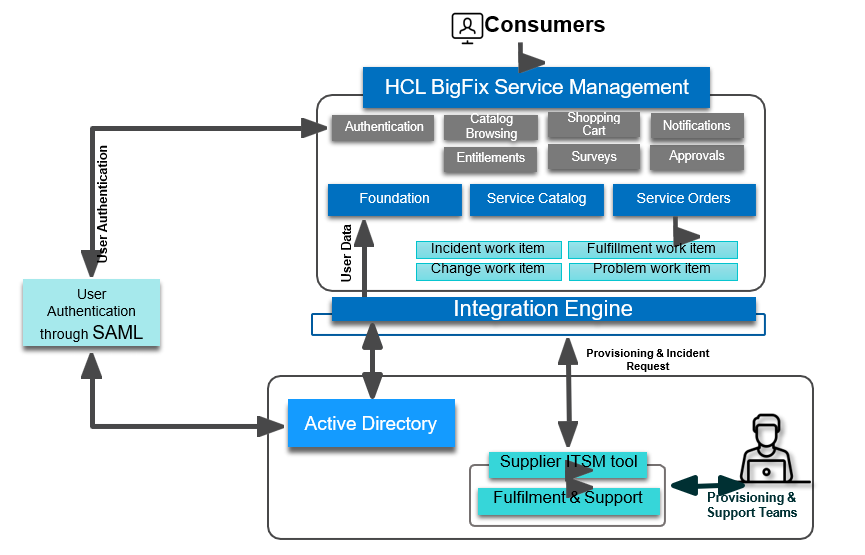
The diagram illustrates how HCL BigFix Service Management operates within an enterprise IT ecosystem. It shows the interaction between users, authentication systems, the service management platform, and external supplier systems.
- Consumers (End Users)
At the top of the flow are the consumers. These are the employees, customers, or business users who interact with the service management portal. They initiate requests, browse the catalog, or check notifications through the BigFix Service Management interface.
- User Authentication
Before accessing the portal, all users go through an authentication process to ensure secure access.
- SAML Authentication – Provides single sign-on (SSO), allowing users to log in securely with their enterprise credentials.
- Active Directory Integration – The system validates user identities and retrieves user data such as roles, permissions, and entitlements from Active Directory.
This ensures that users see only the services and information relevant to their role.
- HCL BigFix Service Management Platform
Once authenticated, users interact with the BigFix Service Management modules:
- Authentication – Verifies access for each session.
- Catalog Browsing – Allows users to explore available services.
- Shopping Cart – Users can select and request services.
- Notifications – Alerts and messages are delivered to users.
- Entitlements – Controls what services each user is eligible to request.
- Surveys – Collects feedback after services are delivered.
- Approvals – Enables managers or approvers to validate service requests.
Core Functional Areas:
- Foundation – The base configuration and data model.
- Service Catalog – Displays all available IT and business services.
- Service Orders – Tracks requests once they are placed, ensuring proper routing and fulfilment.
Work Items Supported:
- Incident Work Item – Tracks incidents raised by users.
- Change Work Item – Manages change requests.
- Problem Work Item – Used for root cause analysis and problem resolution.
- Fulfilment Work Item – Tracks service delivery and provisioning.
- Integration Engine
The Integration Engine plays a central role by connecting the BigFix Service Management platform with backend systems. It ensures smooth data exchange and workflow automation, including:
- Passing user data to backend systems.
- Handling provisioning requests.
- Routing incident requests to appropriate teams or supplier tools.
- Active Directory
Active Directory provides the identity backbone. It stores user credentials, group memberships, and roles, which are synchronized with the BigFix Service Management platform. This ensures consistent user access and compliance with enterprise security policies.
- Supplier ITSM Tools and Support Teams
For certain services or incident resolutions, requests may need to be routed outside the BigFix platform. The Integration Engine connects with:
- Supplier ITSM Tools – Third-party service management tools used by external providers.
- Fulfilment & Support Teams – Internal or external teams responsible for delivering services, handling provisioning, and resolving incidents.
This ensures seamless collaboration between internal IT and external vendors.
Summary
In summary, the architecture shows how:
- Consumers securely log in using SAML authentication and Active Directory.
- They interact with the BigFix Service Management portal, browsing catalogs, raising requests, and managing incidents.
- The Integration Engine connects the platform with both internal and external support systems.
- Supplier ITSM tools and fulfillment teams ensure requests are completed and services are delivered efficiently.
This integrated architecture ensures scalability, secure access, and efficient service delivery in complex IT environments.