Refresh the Thumbprint of Deployed WDAC Policies Signers on Endpoint v2.x
This deprecated task updates the code-signing certificate thumbprint across all deployed Windows Defender Application Control (WDAC) policies on the endpoint without generating a new certificate. It scans local XML policies, increments their version numbers, updates signer rules to reference the current certificate thumbprint, converts them to binary CIP format using signtool.exe, and redeploys to the EFI partition — refreshing policy enforcement immediately in a single automated five-step workflow.
About this task
Important:
The task follows the below listed workflow:This task is deprecated and will be
removed from BigFix Application Control
v2.x in near future.
- Setup: Initializes the logging and ensures that the required BAC directories exist.
- XML Processing: Scans for the XML policies, automatically increments their version numbers, and updates the signer rules to trust the current certificate.
- Conversion & Signing: Converts the XML to a binary (*.cip) file and cryptographically signs it using signtool.exe.
- EFI Deployment: Temporarily mounts the system's hidden EFI partition and deploys the signed policy directly to the boot manager's Active CiPolicies directory.
- Refresh: Invokes the local refresh utility to apply the policy immediately without a reboot.
Refer to the table below to know more about the task's exit code.
| Exit Code | Meaning |
|---|---|
| 0 | Success |
| 10 | Directory setup failure |
| 20 | Certificate creation or export failure |
| 30 | XML processing or version bumping failure |
| 40 | Binary conversion failure |
| 50 | Signtool signing failure |
| 60 | EFI mount or deployment failure |
| 70 | Policy refresh tool failure |
| 80 | Thumbprint rotation failure |
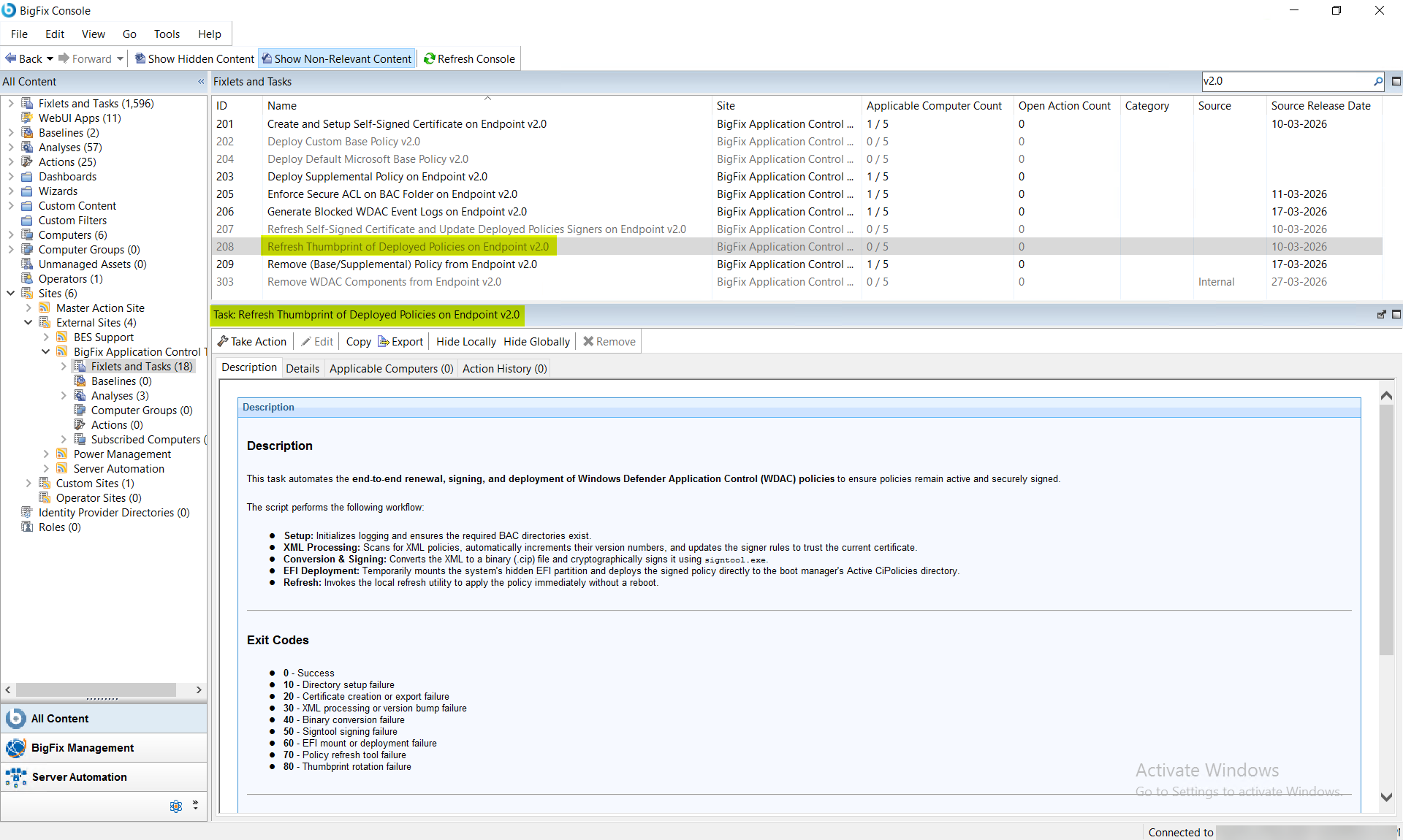
Procedure
- In the BigFix Console, navigate to .
- From the Fixlets and Tasks pane, select Task: Refresh Thumbprint of Deployed Policies Signers on Endpoint v2.0.
- From the Task: Refresh Thumbprint of Deployed Policies Signers on Endpoint v2.0 pane, click the Applicable Computers(n) tab and view the endpoints on which you want to run the task.
- Select the Take Actions tab and select the endpoints on which you want to apply this installer task.
-
Click OK.
Note:Once this task is triggered, it remains as an open action and runs on the system whenever the system becomes relevant. Only an administrator can stop this task.
Results
- Local XML policies are updated with incremented version numbers and new signer rules.
- Cryptographically signed binary (*.cip) policies are successfully deployed to the EFI partition.
- System application control policies are immediately refreshed and enforced.