
Deploying CDP S3 Connector Sink Job
This section provides detailed instructions on how to deploy HCL CDP S3 Connector Sink Job using the Devtron in the OpenShift.
Creating custom app
- In the devtron console, select Applications, and click Create > Custom
app.
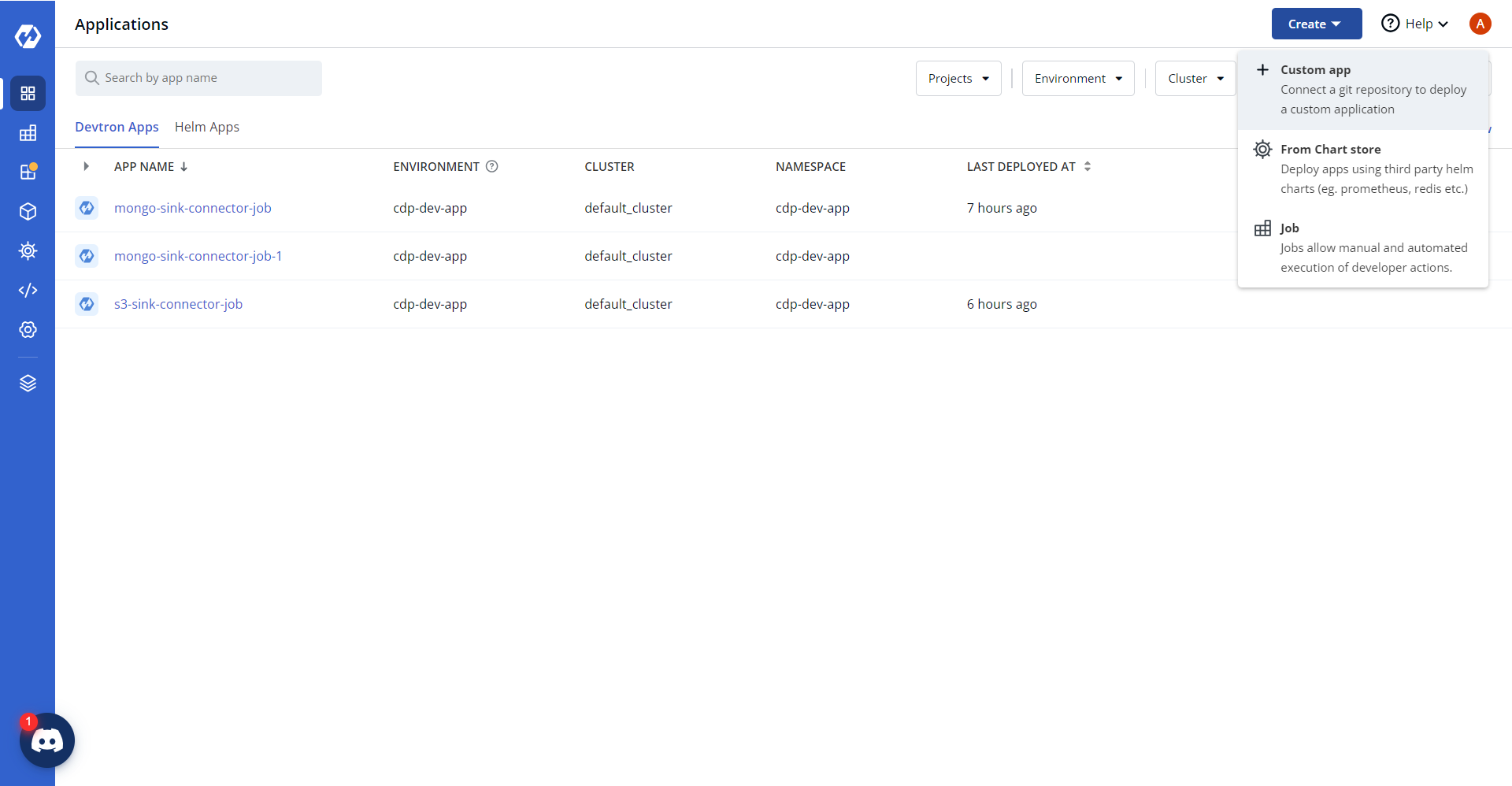
- In the Create Application section, enter application name as
"s3-sink-connector-job" and select a project to store the application.
.png)
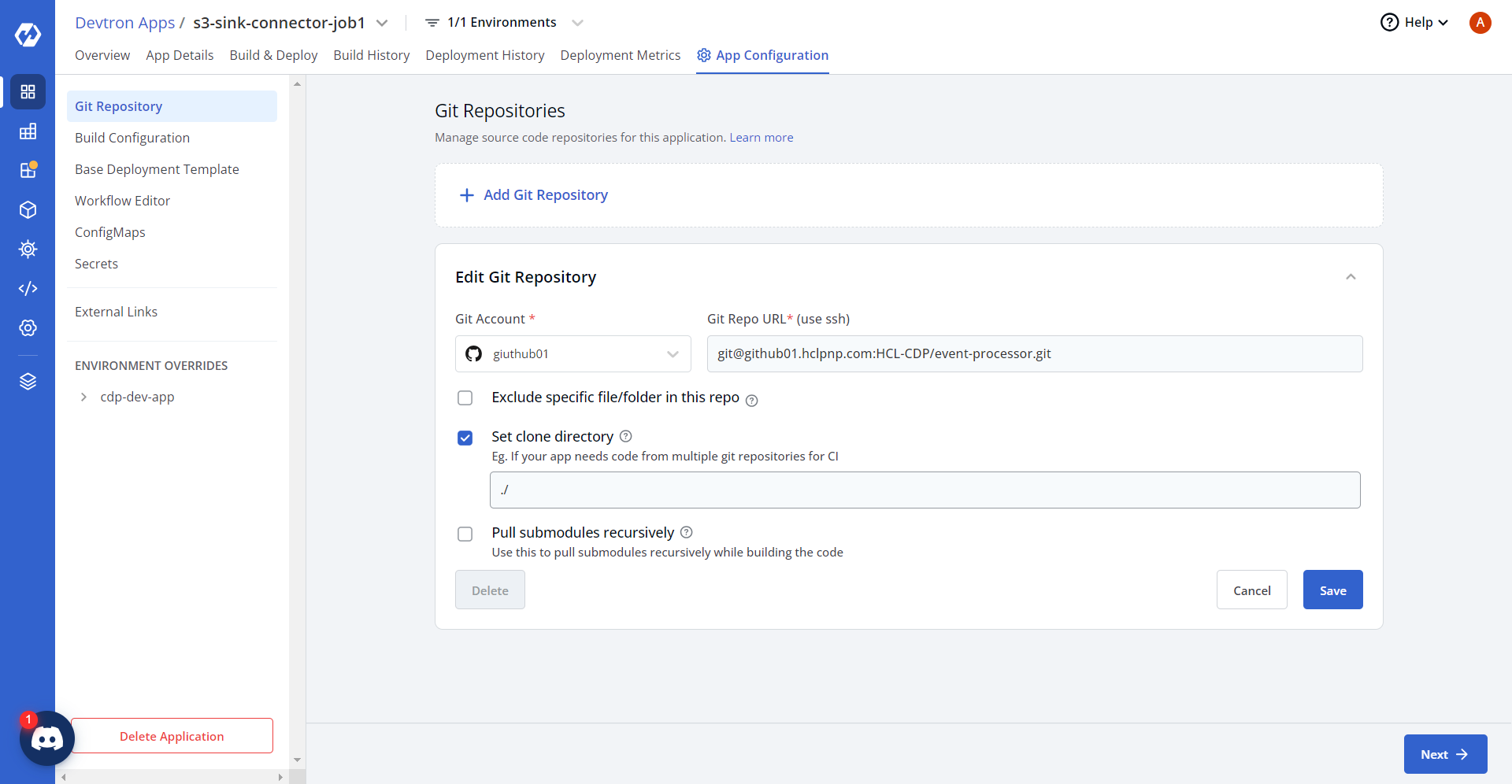
- Click Create App to create the application. Now, click App
Configuration tab, and update source code repositories for the application.
Building custom app
After successfully creating the custom app, build the custom app with docker image, and configure a workflow for the custom app.
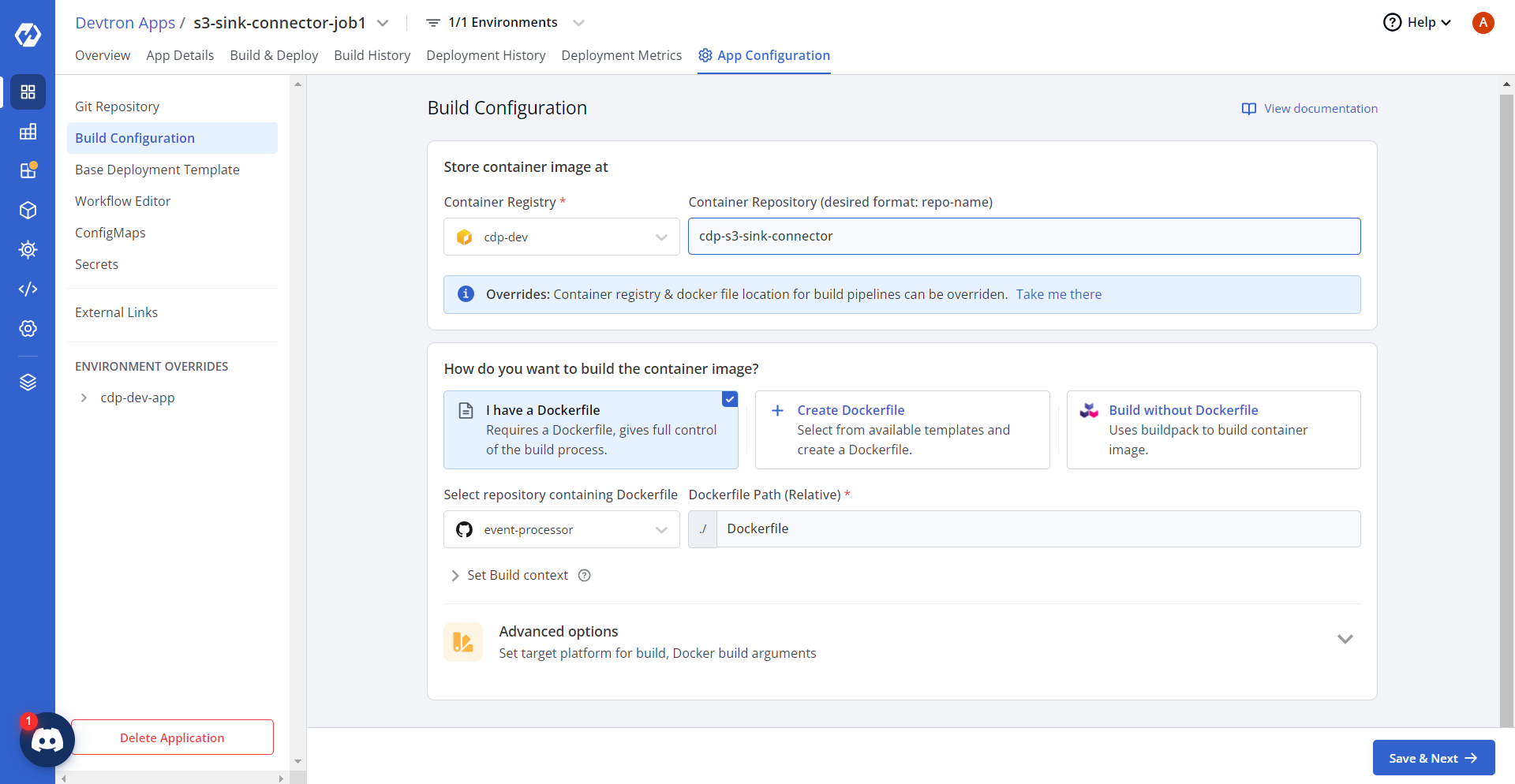
- In the Devtron Apps page, click Build Configurations. In the App
Configuration tab, select I have a Dockerfile option and update the
dockerfile path.
- Click Save & Next, and in the Base Deployment Template
section, update chart type and Mongo Connector Sink URLs in the base deployment template
as shown below.
Deployment Template
ContainerPort: - envoyPort: 8799 idleTimeout: 1800s name: app port: 8080 servicePort: 80 supportStreaming: true useHTTP2: true EnvVariables: [] GracePeriod: 30 MaxSurge: 1 MaxUnavailable: 0 MinReadySeconds: 60 Spec: Affinity: Key: null Values: nodes key: "" args: enabled: true value: - /bin/sh - -c - > until $(curl --output /dev/null --silent --head --fail http://cdp-s3-sink-connector-service.cdp-dev-app.svc.cluster.local:80); do echo "Waiting for Kafka Connect API..." sleep 5 done echo "Posting Kafka Connect configuration..." curl -X POST -H "Content-Type: application/json" --data @/data/${APP_NAME} http://cdp-s3-sink-connector-service.cdp-dev-app.svc.cluster.local:80/connectors command: enabled: false value: [] containerSecurityContext: allowPrivilegeEscalation: false containers: [] cronjobConfigs: concurrencyPolicy: Allow failedJobsHistoryLimit: 1 restartPolicy: OnFailure schedule: "* * * * *" startingDeadlineSeconds: 100 successfulJobsHistoryLimit: 3 suspend: false ephemeralContainers: [] image: pullPolicy: IfNotPresent imagePullSecrets: [] initContainers: [] jobConfigs: activeDeadlineSeconds: 100 backoffLimit: 5 completions: 1 parallelism: 1 suspend: false kedaAutoscaling: envSourceContainerName: "" failedJobsHistoryLimit: 5 maxReplicaCount: 2 minReplicaCount: 1 pollingInterval: 30 rolloutStrategy: default scalingStrategy: customScalingQueueLengthDeduction: 1 customScalingRunningJobPercentage: "0.5" multipleScalersCalculation: max pendingPodConditions: - Ready - PodScheduled - AnyOtherCustomPodCondition strategy: custom successfulJobsHistoryLimit: 5 triggerAuthentication: enabled: false name: "" spec: {} triggers: - authenticationRef: {} metadata: host: RabbitMqHost queueLength: "5" queueName: hello type: rabbitmq kind: Job pauseForSecondsBeforeSwitchActive: 30 podAnnotations: {} podLabels: {} podSecurityContext: {} prometheus: release: monitoring rawYaml: [] readinessGates: [] resources: limits: cpu: "0.05" memory: 50Mi requests: cpu: "0.01" memory: 10Mi secret: data: {} enabled: false server: deployment: image: "" image_tag: 1-95af053 service: annotations: {} enabled: false type: ClusterIP servicemonitor: additionalLabels: {} setHostnameAsFQDN: false shareProcessNamespace: false tolerations: [] topologySpreadConstraints: [] volumeMounts: [] volumes: [] waitForSecondsBeforeScalingDown: 30 - Click Save & Next. In the Workflow Editor section, add new workflow,
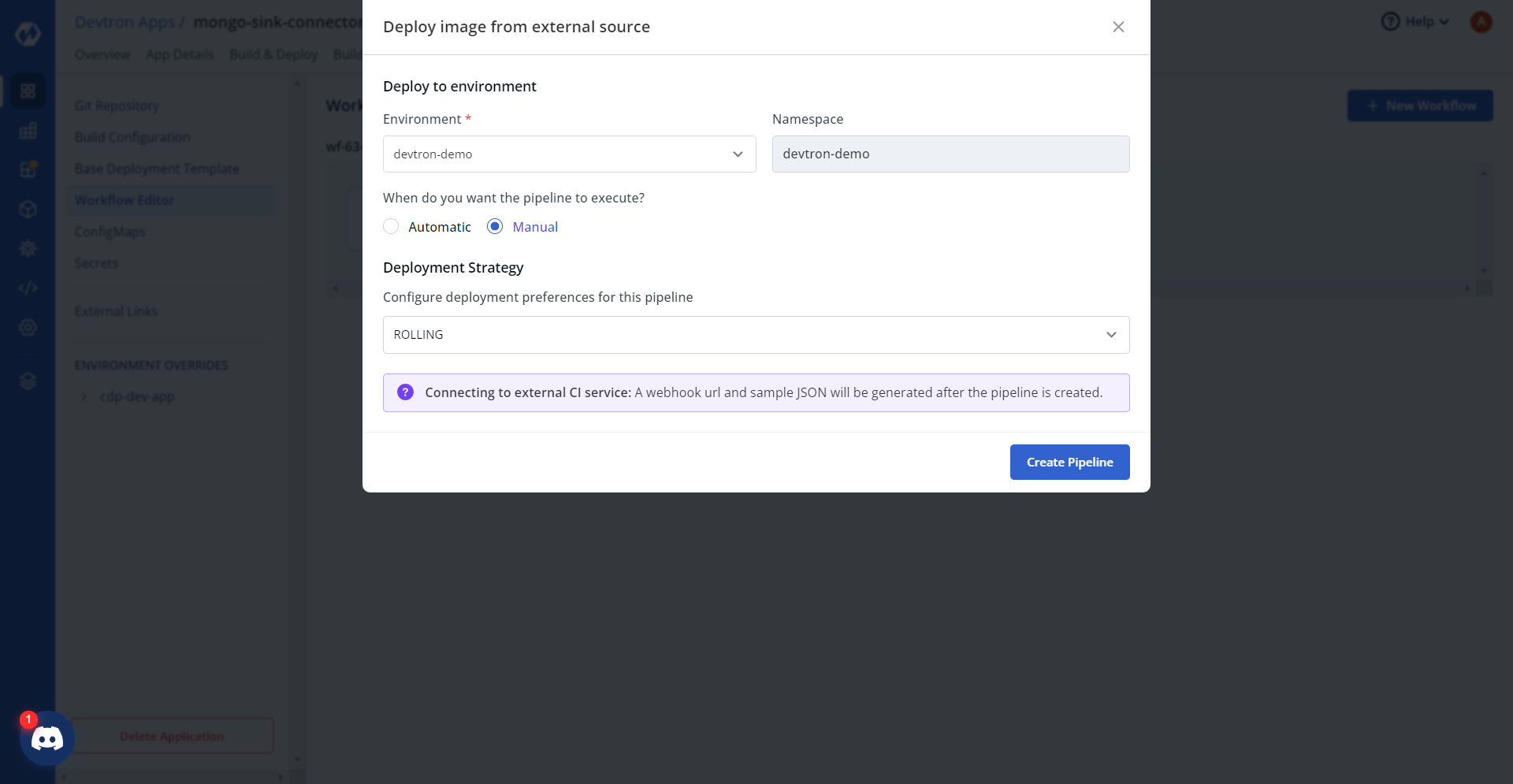
and select the Deploy Image from External Source option.
.png)
- Configure required parameters, and click Create pipeline at the right
bottom corner of the Deploy image from external source section.
- In the Workflow Editor, click Edit Workflow, and in the Webhook
Details section, click the Auto Generate Token tab, and copy the token
details.
.png)
- Now, click Try it out tab below the Auto-generate token section, and update api-token and dockerImage details.
- Click Execute, and on successful execution, check the server
response.
.png)
Configuring and deploying custom app
- Click Edit deployment pipeline, check the deployment stage of the workflow and
click Update Pipeline.
.png)
- In the ConfigMaps section, under the App Configuration tab, update
the app-config as shown below.
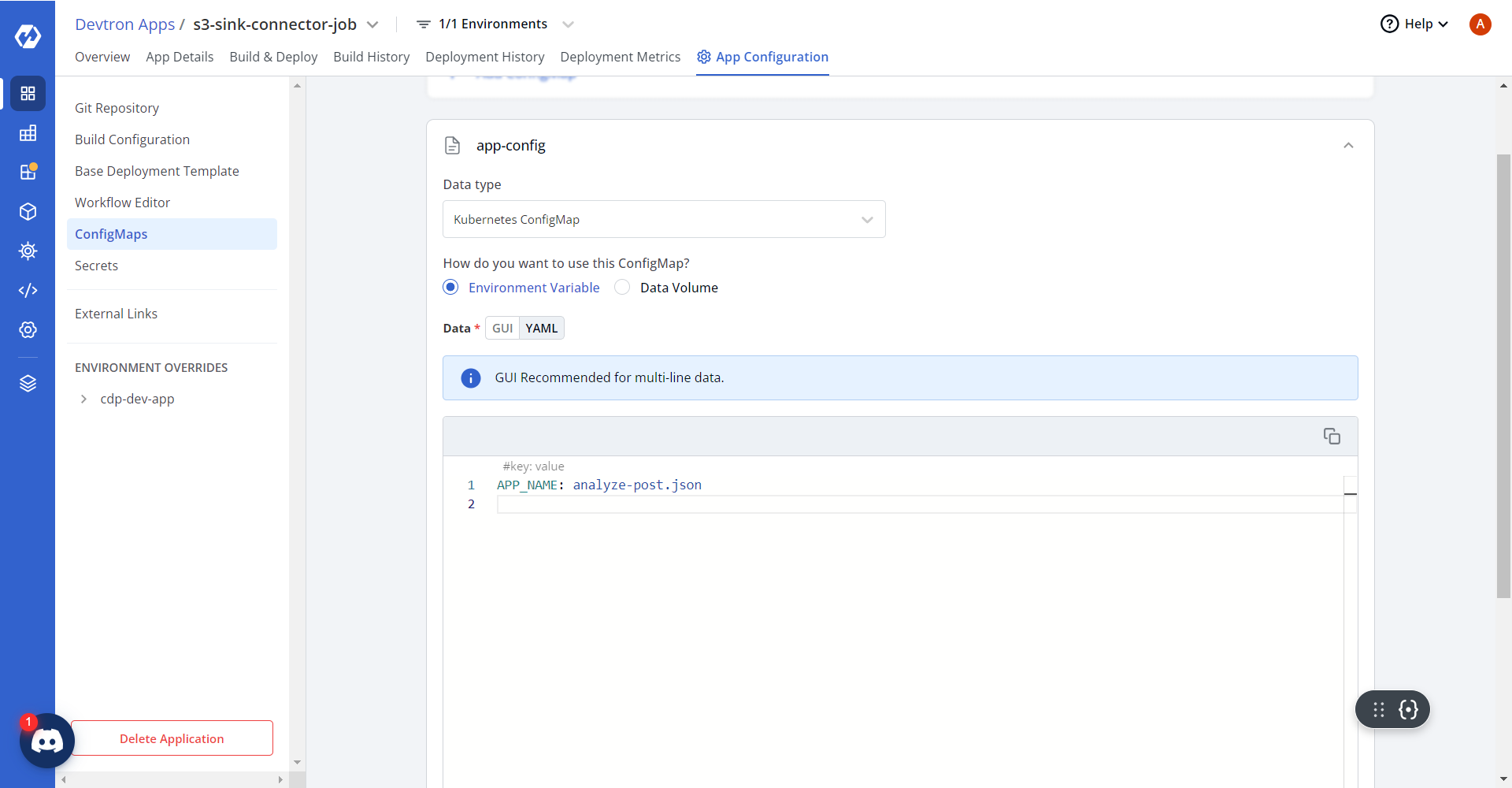
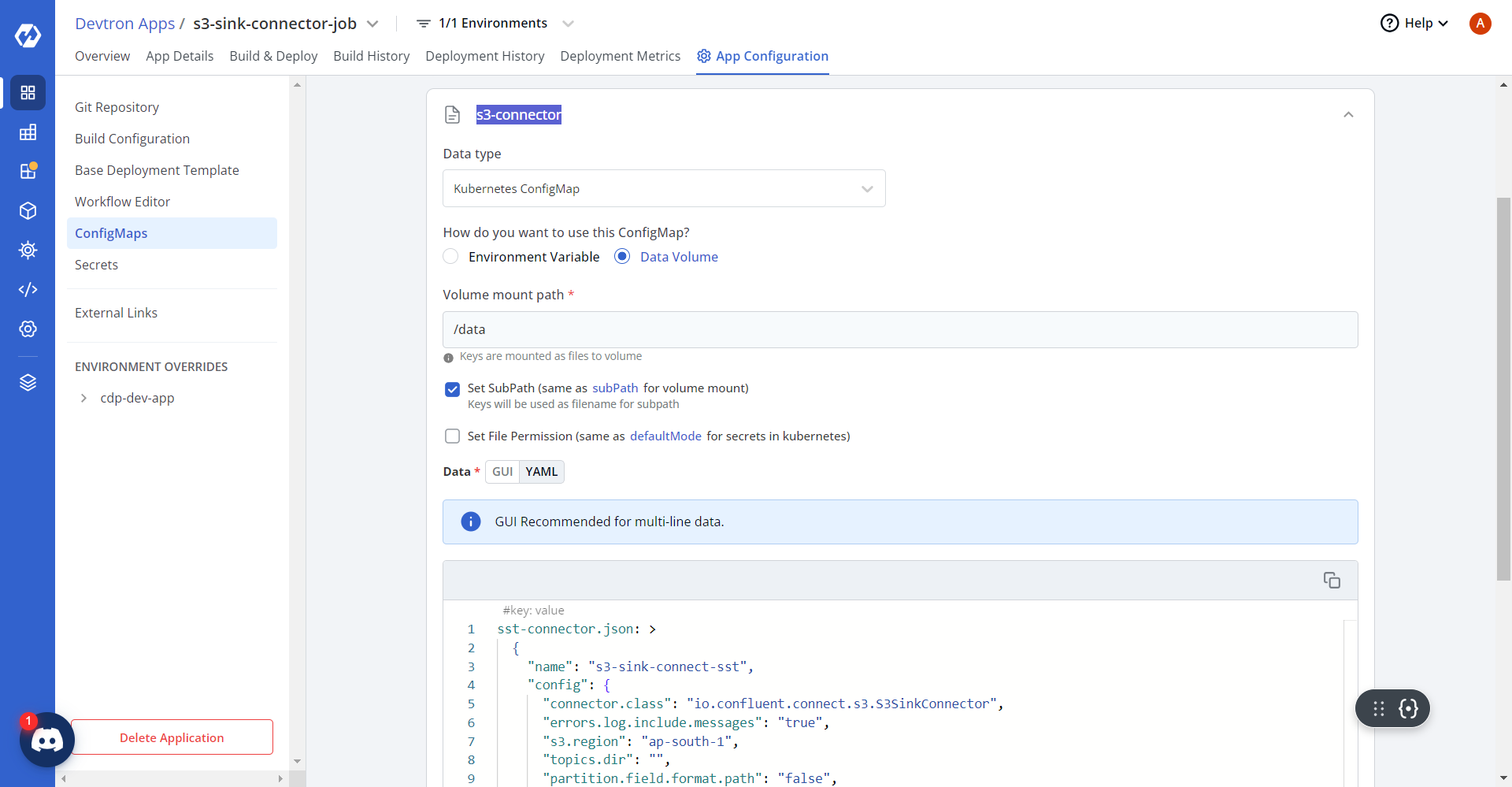
- Similarly, update the ConfigMaps for sst-connector as shown below.
sst-connector.json: >
  {
    "name": "s3-sink-connect-sst",
    "config": {
      "connector.class": "io.confluent.connect.s3.S3SinkConnector",
      "errors.log.include.messages": "true",
      "s3.region": "ap-south-1",
      "topics.dir": "",
      "partition.field.format.path": "false",
      "flush.size": "10000",
      "tasks.max": "6",
      "s3.part.size": "5242880",
      "timezone": "UTC",
      "transforms": "GenericTransformer",
      "rotate.interval.ms": "-1",
      "locale": "US",
      "errors.deadletterqueue.context.headers.enable": "true",
      "format.class": "io.confluent.connect.s3.format.bytearray.ByteArrayFormat",
      "transforms.GenericTransformer.type": "co.lemnisk.kafka.connect.transforms.GenericTransformer$Value",
      "aws.access.key.id": "",
      "errors.deadletterqueue.topic.replication.factor": "2",
      "value.converter": "org.apache.kafka.connect.json.JsonConverter",
      "errors.log.enable": "true",
      "s3.bucket.name": "hclsw-hxcd-hss-prd-s3-cdp-app",
      "key.converter": "org.apache.kafka.connect.storage.StringConverter",
      "partition.duration.ms": "300000",
      "topics":"sst_blacklistProfile,sst_mergeProfile,sst_outboundEvents,sst_inboundEvents,sst_failedEvents,sst_blacklist,sst_deletedOid,sst_profile","directory.delim":"/","aws.secret.access.key":"","transforms.GenericTransformer.meta":"[{\"topic\":\"sst_blacklistProfile\",\"tsCol\":\"ts\",\"dataFormat\":\"json\"},{\"topic\":\"sst_mergeProfile\",\"tsCol\":\"ts\",\"dataFormat\":\"json\"},{\"topic\":\"sst_outboundEvents\",\"tsCol\":\"ts\",\"dataFormat\":\"json\"},{\"topic\":\"sst_inboundEvents\",\"tsCol\":\"ts\",\"dataFormat\":\"json\"},{\"topic\":\"sst_failedEvents\",\"tsCol\":\"ts\",\"dataFormat\":\"json\"},{\"topic\":\"sst_blacklist\",\"tsCol\":\"4\",\"dataFormat\":\"tsv\"},{\"topic\":\"sst_deletedOid\",\"tsCol\":\"5\",\"dataFormat\":\"tsv\"},{\"topic\":\"sst_profile\",\"tsCol\":\"ts\",\"dataFormat\":\"json\"}]",
      "partition.field.name": "p1,p2",
      "s3.compression.type": "gzip",
      "errors.deadletterqueue.topic.name": "dlq_sst",
      "partitioner.class": "co.lemnisk.kafka.connect.partitioner.GenericPartitioner",
      "value.converter.schemas.enable": "false",
      "name": "s3-sink-connect-sst",
      "errors.tolerance": "all",
      "storage.class": "io.confluent.connect.s3.storage.S3Storage",
      "rotate.schedule.interval.ms": "900000",
      "path.format": "YYYY/MM/dd",
      "timestamp.extractor": "Record"
    }
    },
diapi-connector.json: >
  {
    "name": "s3-sink-connect-diapi",
    "config": {
      "connector.class": "io.confluent.connect.s3.S3SinkConnector",
      "errors.log.include.messages": "true",
      "s3.region": "ap-south-1",
      "topics.dir": "",
      "partition.field.format.path": "false",
      "flush.size": "10000",
      "tasks.max": "6",
      "s3.part.size": "5242880",
      "timezone": "UTC",
      "transforms": "GenericTransformer",
      "rotate.interval.ms": "-1",
      "locale": "US",
      "errors.deadletterqueue.context.headers.enable": "true",
      "format.class": "io.confluent.connect.s3.format.bytearray.ByteArrayFormat",
      "transforms.GenericTransformer.type": "co.lemnisk.kafka.connect.transforms.GenericTransformer$Value",
      "aws.access.key.id": "",
      "errors.deadletterqueue.topic.replication.factor": "2",
      "value.converter": "org.apache.kafka.connect.json.JsonConverter",
      "errors.log.enable": "true",
      "s3.bucket.name": "hclsw-hxcd-hss-prd-s3-cdp-app",
      "key.converter": "org.apache.kafka.connect.storage.StringConverter",
      "partition.duration.ms": "300000",
      "topics": "diapi_outbound",
      "directory.delim": "/",
      "aws.secret.access.key": "",
      "transforms.GenericTransformer.meta": "[{\"topic\":\"diapi_outbound\",\"tsFormat\":\"yyyy-MM-dd'T'HH:mm:ss\",\"tsCol\":\"ts\",\"dataFormat\":\"json\",\"inputTz\":\"UTC\",\"outputTz\":\"Asia/Kolkata\"}]",
      "partition.field.name": "eventType,campaignId",
      "s3.compression.type": "gzip",
      "errors.deadletterqueue.topic.name": "dlq_diapi",
      "partitioner.class": "co.lemnisk.kafka.connect.partitioner.GenericPartitioner",
      "value.converter.schemas.enable": "false",
      "name": "s3-sink-connect-diapi",
      "errors.tolerance": "all",
      "storage.class": "io.confluent.connect.s3.storage.S3Storage",
      "rotate.schedule.interval.ms": "900000",
      "path.format": "YYYY/MM/dd",
      "timestamp.extractor": "Record"
    }
    },
analyze-post.json: >
  { "name": "s3-sink-connect-analyze_post", "config": {
      "connector.class": "io.confluent.connect.s3.S3SinkConnector",
      "errors.log.include.messages": "true",
      "s3.region": "ap-south-1",
      "topics.dir": "",
      "partition.field.format.path": "false",
      "flush.size": "10000",
      "tasks.max": "6",
      "s3.part.size": "5242880",
      "timezone": "UTC",
      "transforms": "GenericTransformer",
      "rotate.interval.ms": "-1",
      "locale": "US",
      "errors.deadletterqueue.context.headers.enable": "true",
      "format.class": "io.confluent.connect.s3.format.bytearray.ByteArrayFormat",
      "transforms.GenericTransformer.type": "co.lemnisk.kafka.connect.transforms.GenericTransformer$Value",
      "aws.access.key.id": "",
      "errors.deadletterqueue.topic.replication.factor": "2",
      "value.converter": "org.apache.kafka.connect.storage.StringConverter",
      "errors.log.enable": "true",
      "s3.bucket.name": "hclsw-hxcd-hss-prd-s3-cdp-app",
      "key.converter": "org.apache.kafka.connect.storage.StringConverter",
      "partition.duration.ms": "300000",
      "topics": "analyze_post",
      "directory.delim": "/",
      "aws.secret.access.key": "",
      "transforms.GenericTransformer.meta": "[{\"topic\":\"analyze_post\",\"tsFormat\":\"yyyy-MM-dd'T'HH:mm:ss\",\"dataFormat\":\"json\",\"inputFormat\":\"tsv\",\"dataCol\":3,\"partitionerKeys\":\"AnalyzePost,{{campaignId}}\",\"tsCol\":\"receivedAt\",\"inputTz\":\"UTC\",\"outputTz\":\"Asia/Kolkata\"}]",
      "s3.compression.type": "gzip",
      "errors.deadletterqueue.topic.name": "dlq_analyze_post",
      "partitioner.class": "co.lemnisk.kafka.connect.partitioner.GenericPartitioner",
      "value.converter.schemas.enable": "false",
      "name": "s3-sink-connect-analyze_post",
      "errors.tolerance": "all",
      "storage.class": "io.confluent.connect.s3.storage.S3Storage",
      "rotate.schedule.interval.ms": "900000",
      "path.format": "YYYY/MM/dd",
      "timestamp.extractor": "Record"
  } }
- Save the configuration, navigate to the Build & Deploy tab, and run
the execution.
.png)
.png)
- On successful deployment, the Pod is in completed status as shown
below.
.png)