
Buy online pickup in store support for checkout profile
The Checkout Profile feature simplifies the checkout process by allowing users to save and use predefined shipping and payment details. Previously, this feature was available only for delivery mode. It has now been extended to support pickup mode and mixed mode (pickup and delivery).
Users can create Checkout Profiles under Account Settings. Previously created profiles appear on the Shopping Cart page. Once the user selects pickup mode and chooses a profile, the Checkout button updates to Checkout with Profile.
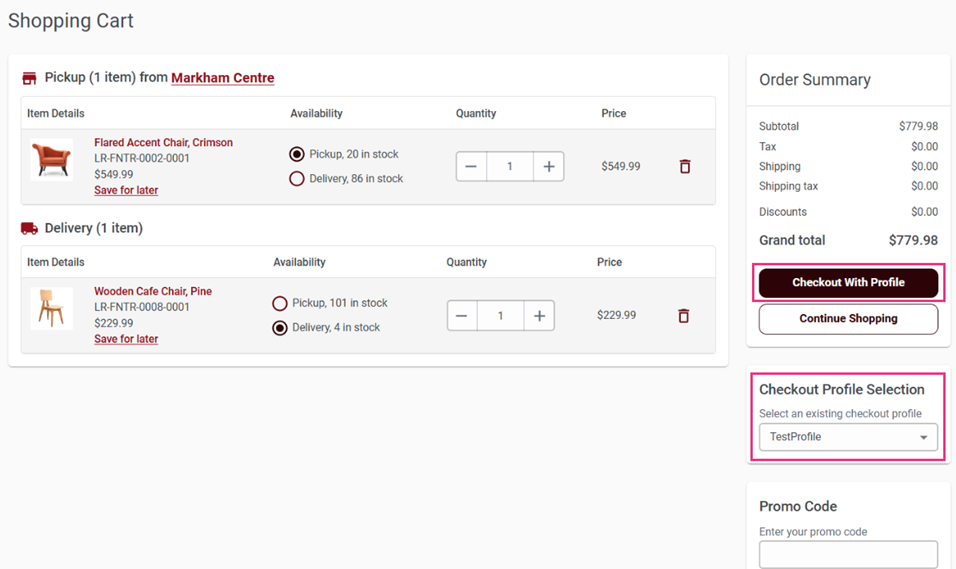
Follow these steps to complete the checkout process using a saved profile for pickup
orders:
- On the Shopping Cart page, click the Checkout with Profile button.
- The system redirects you to the Pickup Details page
before the Review Order page.

- Choose one of the following pickup options:
- I'll pick it up: Select this option if you want to pick up the product yourself and enter your details.
- Someone else will pick it up: Select this option if another person will pick up the product on your behalf, and enter their details.
- Review and confirm the entered pickup details.
- After confirming pickup details, proceed to the Review Order page.
- The system auto-fills the payment and shipping details stored in the selected checkout profile.
- Verify the order summary and click Place Order to complete the checkout process with minimal additional input.