
Video support for Next.js stores (B2C and B2B)
On Product Detail Pages (PDP), videos appear alongside product images, providing an interactive shopping experience. Customers can click the video icon to play the video and use the built-in video player to watch product demonstrations, unboxings, or usage examples, helping them make informed purchase decisions.
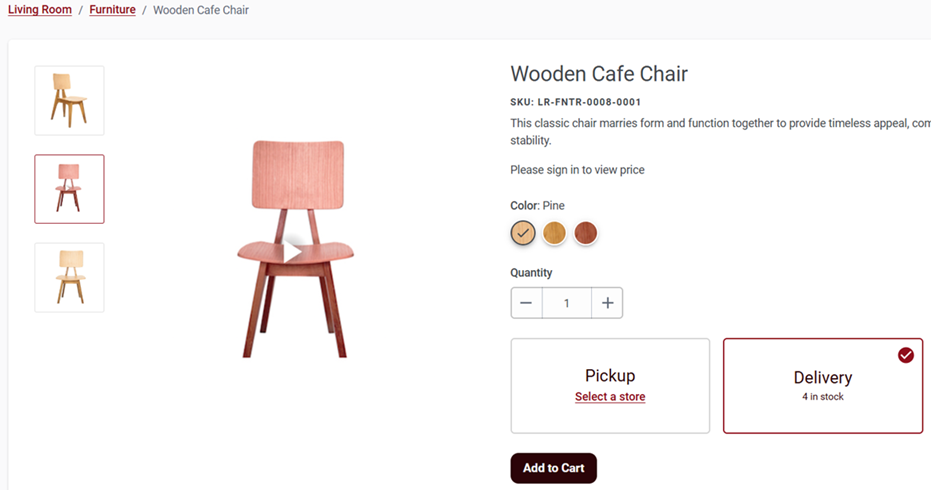
- If only one asset is associated with a SKU, the system determines whether it is an
image or a video based on the asset path extension:
- Image files are displayed as standard PDP images.
- Video files are embedded in the same container for easy playback.
- If multiple assets are available, the PDP carousel is activated:
- The carousel displays both images and video thumbnails.
- Each asset is checked for its type based on its file extension.
- Video assets are represented by a clickable thumbnail that launches the video player.
- Images are displayed normally within the carousel.
The ProductDetailsVideo widget was customized to play product videos. By default, download, playback rate, and picture-in-picture options are disabled. The widget is set to light mode, displaying a poster image initially. When the user clicks the poster image, the video plays. Once the video ends, the widget returns to displaying the poster image. The Next.js store PDP, PLP, Bundle, and Kit pages can display either an image or a video in the same area where the catalog entry image was previously shown.
In the CMC section, business users can specify URLs from known video content sites to display video assets. Currently, only YouTube and Vimeo URLs are accepted. However, adopters can customize the storefront to support other video domains.