
Volume pricing for the Ruby storefronts (B2C and B2B)
Volume pricing is a pricing structure in which the cost per product varies based on the quantity added to the cart, as configured in the Management Center.
Volume pricing involves displaying different prices for specific quantities and creating multiple pricing tiers within a price list. Once you configure it from the Management Center for HCL Commerce, it is available for your Ruby storefronts. To configure volume pricing, see Configuring volume pricing for the Next.js store.
Volume pricing on the PDP
When volume pricing is configured for a product, it appears on the Product detail page (PDP). Volume pricing is shown in the following image for the Ruby storefront.
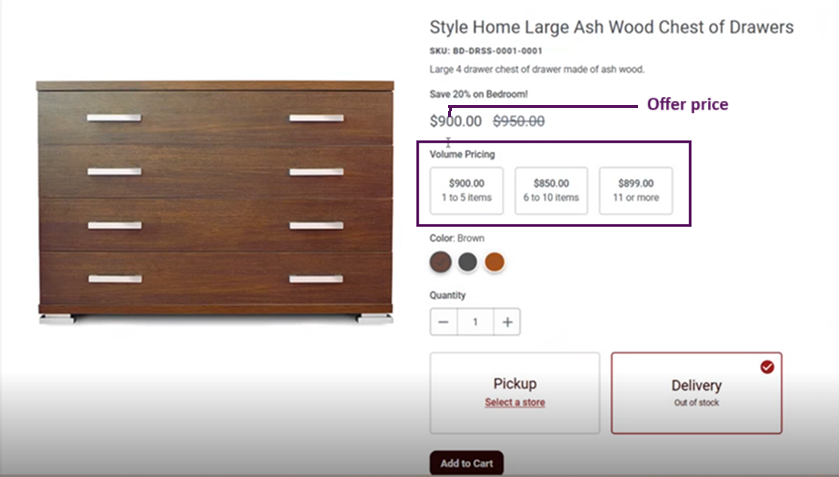
The following
pricing elements are available on the product detail page.
- Offer Price: When you adjust the quantity, the price updates based on volume pricing.
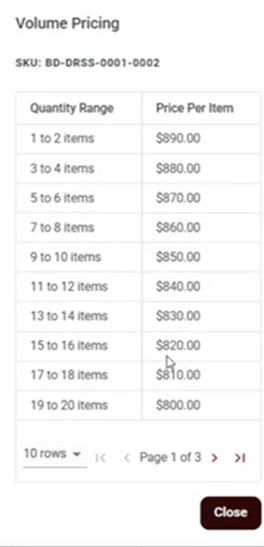
- Volume Pricing Table: This table displays quantity
ranges with their corresponding per unit prices.

- Volume pricing modes
- The Ruby and Ruby B2B storefronts support three volume pricing modes:
priceMode="0": Offer Price and Volume PricingpriceMode="1": Indexed Price from SearchpriceMode ="2": Offer Price and Volume Pricing