
Enabling the Cookie Contents target in Next.js stores
To use the Cookie Contents target in web activities, modify the manifestCustom.ts file for the e-Marketing Spot widget.
Procedure
- Open the file integration/data/custom/MarketingCookieContentTarget/manifestCustom.ts.
-
Edit the manifestCustom.ts file to add the cookie name
with a boolean value of
trueorfalse.true: Enable this cookie for the marketing target.false: Disable this cookie for the marketing target.
For example:export const dataMarketingCookieContentTargetManifestCustom: { [name: string]: boolean } = { mycookiename: true, }; - Save and close the manifestCustom.ts file.
Results
Example
This example explains how to configure a web activity to run on the Next.js store
home page eSpot (Home_ProductRec). The web activity recommends
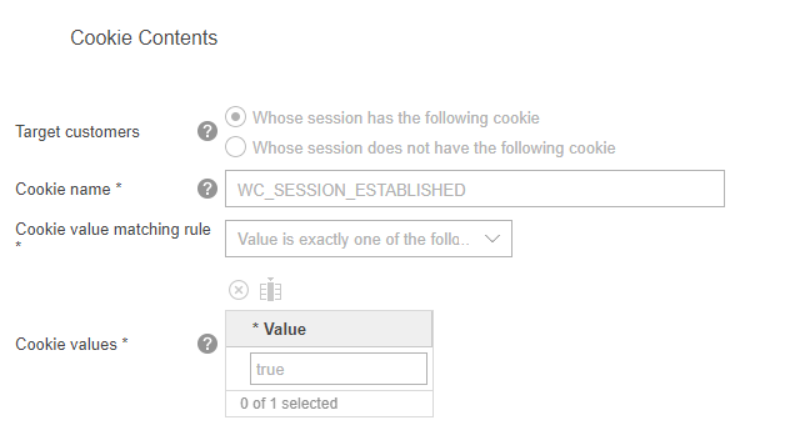
specific catalog entries if the WC_SESSION_ESTABLISHED cookie
is present and its value is true.
-
Configure the manifestCustom.ts file to include the following code.

-
In Management Center, configure the following web activity to run on the Next.js store
Home_ProductReceSpot.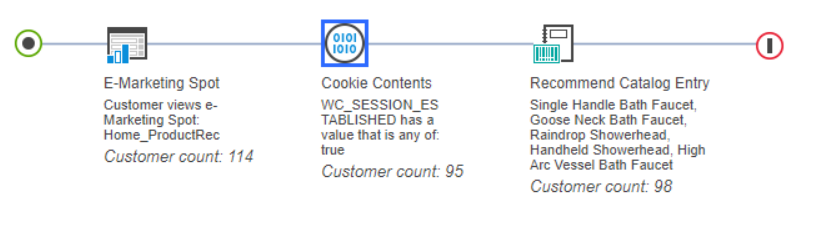
- Configure the Cookie Contents target as shown below:
- Navigate to the storefront homepage and confirm that the
Home_ProductReceSpot displays the web activity recommended catalog entries when theWC_SESSION_ESTABLISHED=truecookie is set in the browser.