Enabling the Cookie Contents target in React-based stores
In order to use the Cookie Contents target in web activities, you must modify the
TypeScript (.tsx) file for the e-Marketing Spot widget. The custom code is required to
specify which custom cookies will be processed by the Cookie Contents logic. It can be
configured to process all cookies (not recommended), a specific named cookie (for example,
WC_SESSION_ESTABLISHED), or all cookies with a specific prefix (for
example, WC_).
Procedure
-
Find the name and location of the React .tsx file for the
e-Marketing Spot used in the web activity.
 For example, in the Emerald React storefront code, find
the file use-espot-helper.tsx in the default reference
store location
react-store/src/components/commerce-widgets/e-marketing-spot-widget/hooks.
For example, in the Emerald React storefront code, find
the file use-espot-helper.tsx in the default reference
store location
react-store/src/components/commerce-widgets/e-marketing-spot-widget/hooks. - Open the .tsx file for the e-Marketing Spot in which you plan to display the targeted marketing content in any editor tool.
-
Follow these steps to customize the code to integrate the
react-cookiepackage and to process either a specific named cookie (for example,WC_SESSION_ESTABLISHED) or all cookies with a specific prefix (for example,WC_). - Save and close the .tsx file.
Results
Example
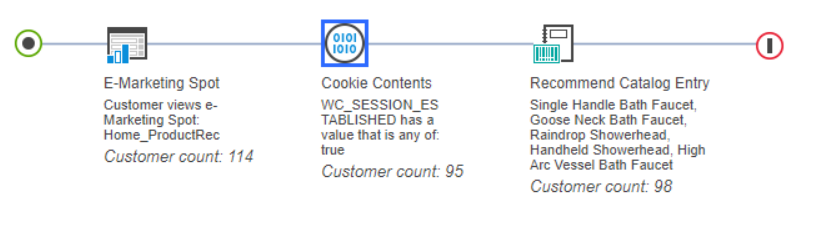
This example explains how to configure a web activity
to run on the React-based store home page eSpot (Home_ProductRec),
assuming the necessary code changes described above to process custom cookies have
been implemented. The web activity recommends specific catalog entries if the
WC_SESSION_ESTABLISHED cookie is present and its value is
true.
In Management Center, configure the
following web activity to run on the React-based store
Home_ProductRec eSpot.
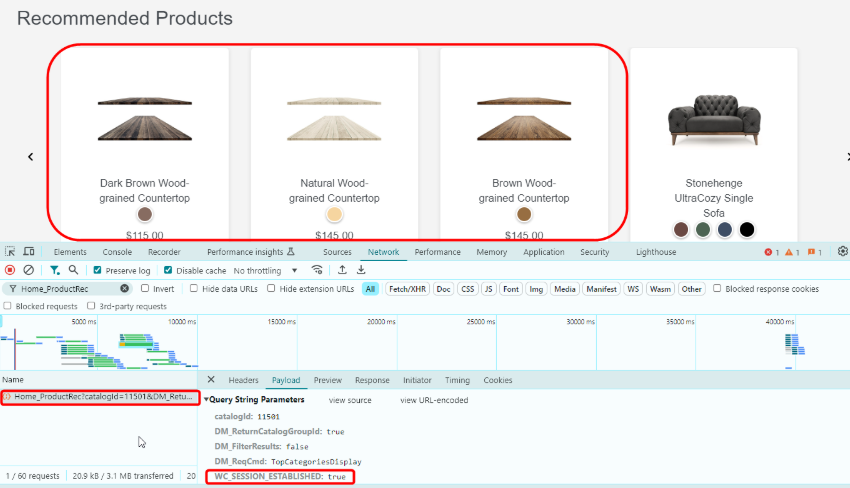
If the custom code is enabled, the eSpot API call includes the
WC_SESSION_ESTABLISHED cookie as a name-value pair (NVP)
appended to the query parameters when the eSpot is loaded in the React-based store.
The eSpot activity will display the recommended content targeted by the cookie, in
this case countertops.