
Health Check
Through this module, users can manage Health check for Deployments (NiFi endpoints) and Integrations
(adapters) through the following steps:
- On the Main Menu bar, click Monitoring then in sub-menu Select Health Check.
- The Health Check screen appears, and it lists down the available Deployments and
Integrations.
Figure 1. Health Check 
- Using Process Type drop-down, user can filter the tile accordingly.
Figure 2. Process Type 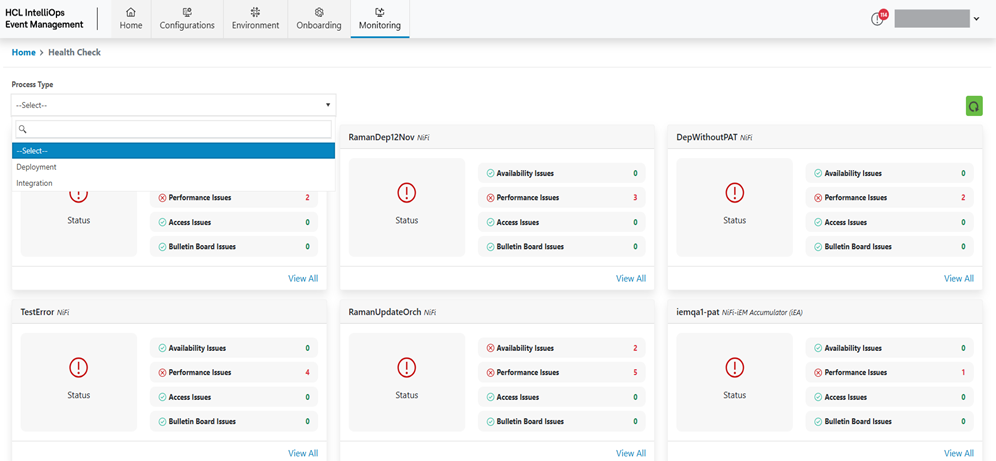
- Each tile categorized the issues into three categories:
- Availability
- Performance
- Access
- To View detailed logging click on View All link on each tile. It will provide the
details of KPI corresponding to each category.
Figure 3. Logs (KPI Details) 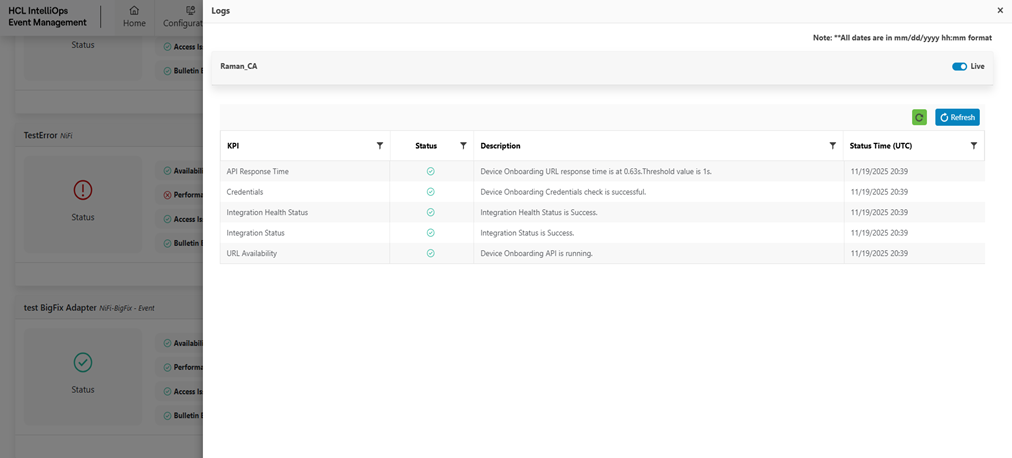
Refer to the following table to understand the fields mentioned in the above figure.
Table 1. View Health Check Logs Field Fields Description KPI Displays the KPI Name. Status Displays the Status Success or Fail. Description Displays the Description. Status Time Display the Status Time.