
Just-in-Time Privacy Policy for the Next.js store
When enabled, the Just-in-Time Privacy Policy page is displayed as a pop-up window when a shopper first visits your store. Shoppers must review and accept the store privacy policy that is included on the page before they can proceed to browse and shop within the store.
You can enable the Just-in-Time Privacy Policy to display by selecting the associated store function in the Store Management tool for Management Center. For more information, see Enabling just-in-time Privacy Policy,
The content that displays on the page is the same as the content on the Privacy Policy page except for the inclusion of a check box for accepting the privacy policy. This check box displays on only the Just-in-Time Privacy Policy page.
The Just-in-Time Privacy Policy page (and other store pages) can also be configured to display an option for shoppers to provide consent for the tracking of their shopper behavior. If the store function for requesting consent from shoppers to track shopping behavior is enabled, additional text and radio buttons are included on the Just-in-Time Privacy Policy page. The radio buttons provide shoppers with the options to provide consent for tracking their shopper behavior or to decline being tracked.
Elements of the Just-in-Time Privacy Policy page
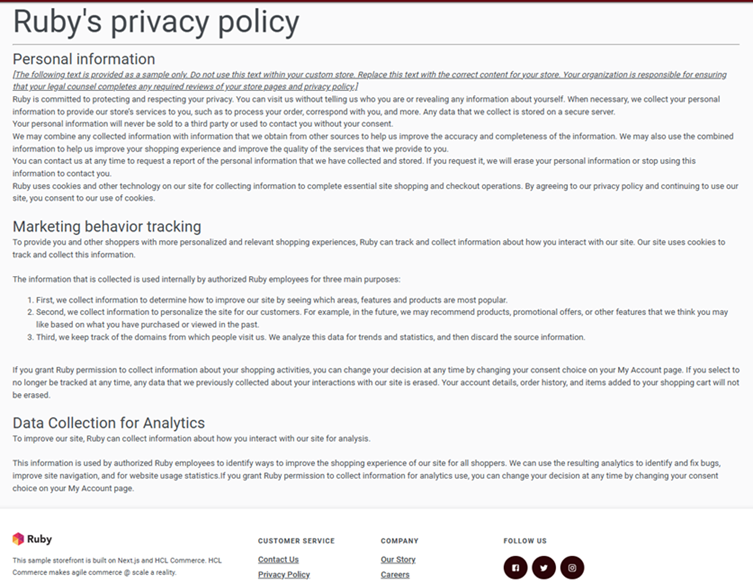
E-Marketing Spot for the page
The sample store page includes the following e-Marketing Spot, which can be used to display content or a web activity. The e-Marketing Spot is intended to display static content, so typically you fill it using default content rather than a web activity. Use a web activity only if you want to schedule or personalize the content, or take advantage of other web activity features.
By default, the e-Marketing Spot is used to display the store's privacy policy as static content. This privacy policy content is the same static content that is displayed on the Privacy Policy page.
For more information, see Privacy Policy for the Next.js store.
| E-Marketing Spot name and details | Supported default content types | Supported web activities |
|---|---|---|
|
PrivacyPolicyPageCenter_Content
Recommended usage: Display content about your store's privacy policy and provide a check box for shoppers to accept the policy. Optional usage: Display content to request consent from shoppers for tracking shopping behavior, such as for marketing purposes. Include details for your site's usage of any subsequent collected data, and provide selectable radio buttons for shoppers to use to provide or decline consent for your store to track their shopping behavior. The radio button options for providing consent display only when the consent management store function is enabled. If your site must comply to GDPR or any other regulation that requires you to obtain user consent before processing a user's personal data, enable this store function. For more information about enabling this functionality, see Enabling consent management. |
This e-Marketing Spot and the associated marketing content for your store's privacy policy are managed within the Marketing tool in Management Center. The Privacy Policy page uses an e-Marketing Spot named PrivacyPolicyPageCenter_Content. The marketing content is named according to the naming convention PrivacyContentVersionx.x, where x.x is the current version of the privacy policy. For instance, the default content for the Next.js store privacy policy is PrivacyContentVersion1.0. The
Just-in-Time popup uses an e-Marketing Spot named
PrivacyPolicyPageCenter_Content,
which contains the following three content items:
For more information about editing the
content, see Updating the privacy policy content.
Note: x.x represents the current
version of the privacy policy. The default version
is 1.0. |
Run web activities that use the following actions: |