
Configuring Actions and Notifications
Configure geofence actions and notifications to monitor device movement, trigger policies or actions, and send alerts when devices enter or exit defined zones.
-
Track Only – Monitors device location but does not perform an action.
-
Notifications – Sends a notification message to the device when it enters or exits the zone.
-
Policy Group – Applies policies to the device when it crosses the zone boundary.
Setting Up Notifications for Geofence Events
Notifications allow devices to receive messages when they enter or exit a defined geofence zone. This is useful for alerting users or triggering specific actions when they cross zone boundaries.
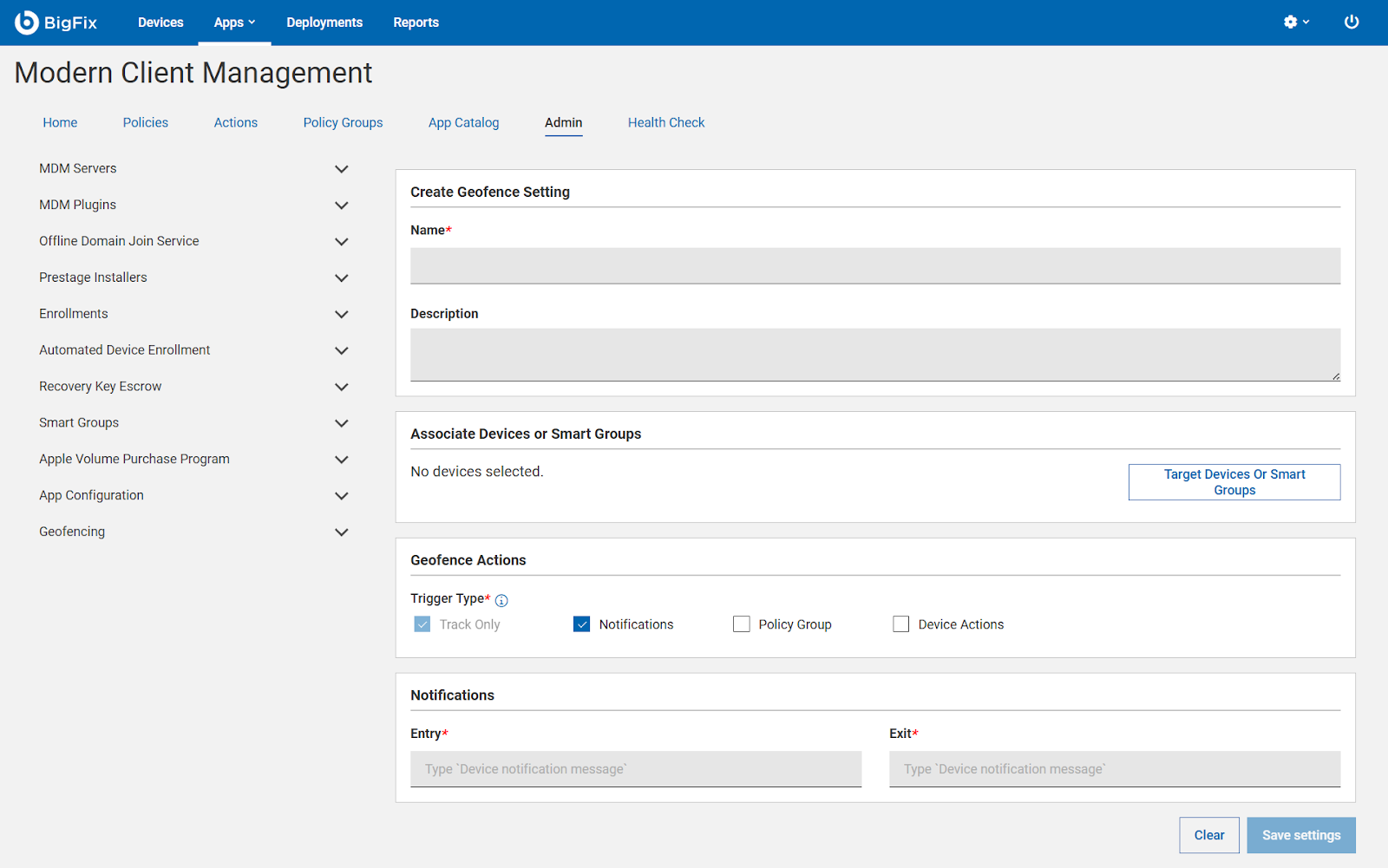
For notifications, make sure the Notifications checkbox is selected. Enter Notification Messages
-
Entry: Message displayed when a device enters the geofence. Example:
"You have entered the secure zone."
-
Exit: Message displayed when a device exits the geofence. Example:
"You have exited the secure zone."
Tip: Keep messages clear and concise for end users.
Once messages are configured and devices are associated, click Save Settings.
Devices will now receive notifications automatically based on the geofence trigger. This setup ensures that devices in your MDM deployment are aware of zone boundaries and can be promptly notified when entering or leaving a zone.