
Feature configuration
The Feature Configuration page in BigFix WebUI enables you to target specific MDM servers and deploy advanced feature modules to managed endpoints. After uprading to MCM v3.6 or later, use the Feature Configuration page to activate specialized management capabilities like Geofencing, Battery Health monitoring, Jailbreak detection, and Remote Access for your MDM servers.
Prerequisites for Geofencing, Battery Health, and Jailbreak features
- 1. Google Cloud Platform (GCP) Account
-
- An active Google Cloud Platform account is a mandatory prerequisite. If you do not have one, you must navigate to the Google Cloud Console to sign up and complete the registration process.
- Service Account and Permissions: A dedicated GCP
Service Account (e.g.,
bigfix-mcm-service-account) must be created with specific IAM roles to authorize secure communication. Required roles include:- API Keys Admin
- Artifact Registry Writer
- Cloud Run Editor
- Firebase Admin
- Firebase Develop Admin
- Pub/Sub Editor
- Secret Manager Admin
- Service Account Key Admin
- Service Account User
- Viewer
- Required Google Cloud APIs: The following APIs must be
enabled in your Google Cloud Project to allow the automation to
interact with the necessary services. For more detailed
information on the required GCP services, refer to GCP Services Reference Guide.
Required GCP APIs
- Artifact Registry API To store and retrieve container images for Cloud Run.
- API Keys API To generate, restrict, and manage Google Maps API keys.
- Cloud Billing API To verify billing configuration.
- Cloud Resource Manager API To Fetch IAM policies and validate project metadata.
- Cloud Run Admin API To deploy and manage the Cloud Run services.
- Firebase Management API To programmatically register Android/iOS apps and manage Firebase resources.
- Identity Toolkit API Required if the automation configures Firebase Authentication (e.g., Anonymous Auth).
- Maps JavaScript API and Places API Required to display the map.
- Pub/Sub API To create and manage topics and subscriptions.
- Secret Manager API To store and retrieve sensitive configuration and keys.
- Service Usage API Necessary for the automation to enable services and check quotas/status.
- 2. Firebase Project Creation
-
A Firebase project must be created and linked to your GCP project. This project is essential for managing app communication and delivering real-time notifications via Firebase Cloud Messaging (FCM). Refer to the official documentation at https://firebase.google.com/docs/projects/use-firebase-with-existing-cloud-project.
- The Firebase project name should match your Google Cloud Project name.
- After creating Firebase project, initialize the Firebase
Authentication:
- Go to and Click on Get Started
- 3. Billing and Cloud Run Costs
- Billing must be enabled in the Google Cloud Console as part of the
account registration.Note: The Cloud Run service, which acts as a bridge for location updates and data exchange, involves operational costs based on usage.
- GCP Pricing: https://cloud.google.com/pricing
- Firebase Pricing: https://firebase.google.com/pricing
- 4. Email required details to HCL
- Send the required Android and Apple details via an email to
bigfix_mdm_admin@hcl.comEmail Template to send the requiredSubject: Account Details for BigFix UEM App Deployment Configuration - [Customer Organization Name] Dear HCL BigFix Admin Team, Please find below the organization and enterprise details required to proceed with BigFix UEM app Deployment configuration. As per the deployment scope, we have provided the relevant details for our chosen operating system platform(s). Section A: Android Enterprise Details Required for Android Deployment Android Enterprise Organization ID: [Customer to insert ID] Associated Enterprise Email: [Customer to insert Email] Section B: Apple Business Manager (ABM) Details Required for iOS Deployment Apple Organization Name: [Customer to insert Exact Name] Apple Organization ID: [Customer to insert Org ID] Best regards, [Customer Name] [Customer Title] [Customer Organization Name]
- Android Enterprise ID: To manage Android devices, you must share your
Enterprise ID.
-
Where to find it: In the BigFix WebUI, navigate to Apps > MCM > App Catalog > Add > Android > Public Apps.
Click the profile settings icon to retrieve your Organization ID / Enterprise ID.
-
- iOS/iPadOS Credentials: You must obtain a
.p12certificate from the HCL/BigFix team. This is required for the Firebase project integration after deployment. - Postgres password for db
- As a prerequisite for the deployment process, a Docker repository in Artifact
Registry must be created manually. Note: To Create the Repository:
- In the Google Cloud Console, navigate to Artifact Registry > Repositories.
- Click Create Repository.
- Configure the repository with the following details:
- Name:
bigfix-docker-repo(must match exactly) - Format: Docker
- Location:
asia-south1(or the region specified in your deployment configuration)
- Name:
- Click Create.
- The repository name must exactly match
bigfix-docker-repo. - Ensure the repository is created before starting deployment to avoid failures during the setup process.
Configuration Steps
- In the MCM app in BigFix WebUI, navigate to .
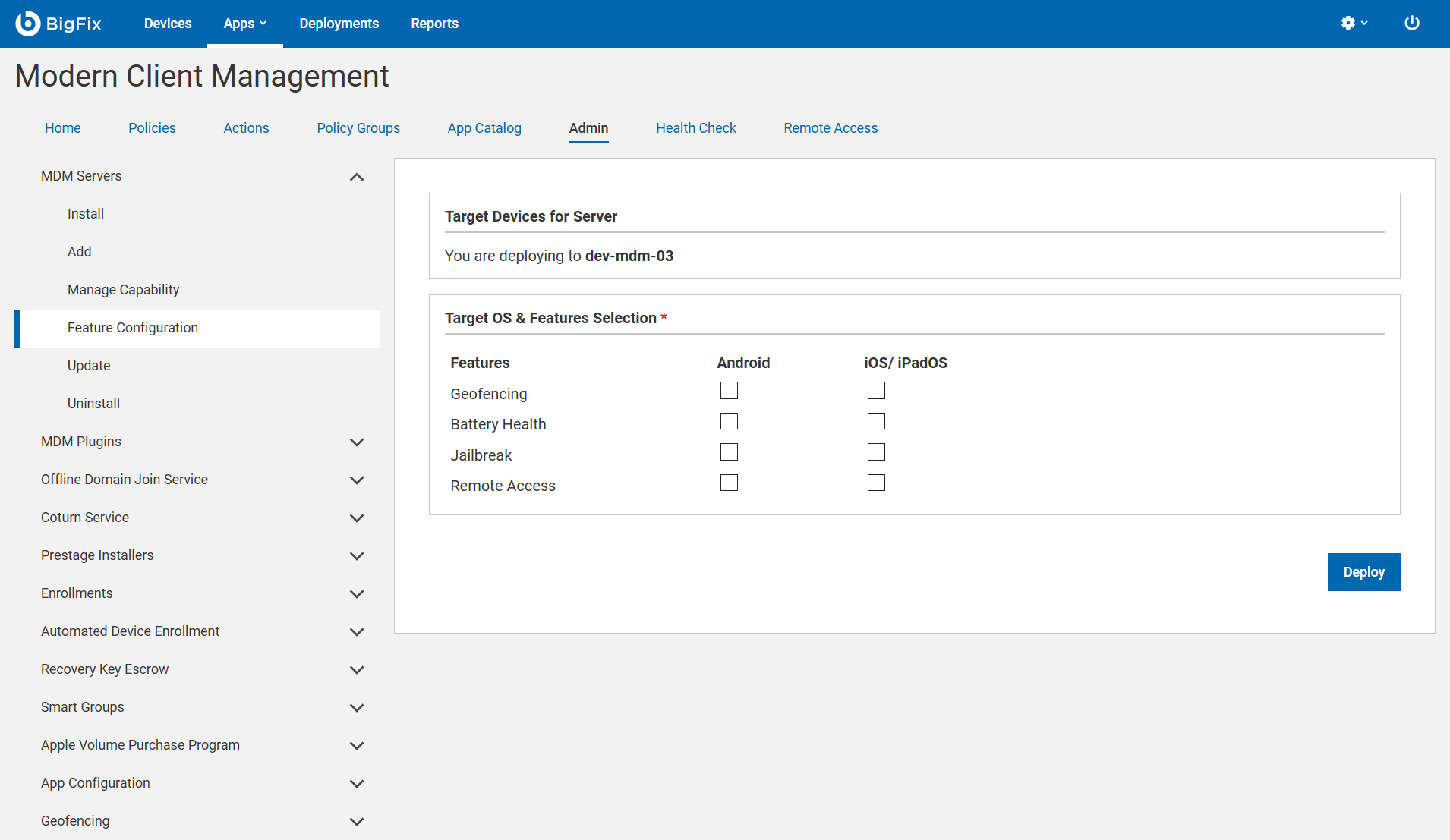
- In the Target Devices for Server section, click Select. Choose the MDM server(s) from the list that will host the selected specialised features.
- In the Target OS & MDM Features section, a feature matrix is
displayed allowing administrators to enable or disable specific features. Select
the check boxes for the capabilities you want to enable across supported
platforms.
Feature Description Geofencing Enables location-based configuration profiles or restrictions. Battery Health Monitors real-time battery performance and health metrics. Jailbreak Detects compromised or rooted status on mobile devices. Remote Access Allows administrators to remotely view or control the device for troubleshooting.
- For Geofencing, Battery Health, and Jailbreak features configure the following.
For Remote Access you can skip these steps.
- Configure App Push Notifications based on your target platforms:
- For iOS: Select the checkbox to enable APNs Auth Configuration.
Important: You must obtain the SHA fingerprint and APNs certificate from the HCL Admin team. For iOS, the APNs certificate must be uploaded to Firebase after deployment. Refer to How to Upload an APNs File to Firebase for iOS - Customer GCP Configuration: Upload service account JSON file.
- Region: An artifact registry with name bigfix-docker-repo needed to be created by client for automation. And specify the region on the cloud console and same region needs to be selected on this page.
- Configure App Push Notifications based on your target platforms:
- Database Configuration: This configuration is displayed dynamically only if ChromeOS is not configured. When displayed, enter a string to set Postgres password for db connection.
- Click Deploy to apply the configuration to the selected servers.
Post-Deployment Requirements
.p12 certificate received from the HCL Admin team to your
Firebase project to enable push notifications after the deployment is
complete.Automated Feature Updates
When you enable or disable features in the WebUI, the system automatically sends these updates to your managed devices. The background process ensures that whenever you update your settings, your devices receive the instructions instantly and reliably, keeping your configurations in sync without requiring any manual intervention.