
Configure SAML2.0
- To Configure SAML Authentication select authentication type is “SAML2.0”
following section will appear.
Figure 1. SAML2.0 Details 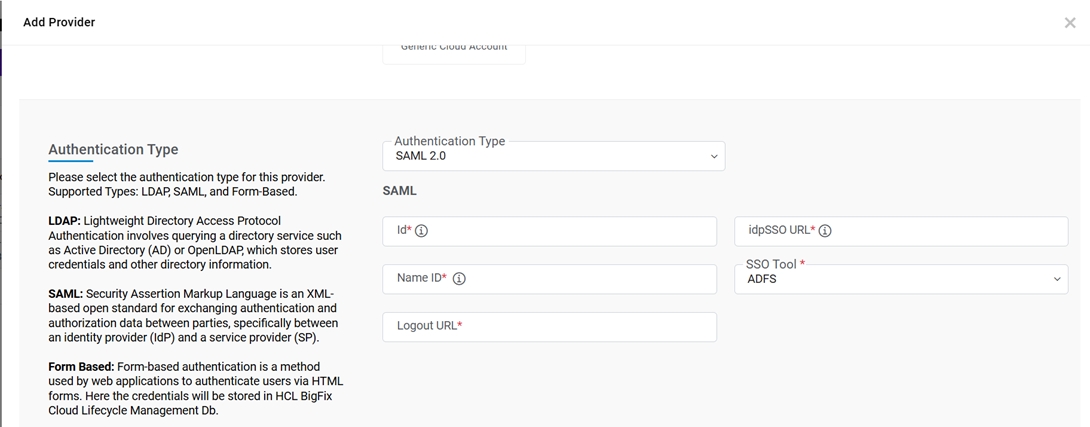
- Define SAML2.0 attributes as described in the table below:
Table 1. SAML2.0 Attributes Field Description Id Identity Provider might need this to establish the identity of the service provider requesting login. Basically, it is used for handshaking of the application. Example: HCL BIGFIX CLMDEV. idpSSO URL Identity Provider Single Sign-on URL, where our website redirect for
Authentication.
Example: https://XXX.COM/SAAS/auth/federation/sso.
Name ID NAMEID is the complete path of xmlnode where NameID value (USERNAME/EMAIL) exist. It based on identity provider.
Example: VMWAR Identity Manager: /samlp:Response/saml:Assertion/saml:Subject/saml:NameID
ADFS : saml2:NameID.
SSO Tool Allowed values are ADFS, IDM, PINGFEDERATE, PINGIDENTITY Logout URL Logout URL where application will take user after logout the application. - Click Add to add a provider or click Cancel to stop the action.Note:These details are required as a record against the provider in the application. All the fields marked with asterisk (*) are mandatory.
A success message appears.
Figure 2. Add Provider (Cont.) 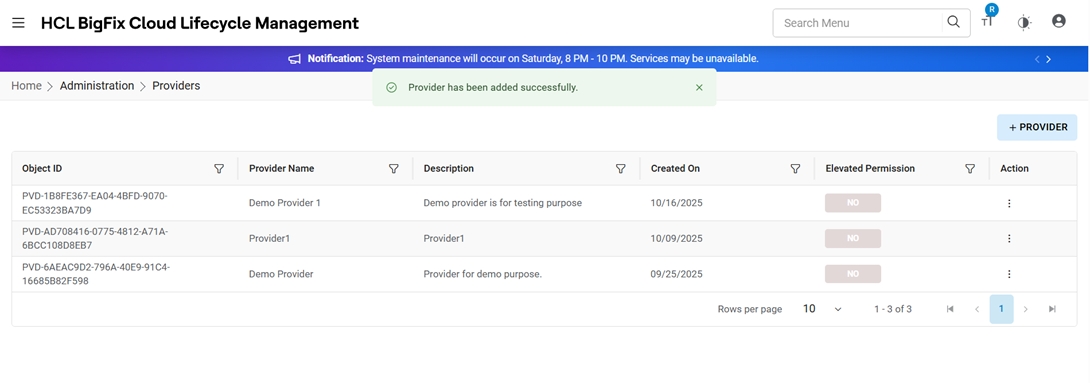
A new provider has been created, and it appears in the View Provider as shown in the figure.