
Configuring volume pricing for the Next.js store
In the Next.js store, you can configure volume pricing for the users from the Management Center for HCL Commerce.
About this task
Procedure
Configure the volume pricing for the Next.js store user interface by
following the steps given below:
- Open Management Center Tools.
- From the left navigation menu, go to .
-
Enter the product SKU in the search box on the right side.
The SKU details appear.
- Navigate to .
-
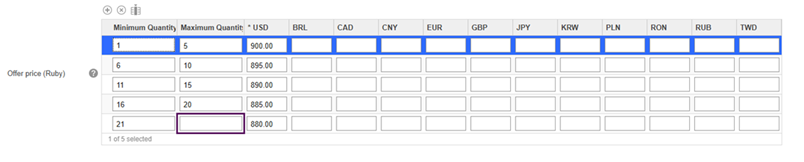
Enter the Minimum and Maximum
quantities and price values.
Note: In the last row, leave the Maximum Quantity field empty to allow the user to enter any quantity.
- Click the Save button.