Assigning descriptive
attributes from the attribute dictionary to a single catalog entry
Assigning descriptive
attributes from the attribute dictionary to a single catalog entry
About this task
Additional descriptive information about a catalog entry is called a descriptive attribute. Descriptive attributes can have assigned values or predefined values. Descriptive attributes can display text or images.Use attributes that are contained within the attribute dictionary for new products or products that do not already contain descriptive attributes.
For example, a coffee maker might have the following text descriptive attributes: Auto-off, Timer, Espresso. An article of clothing might have a descriptive attribute of Dry-clean only.
 If you want
to assign multiple descriptive attributes to multiple catalog entries,
use the attribute assignment features. For more information, see Assigning attribute dictionary descriptive attributes to multiple catalog entries
If you want
to assign multiple descriptive attributes to multiple catalog entries,
use the attribute assignment features. For more information, see Assigning attribute dictionary descriptive attributes to multiple catalog entries
 To help you determine which catalog entries
need to be assigned a specific attribute, you can view the existing
assignments for an attribute in the References tab
for that attribute. For more information, see Viewing the catalog entries that are assigned an attribute dictionary attribute.
To help you determine which catalog entries
need to be assigned a specific attribute, you can view the existing
assignments for an attribute in the References tab
for that attribute. For more information, see Viewing the catalog entries that are assigned an attribute dictionary attribute.
Procedure
- Specify a value for the attribute.
Option Description Attributes with predefined values From the list in the Value field, select a value. Attributes with assigned values In the Value field, specify a value for the attribute.  You can assign one or
more values for the same descriptive attribute in a catalog entry.
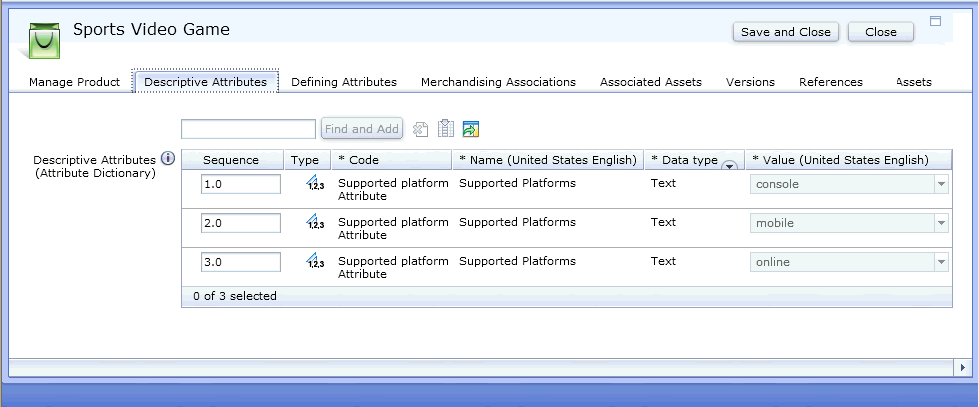
The same descriptive attribute can be added in multiple rows with
different values assigned to the attribute. For example, if a specific
video game supports more than one platform, you can assign more than
one attribute value to that product. To assign more than one value,
you can add multiple rows with the same attribute but different supported
values as shown here:
You can assign one or
more values for the same descriptive attribute in a catalog entry.
The same descriptive attribute can be added in multiple rows with
different values assigned to the attribute. For example, if a specific
video game supports more than one platform, you can assign more than
one attribute value to that product. To assign more than one value,
you can add multiple rows with the same attribute but different supported
values as shown here: