
Fixlet details page
The Fixlet Details Page provides comprehensive information about the status and configuration of your Fixlet Stream.
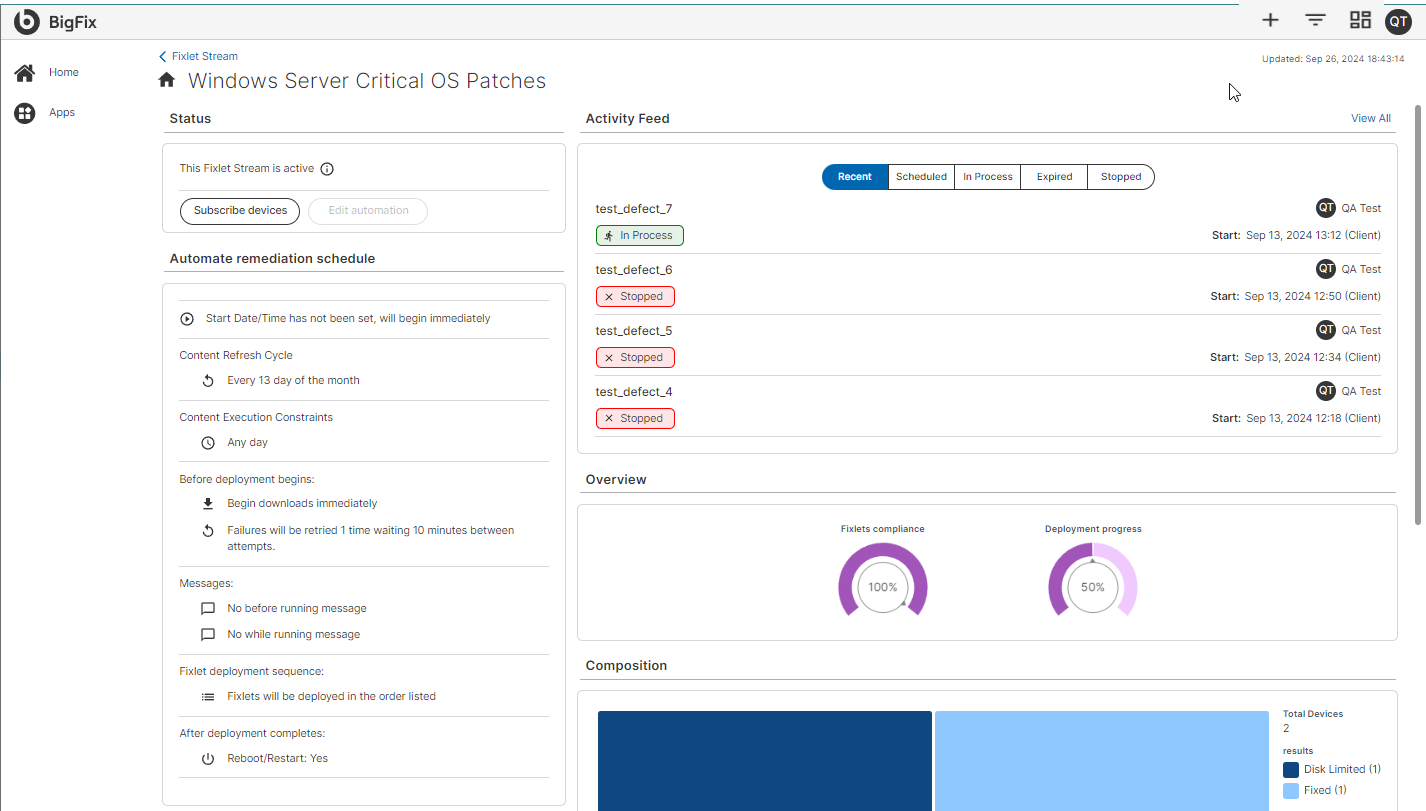
Here’s what you can find:
-
Status: Displays whether the Fixlet Stream is Active or Inactive. Users can toggle this status as needed.
-
Edit Options:
- Edit Subscription: Modify the device subscriptions associated with the Fixlet Stream.
- Edit Automation: Change the automation settings, including the schedule or conditions.
-
Activity Feed:
- Shows a list of Recent, Scheduled, In Progress, Expired, and Stopped Deployments.
- Displays Fixlet Compliance data, indicating the percentage of compliant devices.
- Provides Deployment Progress Data, allowing users to track the success of the current deployment.
- Overview: Displays real-time data to monitor Fixlet Compliance and Deployment Progress.
- Composition: Shows the composition of the results.
- Subscription definition: Shows the dynamic filter conditions that you have defined to subscribe devices to the Fixlet Stream.
- Properties: Displays critical information about the Fixlet Stream such as its category, ID, severity.
- Fixlets: Lists all the applicable Fixlets along with some critical information about the Fixlets in a grid.
- Subscribed devices: Lists all the devices that are subscribed to the Fixlet Stream along with their details in a grid.