
Disabling hide prices for guest users
The hide price functionality restricts guest users from viewing product prices on the Product Detail Page (PDP) and Product Listing Page (PLP).
About this task
Procedure
- Open Lab Tools.
- From the left navigation menu, go to .
- All the stores are listed on this page. Double-click on the Ruby store. The tab displays.
-
Navigate to the window.
Note: Check that the Enable guest shopping checkbox is selected.
-
Select the checkbox to Show product prices for guest users (when the
store is served by Next.js).
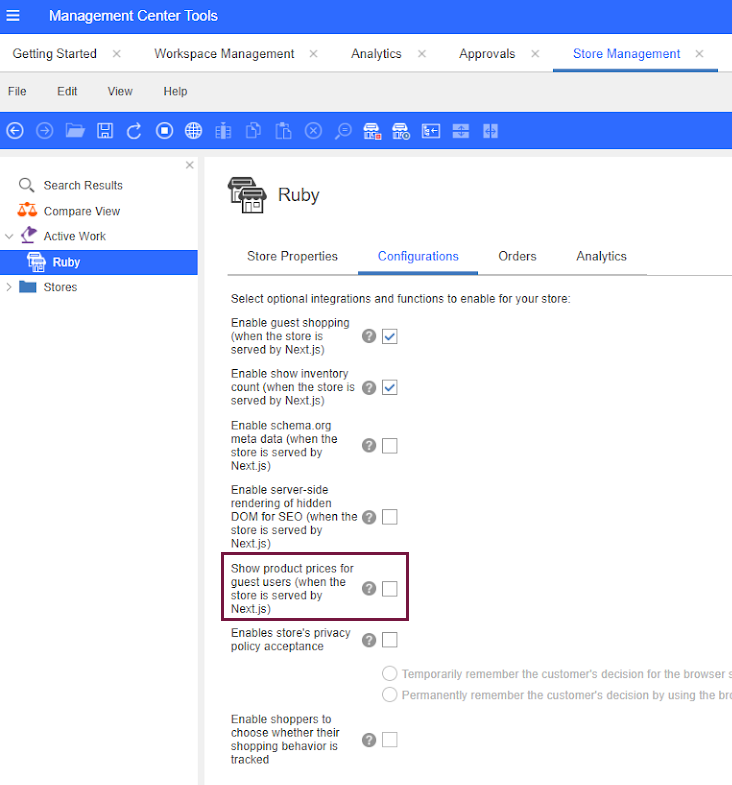 Note: If product prices are showing by default for guest users, deselect the Show product prices for guest users (when the store is served by Next.js) checkbox to hide them.
- Click the Save button.
- Refresh the registries in Lab for Commerce+ Transaction Server or restart the server container.