
Enabling schema org metadata for Ruby storefronts (B2C and B2B)
Schema org metadata is added to the Ruby storefront pages for better search engine optimization (SEO). Schema org is a collaborative community activity that creates, maintains, and promotes schemas for structured data on the internet, web pages, email messages, and beyond.
About this task
Procedure
Enable the schema org metadata for the Ruby storefront user
interface by following the steps given below:
- Open Commerce Lab Tools.
- From the left navigation menu, go to .
- All the stores are listed on this page. Double-click on the Ruby store. The tab displays.
- Navigate to the window and select optional integrations and functions to enable schema org metadata for the Ruby storefront.
-
Click the check box to Enable Schema Org meta data (when the store
is served by Next.js).
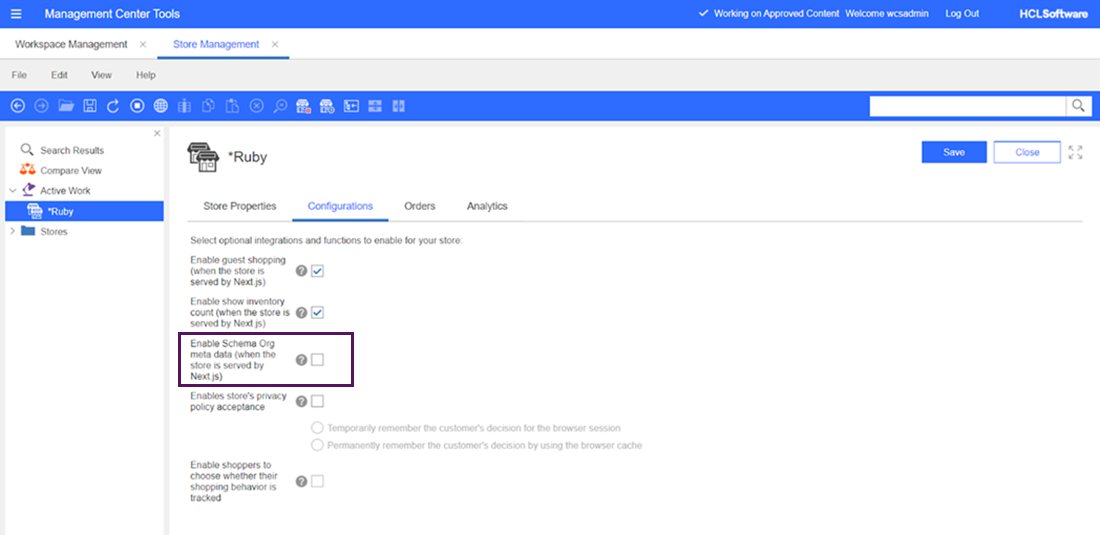 Schema org metadata is enabled for the user in the Ruby storefront.
 - Click the Save button.
- Refresh the registries in Commerce Lab for Commerce+ Transaction Server or restart the server container.
-
Validate your Ruby storefront URL by following these steps.
- Open validator.schema.
- Enter the Ruby storefront URL and select Run test button.