ResetPassword URL
Resets or updates passwords of users. This command works regardless of the authentication mode: Database, LDAP or Third Party.
The ResetPassword function can be used by the following users:
- Registered storefront users and administrators, to update their own passwords, while authenticated.
- Registered users who want to log on but have forgotten their password. They can
use this command to reset their password without logging in. There are three
methods that you can use to generate a temporary login for the user:Important: As of Version 9.1.7.0, the first two methods are deprecated and will be removed in a future version.
- A randomly generated password is emailed to the registered user. This method is now deprecated.
- A long validation code that is based upon their ID and other information
is emailed to the user. The user then enters the validation code along
with a new password to update their login credentials. This method is
now deprecated.
For more information, see Configuring Reset Password to use long validation codes.
- A long validation code is not practical in all
circumstances. For example, when a user is working on a mobile phone.
Instead, a short, numeric validation code is sent. This is the
recommended method for use with Commerce+ Transaction Server version 9.1.7.0
and greater.
For more information, see Configuring Reset Password to use short validation codes.
As noted, the previous methods, while temporarily available, will eventually be disabled.
Use this URL with SSL (Secure Sockets Layer) to ensure that the logon password and personal information are encrypted. To do so, type the URL with the HTTPS secure protocol.
URL structure
- http:// host_name/path/
- The fully qualified name of your server and the configuration path
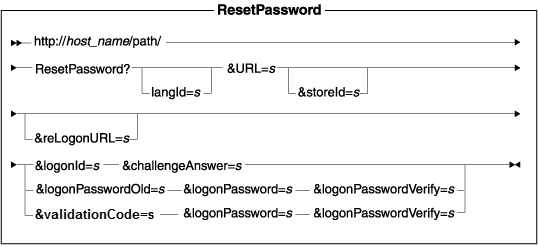
Parameter values
- langId
- Sets or resets the preferred language for the duration of the session; the supported languages for a store are found in the STORELANG table
- URL
- The URL to be called when the command completes successfully
- storeId
- The reference number of a store
- reLogonURL
- The URL to which the ResetPassword command is redirected in the case of an error condition
- logonId
- The logon ID of the user whose password is to be reset
- challengeAnswer
- Answer to the challenge question; used to confirm the identity of the user
- logonPassword
- The new password of the user
- logonPasswordOld
- The current password of the user
- logonPasswordVerify
- The verified password of the user, which must be identical to logonPassword
- validationCode
- The randomly generated code that is emailed to the registered user.
https://myhostname/webapp/wcs/stores/servlet/ResetPassword?URL=basemall.jsp
    &logonId=a&challengeAnswer=a
If the user is a guest, the command verifies that the supplied answer to the challenge question matches the one in the database. If the match is successful, it generates an arbitrary password, updates the database, and emails the password to the user (identified by the value of the logonId parameter).
Example 2: Reset password while authenticated
This example resets a password by specifying the old and new passwords for registered users who want to update their passwords:
    https://myhostname/webapp/wcs/stores/servlet/ResetPassword?URL=basemall.jsp
&logonPasswordOld=a&logonPassword=b&logonPasswordVerify=b
If the user is a registered customer, or administrator, it verifies that the old password is correct and that the new password matches the verified password. It also verifies that the password complies with requirements defined by this user's password policy. If all conditions are satisfied, it updates the database with the new password.
Example 3: Reset password while unauthenticated (emails a validation code)
-
Resets a password by providing the logonId and the challenge answer for registered users who may have forgotten their password.Note: As they have forgotten their password, they need to run as a guest:
https://myhostname/webapp/wcs/stores/servlet/ResetPassword?logonId=jsmith&challengeAnswer=TheRedFoxFlies&URL=LogonFormIf the user is a guest, the command verifies that the supplied answer to the challenge question matches the one in the database. If the match is successful, it generates a validation code, and emails the code to the user.
- Enters the validation code, new password, and new password verification.
This step must be completed within the time frame that is specified in
ResetPasswordGuestCmdImpl.getExpiryPeriod()which defaults to 30 minutes.https://myhostname/webapp/wcs/stores/servlet/ResetPassword?validationCode=289213&logonPassword=Just4Fun!&logonPasswordVerify=Just4Fun!&URL=LogonForm
Exception conditions
On an error condition, if you specify an error URL in the reLogonURL parameter, the ResetPassword command gets redirected to that URL and an error code is placed on the request. Otherwise, if you do not use the reLogonURL parameter, the command will throw an ECApplicationException and redirect to a error view depending on user identity. You can obtain the error code by using the class ErrorDataBean.
If a required parameter is missing or incorrect, the ResetPassword command sets one of the following error codes, depending on the identity of the requester. These error codes get added to the specified error URL if you use the reLogonURL parameter:
Error view based on identity:
- Registered user
- ResetPasswordRegisterErrorView
- Guest user
- ResetPasswordGuestErrorView
Error conditions and associated error codes:
| Command requester | Error condition and associated error code |
|---|---|
| Guest or a logged in user. |
Note: In this case, the command will redirect to the ResetPasswordView
error view.
|
| Guest |
|
| Logged in user |
|
The error handler is ECConstants.EC_ERROR_CODE.