TinyMCE Editor
The TinyMCE editor gives you a rich set of formatting options when you write in text fields throughout Commerce Lab.
Commerce Lab has TinyMCE editor version 6.8.4 available for customers but
it is not available by default. You can enable the TinyMCE by running the following
query:
https://hostname:8000/lobtools/cmc/Configure?featureName=ckeditor&featureEnabled=false
Where, hostname:8000 is domain and port used to launch the Commerce Lab
Throughout Commerce Lab, some objects contain fields where you can edit and format text. For example, you can create a bullet list or add HTML code to enhance text display on the storefront.
The following fields support the TinyMCE editor in the Commerce Lab for rich
text editing:
| Tool | Fields |
|---|---|
| Catalogs tool |
|
| Marketing tool |
|
| Promotions tool |
|
The following image displays the editing options available with the TinyMCE editor.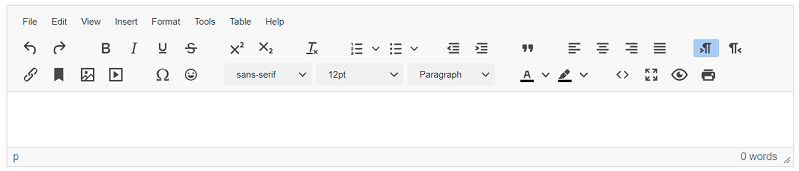
For more information about the various options in the toolbar, see Editing text in the TinyMCE editor.
Advantages of TinyMCE editor
TinyMCE editor has similar features as CKEditor except for the following features that are not available in the CKEditor:- You can insert emojis in the long descriptions.
- You can insert or edit the media.
The following table lists the capabilities of the TinyMCE editor.
| Editor features | TinyMCE |
|---|---|
| Undo | ✓ |
| Redo | ✓ |
| Bold | ✓ |
| Italic | ✓ |
| Underline | ✓ |
| Strikethrough | ✓ |
| Superscript | ✓ |
| Subscript | ✓ |
| Clear format | ✓ |
| Numbered list | ✓ |
| Bulleted list | ✓ |
| Decrease indent | ✓ |
| Increase indent | ✓ |
| Block Quote | ✓ |
| Align left | ✓ |
| Align center | ✓ |
| Align right | ✓ |
| Justify | ✓ |
| Text direction from left to right | ✓ |
| Text direction from right to left | ✓ |
| Insert/Edit link | ✓ |
| Anchor | ✓ |
| Insert/Edit image | ✓ |
| Insert/Edit media | ✓ |
| Insert special character | ✓ |
| Insert Emojis | ✓ |
| Font | ✓ |
| Font size | ✓ |
| Paragraph format | ✓ |
| Text color | ✓ |
| Background color | ✓ |
| Edit/View source code | ✓ |
| Full screen | ✓ |
| Preview | ✓ |
| ✓ | |
| New Document | ✓ |
| Cut | ✓ |
| Copy | ✓ |
| Paste | ✓ |
| Paste as plain text | ✓ |
| Find and replace | ✓ |
| Replace | ✓ |
| Select all | ✓ |
| Insert horizontal line | ✓ |
| Insert nonbreaking space | ✓ |
| Insert date and time | ✓ |
| Insert/Remove Numbered list | ✓ |
| Insert/Remove Bulleted list | ✓ |
| Insert/delete table | ✓ |
| Word count | ✓ |
| URL link | ✓ |
| Insert document bookmark | ✓ |
| Style (for example, Coding, Red title) | ✓ |
| Show block | ✓ |
| About TinyMCE | ✓ |