Commerce Lab tools

The following table summarizes the tools that the Commerce Lab provides.

Table 1. Commerce Lab Tools
Tools Description
Search You can use the Search tool to manage:
  • Search term associations
  • Search Rules
  • Search Templates
  • Analytics Tool
Catalog You can use the Catalog tool to manage:
  • Master Catalog
  • Sales Catalogs
  • Attribute Dictionary
  • Catalog Uploads
  • Unassigned Catalog Entries
  • Unassigned Categories
  • Set default Catalog
Inventory and Fulfillment You can use the Inventory and Fulfillment tool to manage:
  • Inventory Dashboard
  • Inventory Listing
  • Fulfillment Center
Marketing You can use the Marketing tool to manage:
  • Template Activity
    • Activities
    • Activity Templates
    • Email Templates
  • Marketing Actions
    • Contents
    • Customer Segments
    • Customer Segment Exports
    • E-Marketing spots
    • Campaigns
Promotions You can use the Promotions tool to manage:
  • Promotions
  • Promotion Code Imports
  • Promotion Code Exports
Customer Management You can use the Customer Management tool to manage:
  • Customer Accounts
  • Contracts
  • Price Rules
  • Price Lists
  • Price List Uploads
  • Catalog Filters
  • Catalog Filter Uploads
  • Active Catalog Filter
Store Management You can use the Store Management tool to manage:
  • Manage Stores
  • Extended Site Stores
  • Page Composer
  • Shipping
    • Shipping Jurisdictions
    • Shipping Modes
    • Shipping Codes
  • Tax
    • Tax Codes
    • Tax Jurisdictions
    • Tax Categories
  • Installments
    • Installment Rules
    • New Installment Rule
Workspaces You can use the Workspaces tool to manage:
  • Task List
  • Active Workspaces and Task Groups
Analytics You can use the Analytics tool to manage:
  • Overview
  • Revenue
  • Visitors
  • Products
  • Search
Administration You can use the Administration tool to manage:
  • Organizations
    • Member Groups
    • Organizations
    • Users
    • Approvals
  • System Administration
    • Connectivity
      • Transports
      • Messages
      • Message Types
      • Scheduler
      • Connector Management
    • Security
      • Registries
      • Security Policies
You can access tools from the Commerce Lab dashboard.
Note: Commerce Lab allows you to right click on any tool and open the tool in a new tab. You can bookmark the link for future reference.
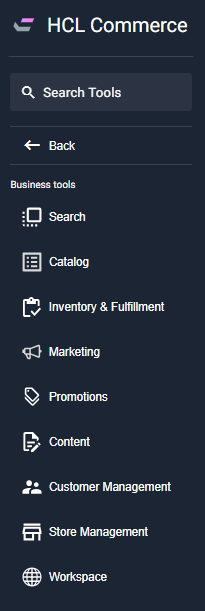
Commerce Lab tools menu with workspaces enabled

Developers familiar with the Commerce Lab framework can customize it further to suit their business needs.

Commerce Lab automatically picks up the language from the user's locale.

After logging in to the Commerce Lab, the session will eventually expire if the user interface is left idle for 30 minutes. See Re-login to the Commerce Lab for more information.