
Configuring the QRA license key
Run the Configure BigFix Quantum Risk Analyzer Key Task to write your license key to the QRA_License client setting on each endpoint you intend to scan.
About this task
License key management is standardized through a dedicated Task:
Configure BigFix Quantum Risk Analyzer Key. Running this
Task writes the license key to the QRA_License BigFix client setting on each
targeted endpoint. You do not enter the key in individual scan actions.
The BigFix Quantum Risk Analyzer - Scan Tool Task uses a Relevance expression that
checks for the QRA_License client setting on each endpoint.
Until this setting exists, scanning is not available: the Task is not relevant,
and therefore cannot be deployed, on those endpoints.
Procedure
- In the BigFix Console, open the QRA site and select the Task named Configure BigFix Quantum Risk Analyzer Key.
-
Click Take Action (or click the Configure Endpoint link in the
Actions box of the Description tab). In the Action Parameter dialog —
“Please enter your BigFix Quantum Risk Analyzer License. This will be saved
under Client Setting ‘QRA_License’” — enter the license key value provided by
HCL and click Ok.
Note:
License keys are issued as a string that begins with the
TYCHON-prefix (for example,TYCHON-<LICENSE_KEY>). Enter the key exactly as issued, including the prefix.Figure 1. Configure BigFix Quantum Risk Analyzer Key. Clicking Take Action opens the Action Parameter dialog, which saves the entered license under the QRA_License client setting. 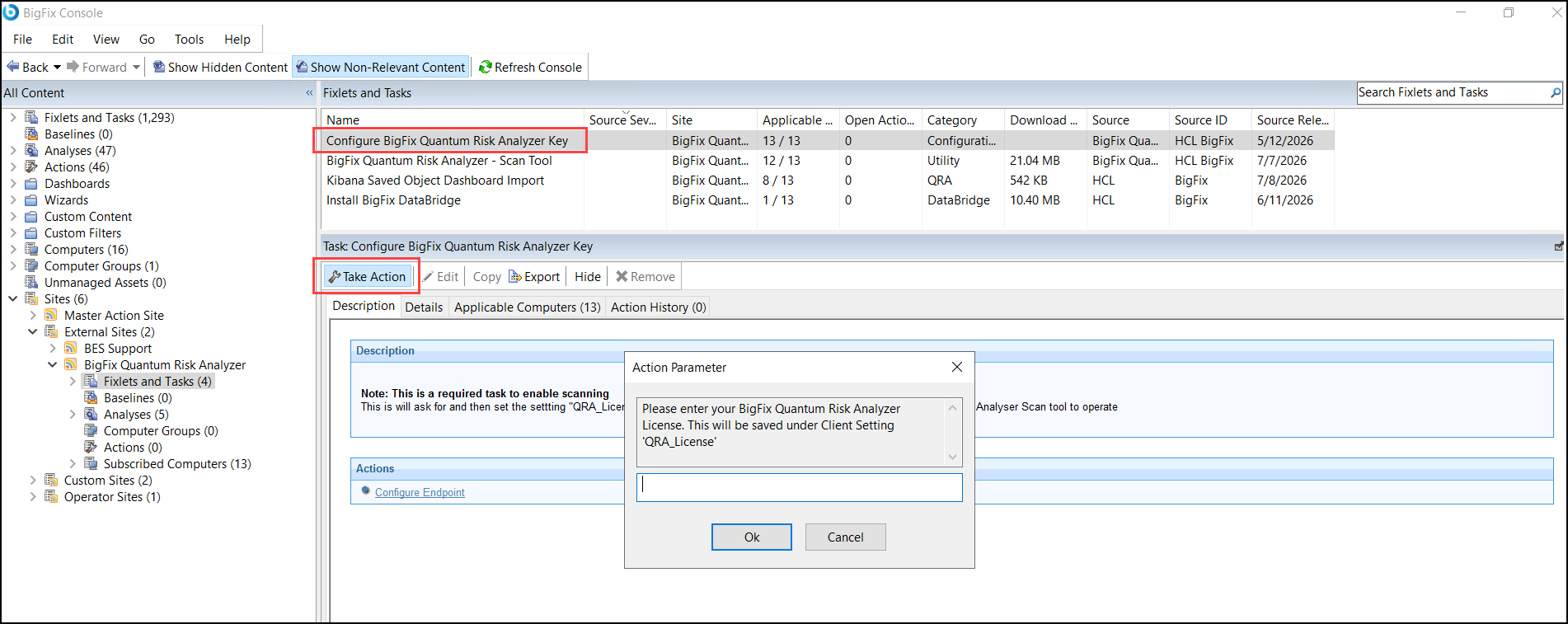
-
On the Target tab, select your targets directly, or
select Dynamically target by property.
If you run the configuration as a policy action, set the repeat schedule and remove the end date, as you would for any other policy action (see Take Action dialog, Target tab).
Figure 2. Take Action dialog, Target tab. With Dynamically target by property selected, the action targets all computers with the selected property values, and computers that later match the selected values are targeted automatically while the action is open. 
-
Click OK to deploy.
Manual per-group configuration is superseded by the Key Task, which applies the setting at scale.
What to do next
After configuring QRA_License on all target endpoints, wait one
BigFix Client evaluation cycle before deploying the scan Task. This ensures the
Relevance expression in the Task has been re-evaluated and applicable endpoints are
visible in the BigFix Console.