Introduction
The BigFix Quantum Risk Analyzer (QRA) discovers and assesses the cryptographic posture of your managed endpoints and surfaces the results through BigFix Analyses and Web Reports.
What is the BigFix Quantum Risk Analyzer?
The HCL BigFix Quantum Risk Analyzer (QRA) is an add-on to HCL BigFix that discovers and assesses the cryptographic posture of your managed endpoints. It deploys a lightweight scanner binary to your BigFix Clients, collects cryptographic findings, and surfaces the results through BigFix Analyses and Web Reports, so your team can identify quantum-vulnerable systems, prioritize remediation, and demonstrate compliance without leaving the BigFix Console.
From the BigFix Console, administrators invoke QRA through named Take Action options on the Scan Tool Task: the endpoint scan (the Scan Endpoint action, which covers active connections, running processes, and memory-loaded cryptographic libraries) and the optional filesystem scan (the Scan Endpoint and File System action, which covers certificates, keystores, and private keys stored on disk). Additional action options forward results to a preconfigured Elasticsearch system or export a CBOM report.
QRA consists of the BigFix delivery layer (Tasks, Analyses, and Web Reports) and
the certscanner scanner binary. The scanner requires a license
key, which you obtain from your HCL account representative.
Why quantum risk matters
Quantum computers will eventually break the RSA, ECDSA, and Diffie-Hellman algorithms that protect most enterprise systems today. Adversaries are already collecting encrypted traffic today and storing it for decryption once quantum hardware matures, a strategy known as Harvest Now, Decrypt Later. Federal agencies and critical infrastructure must transition to post-quantum cryptographic standards by 2035 per NIST guidelines. Regulatory drivers include EO 14028, NSM 10, OMB M-23-02, H.R. 7535, and the EU Cyber Resilience Act.
QRA gives you the cryptographic inventory your organization needs to plan and validate that transition, before the deadline forces the issue.
How QRA works with BigFix
QRA operates entirely within your existing BigFix infrastructure. The workflow is:
- Scan: A BigFix Task deploys the
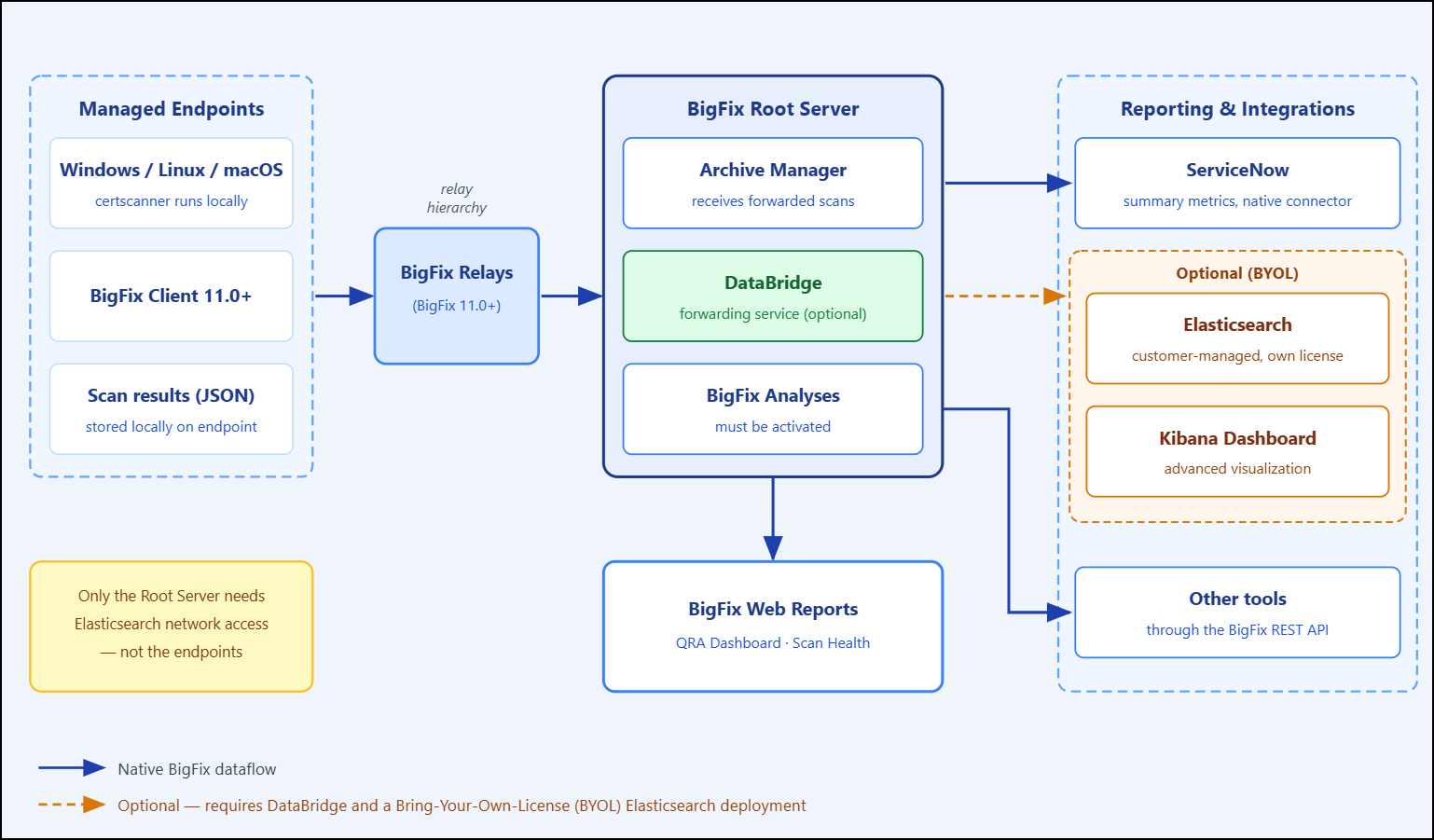
certscannerbinary to endpoints and runs it. BigFix Clients execute the scanner locally; no agent upgrade is required beyond BigFix Client 11.0. - Collect: The scan writes its results (qra_webreport_data.json) locally on each endpoint, under the BigFix Client quantum-scans folder. Only the Elasticsearch-forwarding and CBOM scan actions upload results through the relay hierarchy to the Root Server.
- Analyze: BigFix Analyses read the local scan results on each endpoint and surface properties, such as cryptographic findings, scan timestamps, and success or failure status, across all managed endpoints.
- Report: BigFix Web Reports aggregate the Analysis properties into two ready-made reports: the BigFix Quantum Risk Analyzer Dashboard (cryptographic risk assessment) and the BigFix Quantum Risk Analyzer Scan Health report (operational monitoring).
- Integrate (optional): If the ServiceNow connector is configured in your environment, summary metrics flow to ServiceNow. Other tools can consume QRA data through the BigFix REST API (see QRA architecture and dataflow).
- Optionally visualize: If your organization has Elasticsearch, the forwarding scan options upload results to the Root Server, where the optional DataBridge service sends them to Elasticsearch, and a pre-built Kibana dashboard provides advanced visualization.
Elasticsearch connectivity is not required at individual endpoints. If you choose to use Elasticsearch, only the BigFix Root Server needs network access to it. This is the explicit design purpose of the optional DataBridge service. Because results travel through the BigFix relay hierarchy, this centralized design improves firewall compliance and enterprise scalability, and supports scanning machines outside the network through a DMZ relay.