
Configuring DataBridge
Install and configure DataBridge on the BigFix Root Server to forward scan results to Elasticsearch. Complete this task only if your organization uses Elasticsearch.
Before you begin
This task applies only to environments with Elasticsearch. You need the Elasticsearch URL and an API key, and network access from the Root Server to Elasticsearch.
The forwarding scan options require DataBridge; there is no direct endpoint-to-Elasticsearch forwarding. If you do not install DataBridge, use the BigFix Web Reports for all reporting.
About this task
DataBridge is an optional service installed on the BigFix Root Server. It reads forwarded scan output from the Upload Manager buffer on the Root Server and pushes it to Elasticsearch. Its primary purpose is architectural: it means individual endpoints never need to connect to Elasticsearch directly. Only the Root Server requires Elasticsearch network access. This also supports scanning machines outside the network, such as endpoints reachable only through a DMZ relay.
Procedure
-
In the BigFix Console, run the Task named Install BigFix
DataBridge against the Windows BigFix Root Server.
The Task installs DataBridge as the
BES DataBridgeservice, creates its configuration file (config.yaml) in the DataBridge installation directory, installs the PQC template and mapping files, stores the Elasticsearch API key with Windows DPAPI, and starts the service. DataBridge imports native scanner JSON and flat NDJSON into the configured Elasticsearch destination. -
In the Task, provide the Elasticsearch URL and
Elasticsearch API key. If your Elasticsearch
certificate is self-signed, select Allow insecure TLS.
The Allow insecure TLS option is described as "Ignore certificate validation for DataBridge setup and runtime". DataBridge deployment is a one-time configuration.
Figure 1. Install BigFix DataBridge. The DataBridge Elasticsearch Setup description with the Elasticsearch URL, Elasticsearch API key, and Allow insecure TLS fields, and the Install DataBridge action. 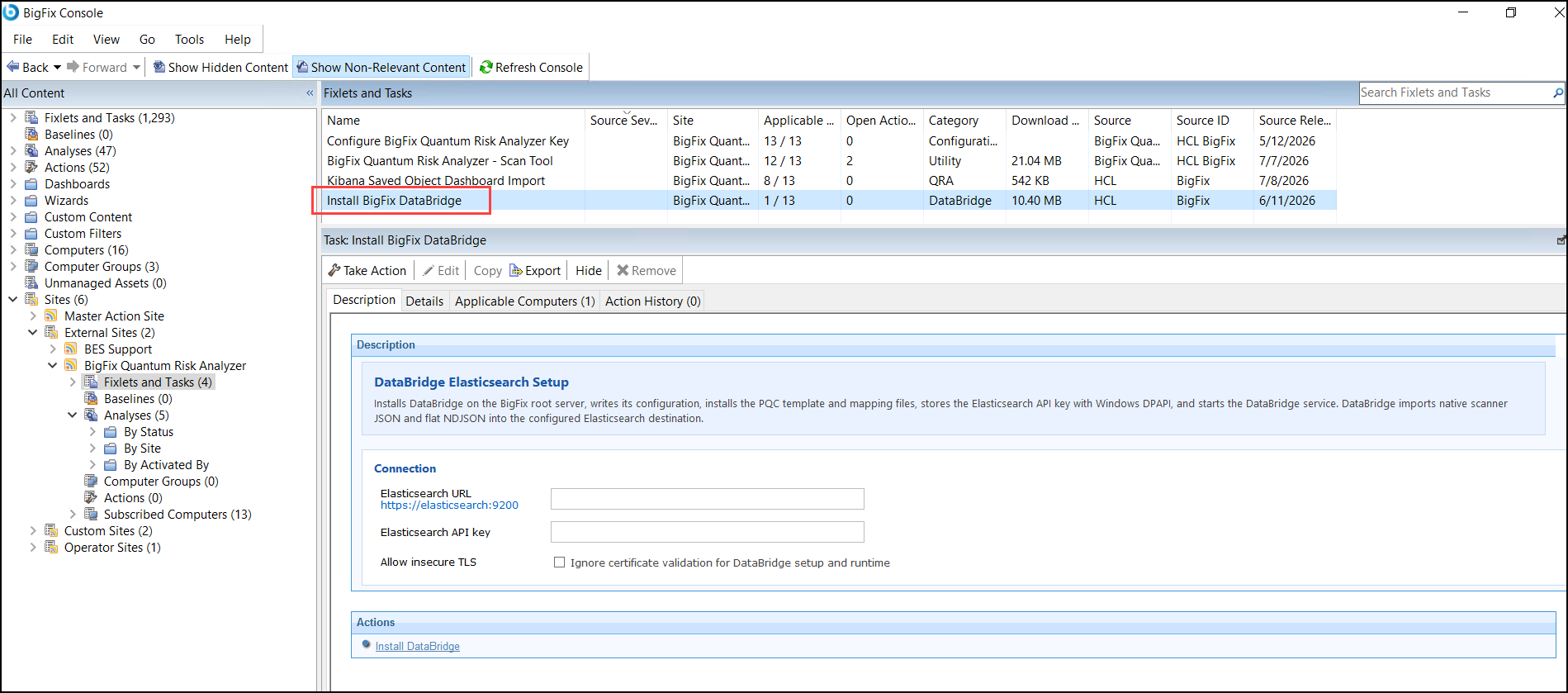
-
Activate the
HCL DataBridge Audit StatusAnalysis on the Root Server.It monitors successful and failed transfers. The DataBridge Status tab of the Scan Health Web Report shows transfer audit information only while this Analysis is active.
- Verify that scan data flows to Elasticsearch by checking your Elasticsearch index for new documents after a scan completes, and confirm the transfer in the DataBridge Status tab of the Scan Health Web Report.
-
To troubleshoot forwarding, inspect the Root Server upload area
(<BigFix Enterprise>\BES
Server\UploadManagerData\BufferDir\sha1\), where archived scan
results arrive.
DataBridge sorts processed scans into processed or failed folders, so you can identify failures without deep log analysis.
Adjusting the DataBridge configuration (config.yaml)
The generated config.yaml can be adjusted for your environment.
Stop the BES DataBridge service before editing it, preserve YAML
indentation, and restart the service afterward. Keep a record of local changes:
rerunning the installation Task deletes and recreates
config.yaml with the Task defaults.
- Use an
https://Elasticsearch URL for TLS. Certificate validation is enabled by default. - The install Task's Allow insecure TLS option sets
destination.skip_cert_validation: truefor both setup and runtime. Use it only when a trusted certificate cannot be supplied, for example in a temporary test environment, because it prevents verification of the Elasticsearch server certificate. - The QRA Dashboard also reports observed TLS posture on endpoints (TLS 1.3, TLS 1.2, TLS 1.1 or below, ciphers, key exchange). Those are scan findings, not connection settings for DataBridge.
Processed-file cleanup. The installed default is
watcher.delete_on_success: false. Set it to
true to delete an input after it is imported successfully. When
successful files are retained, watcher.processed_dir identifies the
processed-file location and watcher.processed_retention_days
controls how long they are kept (installed default: 30 days). Failed inputs use
watcher.failed_dir and
watcher.failed_retention_days (also 30 days by default). Choose
the cleanup policy based on disk capacity and audit or replay requirements: retaining
files provides a recovery window but consumes storage. Monitor both directories after
changing these values.
| YAML area | Common settings and purpose |
|---|---|
log |
Logging level and path, console output, maximum log size, backup count, and log age. Defaults include 100 MB, 5 backups, and 30 days. |
audit |
Enables the host audit CSV and controls its path. Keep this enabled when using the Scan Health report's DataBridge Status tab. |
watcher |
Upload Manager root path, accepted filename globs, polling
interval, file stability delay, worker count, processing suffix,
processed and failed directories, deletion behavior, and retention.
scan_workers: 0 selects automatic concurrency;
positive values are capped at 32. |
destination |
Elasticsearch URL, routing field and index routes, optional index or ingest pipeline, templates and mappings, batch size, TLS validation, retry count, and retry backoff. |
The encrypted API key is stored in
destination.api_key_encrypted. Do not replace it with a
plaintext key. Use the DataBridge setup or install workflow when credentials need
to change. Test routing, permissions, disk usage, and successful indexing after
any YAML change.