

Installing Root Server DEX Plugin
This plugin integrates the BigFix Root Server with DEX components for data forwarding and management.
Install using # 29-Install BigFix Root Server DEX Plugin (WIN) Fixlet on the BigFix Root Server (Windows only).
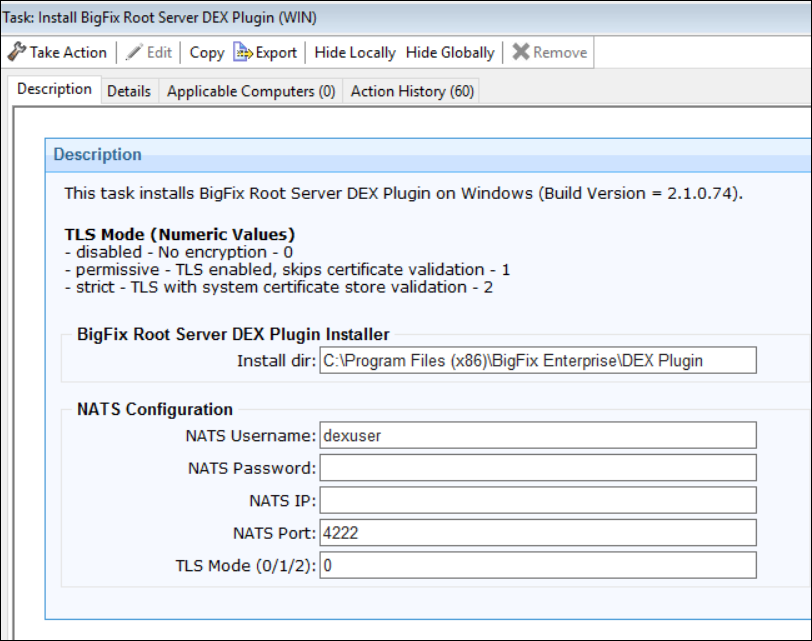
Input parameters required during the installation
In BigFix Console, go to Fixlet and Tasks and provide the following details:
TLS Mode Values (NATS JetStream / ClickHouse / MSSQL):
- 0 – disabled (No encryption)
- 1 – permissive (TLS enabled, skips certificate validation)
- 2 – strict (TLS with system certificate store validation)
The same applies to all other components.
- BigFix Root Server directory: Default: C:\\Program Files (x86)\\BigFix Enterprise\\BES Server\\UploadManagerData\\TransientDir\\dex
- NATS JetStream Configuration: NATS JetStream user credentials (Default: dexuser), host IP, port (Default: 4222), TLS Mode (Default: 0)