

DEX Capacity Plan
Capacity Planning is the proactive practice of checking your IT environments' current endpoint usage and forecast when they will run out of resources. The main objective is to prevent performance drops or system crashes before they happen.
- Storage Capacity
- Compute Capacity (CPU and GPU)
- Memory Capacity
- Infrastructure/Network Capacity
Strategies used
When doing capacity planning, the following approaches are followed:
- Lead Strategy
- Lag Strategy
- Match Strategy
Scenario for a POC/small test environment
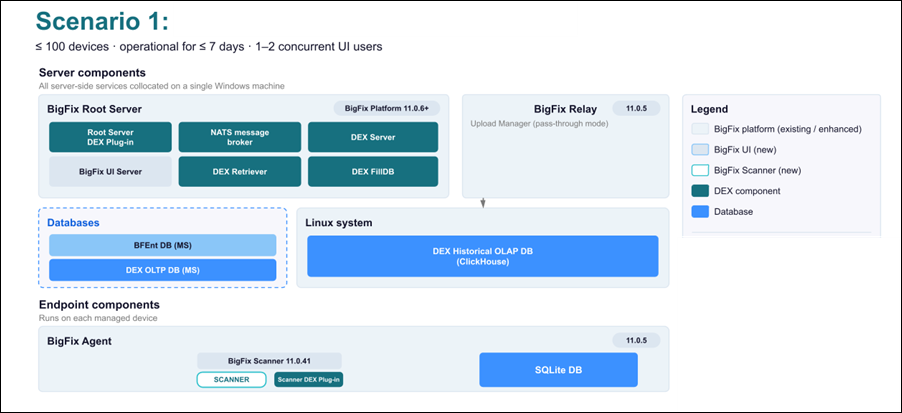
In a POC scenario, an environment with <= 100 devices is considered. It is supposed to be operational for 7 days at most, with 1 or 2 UI concurrent users. In a POC scenario, the RootServer DEX Plugin, NATS Server, 1 DEX FillDB, the DEX Server, and the DEX MSSQL database are collocated on the same Windows machine as the Root Server, the Platform database (BFEnt), and the BigFix UI.
Scenario for small to medium-size environments – up to 50K devices
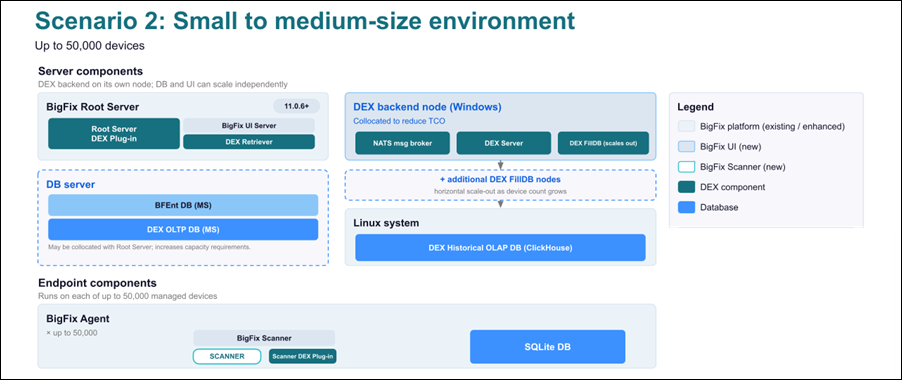
Even though the DEX FillDB, as well as the RootServer DEX Plugin, is meant to be horizontally scalable, the DEX backend components are suggested to be deployed in one single node to reduce the TCO.
This configuration can be then extended by providing additional nodes with the DEX FillDB, while the RootServer Plugin will be able to scale on the TLR in the next releases.
This leads to the following capacity plan in case of 50K devices, where the RootServer Plugin is installed on the Root Server machine and the DEX FillDB, NATS, and DEX Server are collocated in one single Windows node, while the BigFix UI server can be collocated with the Root Server system, increasing the capacity requirements as explained below.
Server & Database Requirements
- 1 Gbps+ NIC
- 1K IOPS at 2ms storage at least
Software requirements
BigFix Platform versioon 11.0.6 or later is required to use the BigFix UI.
Windows Component requirements
The “+” before the required capacity means the value is to be added on top of the OS, the BigFix Platform requirements (where applicable), and the other components’ requirements.
| Use case | Components | CPU | RAM | Disk |
|---|---|---|---|---|
| POC | all co-located with the RootServer | 8 vCPU | 22 GB | 250 GB |
| 50K | DEX RS Plugin | +4 vCPU | +8 GB | +150 GB |
| DEX BackEnd | +6 vCPU | +24 GB | +150 GB | |
| DEX MSSQL | +4 vCPU | +8 GB | +500 GB | |
| BigFix UI | +4 vCPU | +4 GB | +100 GB |
Linux Node requirements (ClickHouse DB)
| Use case | CPU | RAM | Disk |
|---|---|---|---|
| POC | 4 vCPU | 16 GB | 200 GB |
| 50 K | 8 vCPU | 28 GB | 1 TB |
BES Relays
The relays are not required for Proof of Concept (POC) setups or small test environments. For production environments scaling up to 50,000 devices, use the following framework:
| Use case | CPU | RAM |
|---|---|---|
| 50 K | 4 vCPU | 8 GB |
GB = OS + 3GB (BigFix binaries + logs) + 2GB (Default Cache) + Extended Cache (if configured) + 300 MB/site (site cache for relay)
_BESRelay_PostFile_PassThrough setting to '1' on every BigFix
relay as part of the initial DEX configuration.