
Customer Creation
Customer Creation" refers to the process of establishing a new customer profile or record within the event management system. This section enables us to create multiple customers to cater to a multi-tenant environment.
- The following are the actions a logged in user can perform based on the role.
- Please refer to the Managing
Roles
section to understand more about role-based access control.
- Onboarded Customer
- In-progress Customer
Onboarded Customer:- Onboarded View displays the customers that have gone through the onboarding process and certain actions can be performed that are displayed under Actions.
- The goal of customer onboarding in Event Management AIOps is to facilitate efficient introduction to the platform, ensuring that customers can quickly and effectively utilize the features of the system for managing events with the support of AI-driven capabilities.
- In the top navigation bar, click Customer. Customer Grid will be displayed. This displays
a list of all customers configured in the environment. When users come here for the first
time, only the default customer will be listed with Edit option next to it.
Figure 1. Customer Page 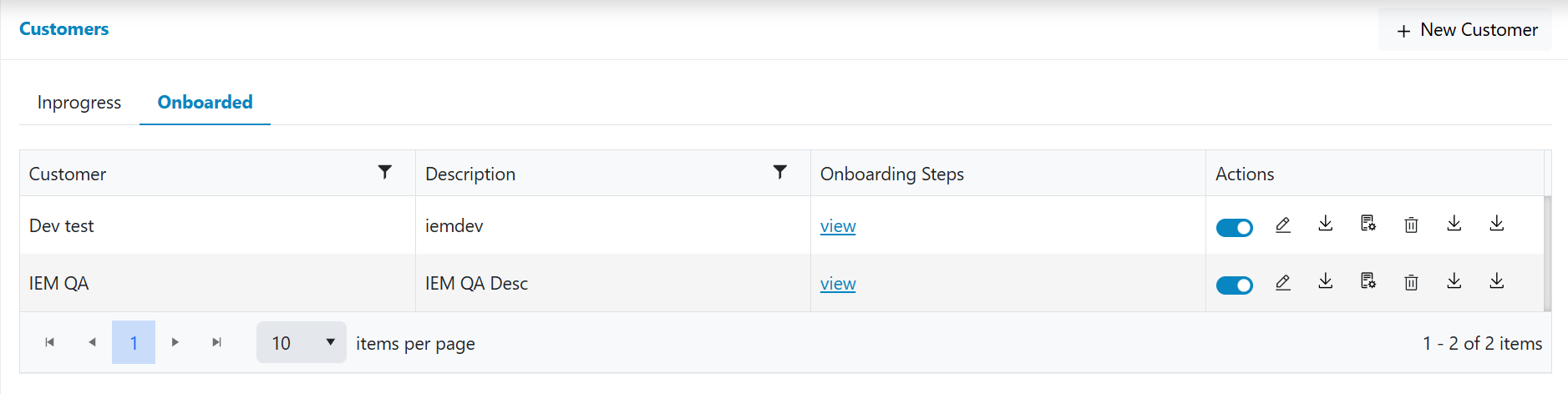
- Add New Customer
- Onboarding Steps View
- Enable/Disable State
- Edit Customer
- Delete Customer
- Download Published API
- Download Installer
- Download License
- Renew License