
Edit Runbook
Users can open an existing runbook, review the available information, and change the runbook details by performing the following steps:
- On the Manage Runbook page, select Runbook Tool to specify the runbook tool. By default, all the runbooks mapped to the selected runbook tool appear in a grid.
- BigFix Runbook AI provides users with search capabilities to access runbook information. The user can limit his runbook search to a specific runbook type by specifying the search filters.
- Select the required parameter in Search Column.
- Type the search keywords in the Search Text field.
- Click Search.
Users can also change the search filter by selecting the Search Column again.
Figure 1. Edit Runbooks 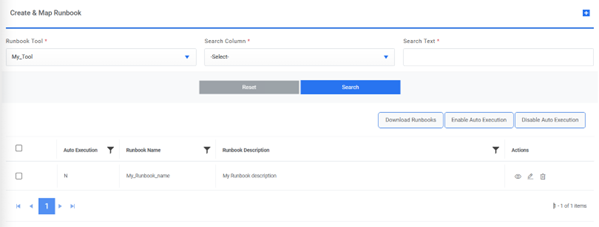
- Click
 next to the runbook you
want to edit that will redirect you to the Add Single
Runbook screen. It auto-fills the details.
next to the runbook you
want to edit that will redirect you to the Add Single
Runbook screen. It auto-fills the details.Figure 2. Edit Runbooks (Cont.) 
- Change the selected runbook details.
- Click Update
to save the changes or click Cancel to discard all
changes. A runbook updated confirmation dialog box
appears.
Figure 3. Runbook Updated 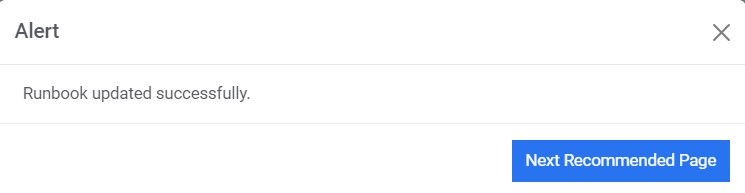 Note:Runbooks configured in this section will be shown while mapping a runbook to a customer. All fields marked with an asterisk (*) are mandatory.